 on 22 October 2026
 SMS or Email Alerts for Jobs – DoliPlus
DoliPlus’s SMS alert for service calls automatically notifies your contacts before an appointment. This prevents wasted trips and saves valuable time.
What is the SMS alert for service calls?
This feature sends a service SMS or email to the right people. Specifically, it reminds them of your visit a few hours before the scheduled time.
As a result, you reduce missed appointments. For SMS sending, you simply need a professional account with sufficient credit.
Setup
First, go to the service call management module. Then enable the “Activate SMS/email alerts” option.
A new tab then appears where you can configure the available settings.
In practice: within the service call and maintenance module,
enable the “Activate SMS/EMAIL Alerts” option. A new tab
then appears on the service call record.
Create an SMS alert for service calls
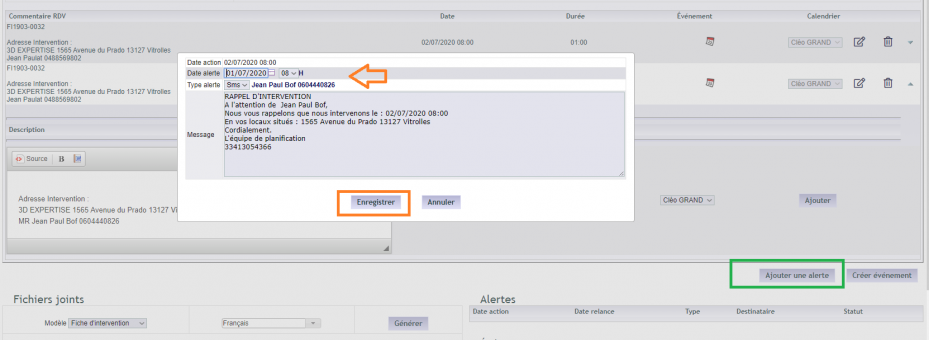
In the scheduling tab, click “Add alert”.
When multiple service calls exist at different dates, the first one serves as reference for the alert date. You can however modify the date or sending method at any time.
Naturally, you can also create multiple alerts.
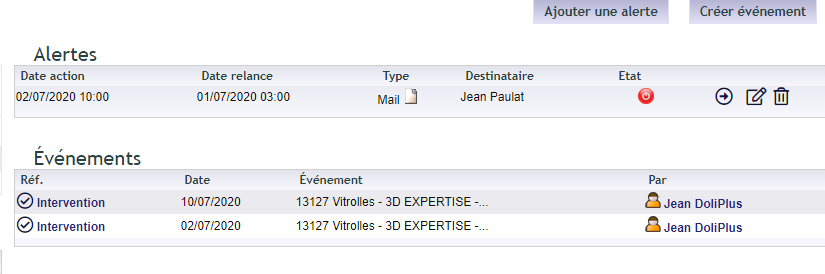
Next, the summary table displays the scheduled alert and its status. You can therefore send it immediately or let the automatic mode operate. Moreover, you can change the alert type or delete it at any time.
Automatic sending mode
Finally, an automated service handles the sending. It operates within a time window you define, Monday to Friday, typically from 8:00 to 18:00.
To learn more, see also the chapter Service call management.
Reviewing scheduled and sent alerts
In the module’s Planning menu, the “Alert log” entry gathers all your alerts: the service call, the date of the visit (“Action date”), the date the reminder goes out (“Reminder date”), the sending method, the recipient and the status. Filter on “To send” or “Sent” to check at a glance what has gone out.
SMS sending regulations
The LCEN (Law for Confidence in the Digital Economy) of 21/06/2004 authorises direct marketing via SMS.
However, this framework imposes the opt-in rule. In other words, only promotional messages with prior consent are allowed.
In France, you therefore cannot send promotional SMS to individuals without their agreement. Moreover, this consent must remain free and clearly informed.
Additionally, commercial SMS sending is prohibited between 8:30 PM and 8:00 AM, as well as on Sundays and public holidays.
The Data Protection Act of 10/01/1978 still requires declaring mobile number databases to the CNIL.
Furthermore, the advertiser must be clearly identified: brand, product, campaign purpose and short identification number.
Finally, each SMS must mention the right to opt out. To unsubscribe, recipients simply reply with the keyword STOP.
For more information, visit the CNIL website and article L34-5 of the Postal and Electronic Communications Code.
