 on 5 September 2026
 Group orders into a single invoice
Grouping orders into a single invoice lets you create one document for multiple orders from the same customer. This speeds up invoicing and simplifies managing your regular customers.
Grouping customer orders into a single invoice
It’s often useful to combine multiple orders, especially for a customer who places frequent orders. In DoliPlus, the process starts from the customer tab.
First, select the « Orders → Invoice » button.  Then, a checkbox table lists the billable orders. Finally, tick the desired orders, then start the process with the top-right button.
Additionally, the invoice includes a comment summarising the key details of each order. This keeps the link to the source, just like on a standard customer invoice.

Grouping supplier orders too
The same principle applies to purchases. To group supplier orders into a single invoice, start from the supplier tab, then select the « Orders → Invoice » button.
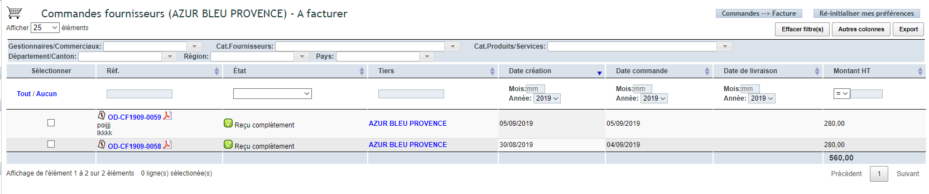
Again, a checkbox table lists the billable orders. You select them, then start the grouping. The comment reminds you of each order’s details.

Why group your orders?
Issuing an invoice per order quickly becomes tedious for a regular customer. This grouping simplifies invoicing for both parties.
You benefit in three ways:
- time saved: one invoice replaces multiple documents;
- easier reading: your customer receives a single summary;
- traceability maintained: each order remains recorded in the invoice.
In short, this grouping lightens the management of regular customers. You invoice less frequently, but more comprehensively. Your follow-ups and tracking become simpler.
Further reading
