 on 16 October 2026
 Hide unused fields: open every record on what matters
Hide unused fields: open every record on what matters
To hide unused fields without deleting a single one, DoliPlus offers the Compact view. DoliPlus is the enhanced cloud edition of Dolibarr, and your quotes, invoices and customer records gain:
- eight useful properties up front, instead of a wall of thirty lines;
- nothing hidden without telling you: the other properties stay counted, one click away;
- your own selection, built with a simple star;
- thirteen records set up in advance, with no configuration at all;
- a shared starting point, which the administrator adjusts for the whole team.
As a result, your eye finds the date, the customer or the due date it is looking for straight away. Moreover, the full record is always there whenever you need it.
A thirty-line record is a record nobody reads
A quote carries up to 31 properties: reference, customer, dates, terms, currency, delivery, follow-up… not counting your custom fields. Each of them is useful to someone, sooner or later.
However, day to day, you look at seven or eight. The rest forms a wall that your eye crosses every time you open the record. A new colleague, for example, does not even know where to start.
Deleting fields is therefore not the answer: whoever needs them would search in vain. That is why DoliPlus prefers to rank them. The record first shows what matters, then clearly announces the rest.
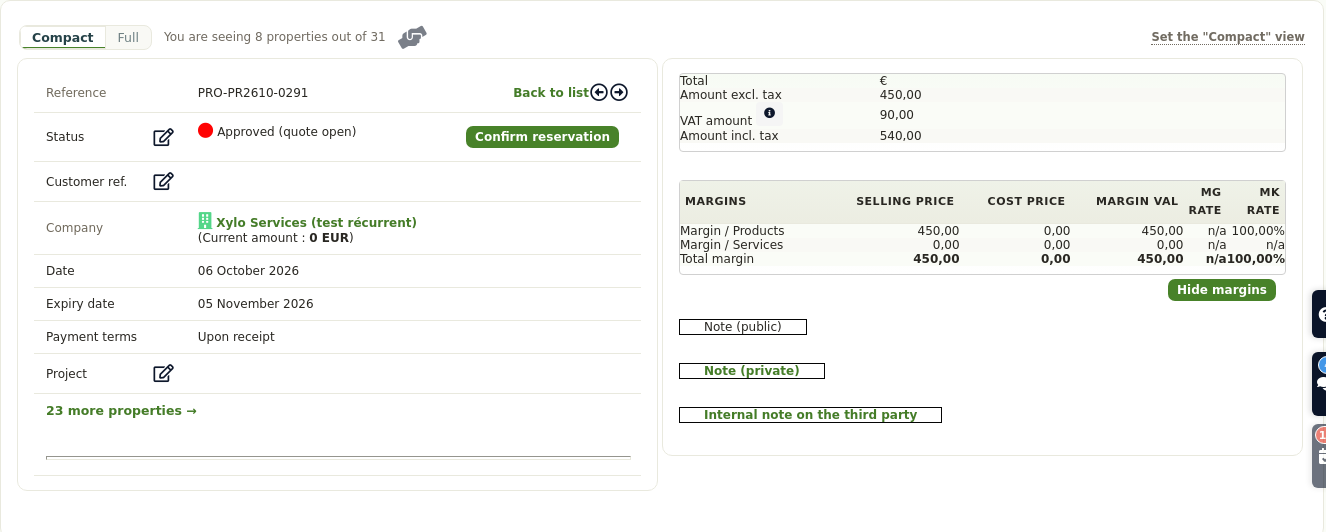
Just above the record, a small bar offers two buttons: Compact and Full. Next to them, a counter states exactly what is displayed, for example “You are seeing 8 properties out of 31”.
In Compact view, a line appears at the bottom of the record: “23 more properties →”. One click on it, or on the Full button, then shows the whole record at once.
In addition, DoliPlus remembers your choice record type by record type. Do you work in Full on invoices and in Compact on quotes? Your software keeps it from one session to the next.
Build your own selection with a star
The suggested selection does not suit you? You change it in a few seconds:
- click Full: a star appears in front of every property;
- click the empty star ☆ of a property to keep it in sight; it turns into ★;
- click a full star ★ to remove the property from your selection;
- finally, go back to Compact: only your starred properties remain on screen.
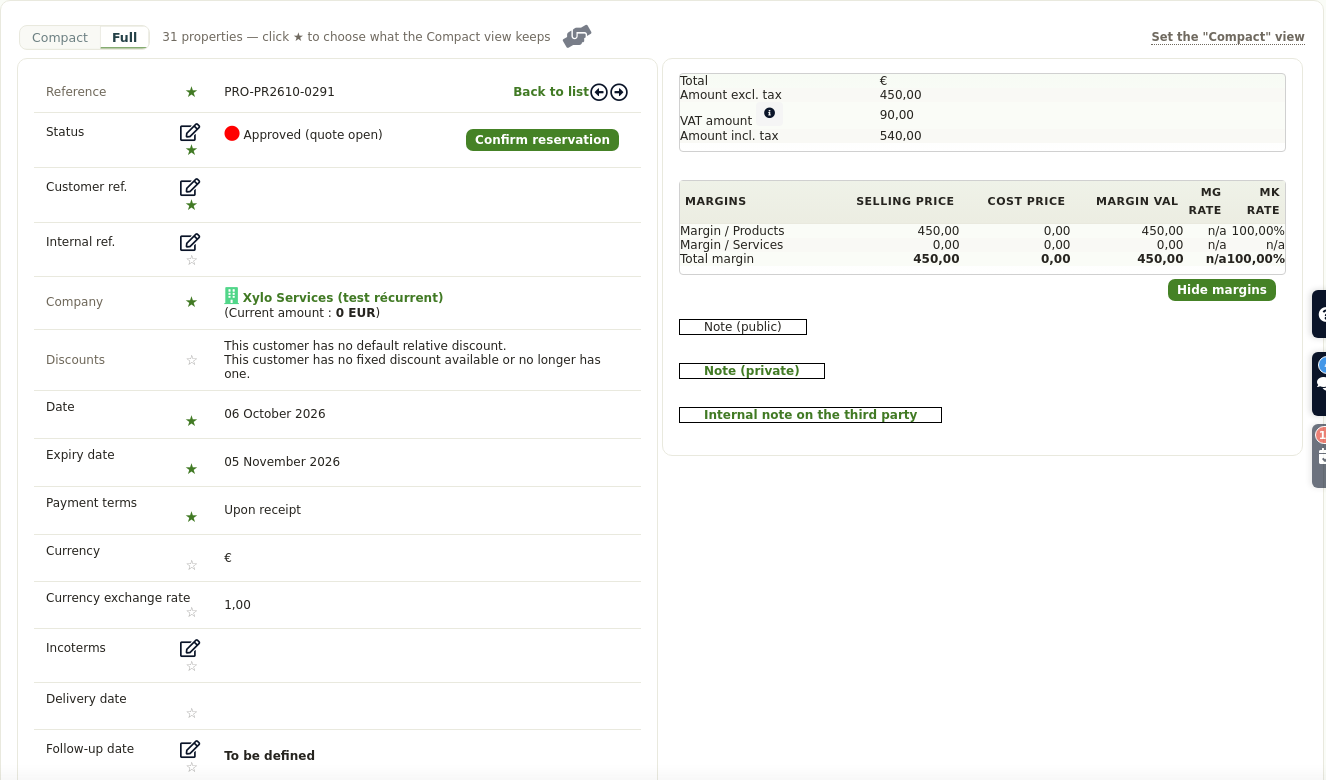
DoliPlus saves your selection instantly, with no button to confirm. It belongs to you: each of your colleagues keeps their own.
Want to start over? The “Back to the default view” link restores the starting selection. Besides, it only appears once your selection differs from it.
Thirteen records already set up for you
You have nothing to configure to hide unused fields on the most used records. Indeed, thirteen of them arrive ready:
- the third party, the contact, the customer and the supplier records;
- the quote, the order and the invoice;
- the supplier order and the supplier invoice;
- the product, the opportunity, the project and the shipment.
Each record highlights what its own trade looks at first. On sales documents, five properties stay the same from one screen to the next: reference, status, company, customer reference and date. The next three then follow the life cycle of the document:
- quote: expiry date, payment terms and project;
- order: planned delivery date, shipping status and payment terms;
- invoice: payment due date, payment terms and e-invoicing.
As for amounts, they never fold away: the document totals always stay on screen.
Hide unused fields for the whole team
The administrator can also hide unused fields for everyone. They set each user’s starting point directly on a real record. First, they star the properties they want. Then, they click the “Set the “Compact” view” link, at the top right of the bar. Only administrators see this link.
DoliPlus then opens the settings screen, with the selection already filled in. All that is left is to save it for the whole company.
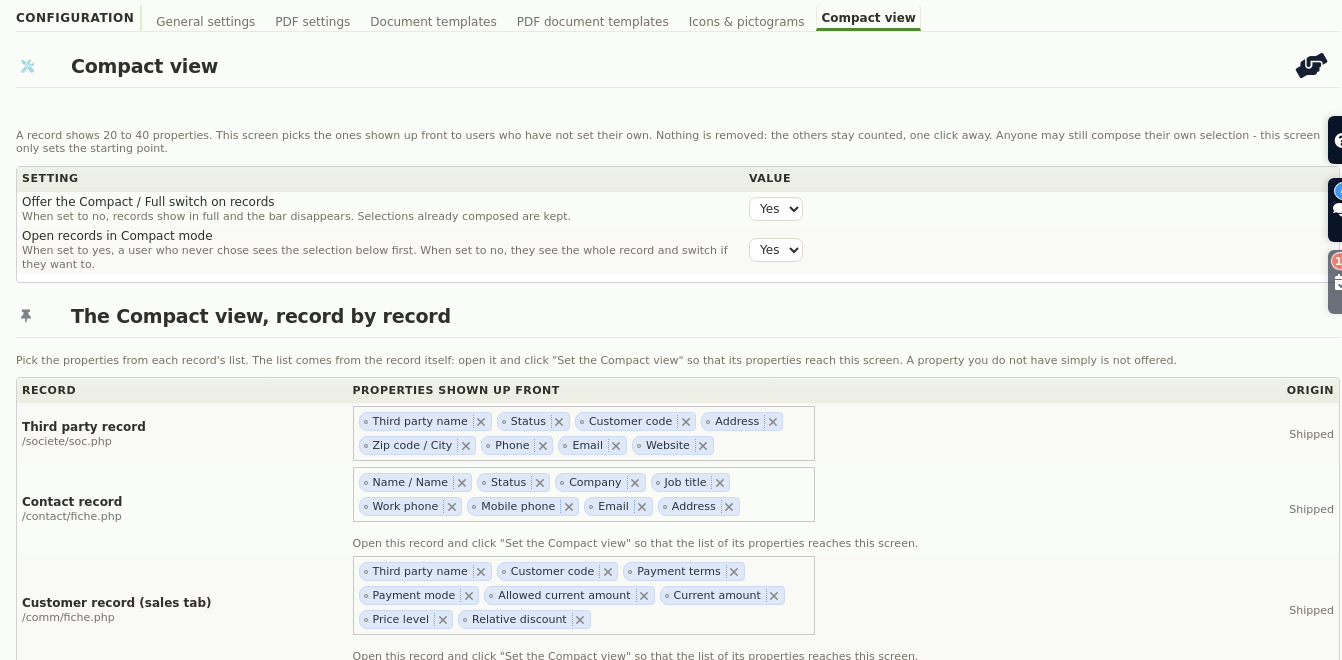
This screen is also available in the Tools module configuration, under the “Compact view” tab. It offers two switches:
- Offer the Compact / Full switch on records: when set to “no”, every record shows in full and the bar disappears. Selections already built are kept, though.
- Open records in Compact mode: when set to “no”, a user who never chose first sees the whole record, then switches if they want to.
Moreover, each record type is set separately. A “Back to the shipped version” button restores the original selection at any time.
The questions we are asked
Can I miss a piece of information?
No. When you hide unused fields, nothing is removed: the Compact view folds lines, it deletes none. The counter always tells you how many properties are out of sight, and one click brings them back.
What happens when I edit a record?
In edit mode, the record always shows in full. Thus, no field to fill in ever stays out of sight.
Does it work on a tablet?
Yes. The stars remain easy to tap with a finger. Furthermore, the bar works the same way in both DoliPlus working modes.
Do I need to switch anything on?
No. The Compact view is part of DoliPlus and is on by default. Your administrator can nevertheless turn it off if they prefer records always shown in full.
Further reading
- Menus, theme, working modes: every screen setting — See the chapter on the customizable interface
- Quotes, orders and invoices day to day — See this chapter
- Finding your way around the DoliPlus menus — See the chapter on navigation
