 on 5 September 2026
 Online Paybox card payments with Dolibarr
Online Paybox card payments with Dolibarr
Thanks to our partner Paybox, you can offer online Paybox card payments with Dolibarr + DoliPlus.
In practice, your customers can easily pay their invoices. Plus, the transaction remains fully secure.
Indeed, Paybox System integrates directly with DoliPlus. This way, buyers are automatically redirected to the payment pages.
Moreover, these multilingual pages are hosted by Verifone. They adapt to each customer’s language.
Additionally, Paybox System meets e-commerce card payment security standards. To do this, the service displays a TLS page.
Finally, the 3-D Secure protocol further enhances protection, if you subscribe to this option.
To enable this feature, a subscription* with Paybox is required. Then, you need to set up the DoliPlus module.
This connector links DoliPlus to a tool we don’t develop. It requires a setup fee, followed by a monthly subscription: this allows us to track updates to the external tool without needing to contact you. Get in touch to discuss.
General overview
To get started, discover the solution in video. This way, you can see the complete payment process.
A streamlined way to use it
First, select the “bank cards” payment method in your invoice. You must set this up in the module configuration beforehand.
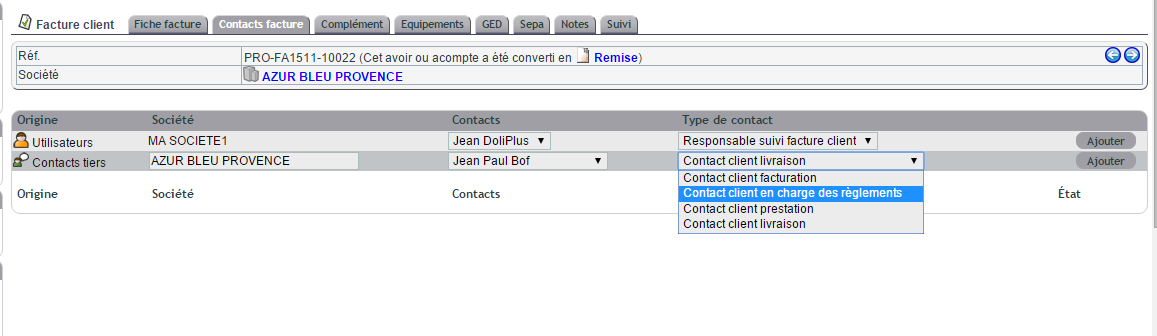
Next, designate a customer contact in the “Invoice Contacts” tab. To do this, choose the type “Customer contact in charge of payments”.
This ensures their email address appears in the online payment interface. Otherwise, the customer or supplier’s default email address is used.
Here is the screen for selecting the relevant contact.
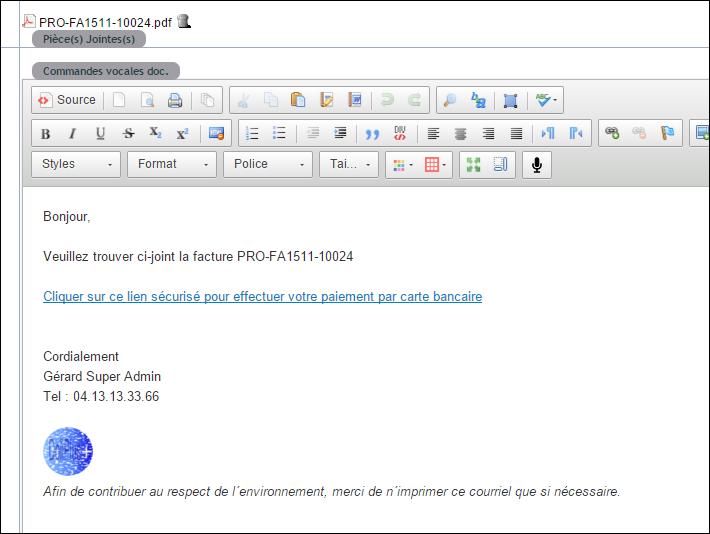
Additionally, when sending your invoice by email, DoliPlus acts automatically. It adds a payment link to the email footer.
Here is a preview of the email with the payment link included.
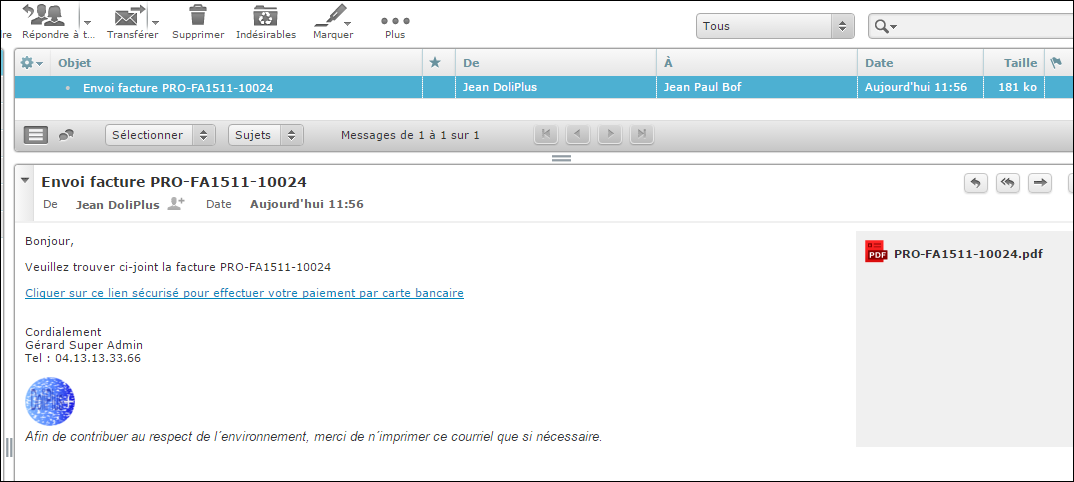
Next, your customer receives the email with the invoice attached. The image below shows the client’s view of this message.
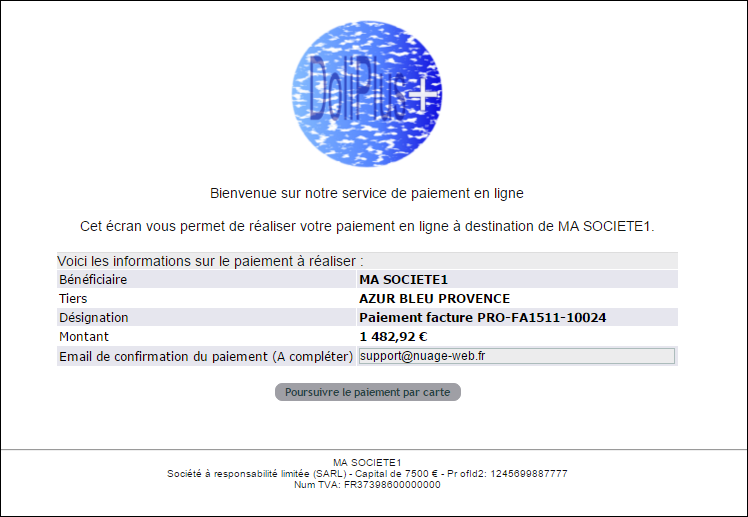
As soon as they click the link, your customer is taken to a confirmation page. This appears in your DoliPlus session and confirms the transaction details.
Here is the confirmation page.
Next, the customer is redirected to Paybox to complete their bank card payment online.
Here are the payment screens provided by Paybox.
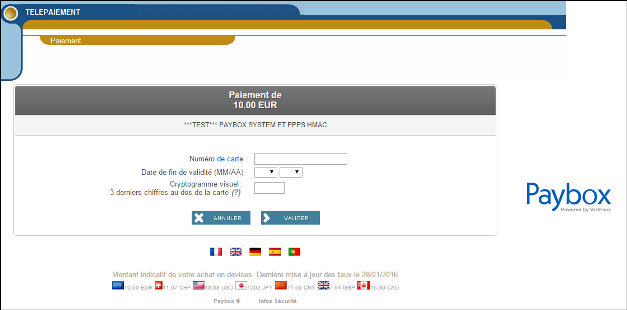
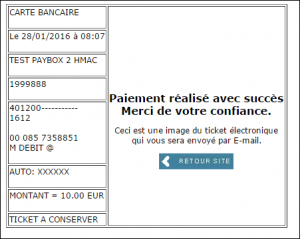
Once payment is completed, Paybox redirects your customer back to your DoliPlus session. This confirms whether the transaction was successful or failed.
Once Paybox validates the payment, several actions are triggered automatically:
- First, an email can be sent to the payment manager in DoliPlus,
- Next, the invoice is marked as paid in DoliPlus with Paybox transaction references,
- Finally, the customer receives their payment receipt from Paybox by email,
Note: in case of error or cancellation, an email is immediately sent to the manager responsible for Paybox credit card payments.
PSD2 – 3DSv2 Integration Manual
The Second Payment Services Directive (PSD2) is now in effect. It requires transaction authentication, though some specific cases remain exempt.
Additionally, the Cartes Bancaires Group, Visa and Mastercard have defined a new protocol. This allows authentication without always requiring cardholder verification.
Typically, this verification is done via SMS. Alternatively, it can be performed through the customer’s banking app.
Concretely, all Paybox System payment attempts now require cardholder authentication. Moreover, the card issuer expects this for every transaction.
March 2023 Version
This new version leverages more data points. As a result, it avoids systematically challenging the cardholder via banking app or SMS.
This is achieved through mandatory information transmitted via new variables. Consequently, they improve the authentication request scoring.
In other words, the number of authentications without bank challenges increases significantly.
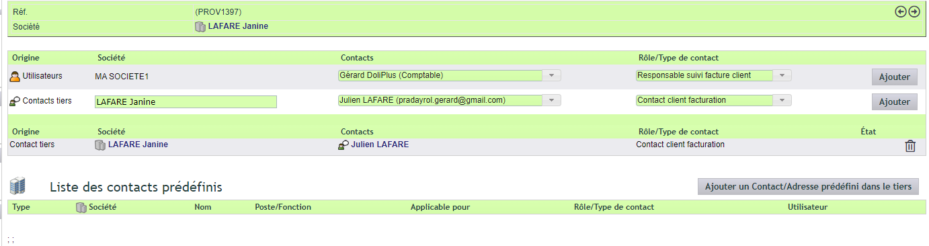
We now recommend designating the customer in the contact tab of orders or invoices. Use the “Billing Customer Contact” role. Also provide their full name and complete address.
Reminder: You can also set this information permanently. Predefined contacts allow for this.
Here’s the input screen for this billing contact.
PayboxDoli Module Configuration
First, access the PayboxDoli module configuration in DoliPlus.
A demo mode is available. It lets you use Paybox’s test platform with DoliPlus.
You can enter this test card number. You can also use a real card: it won’t be charged 😉
You can also test the solution on the online demo site of the Dolibarr + DoliPlus CRM ERP solution.
| DESCRIPTION | CARD | EXPIRY* | CVV |
| Paybox test card number | 1111 2222 3333 4444 | 12/25 | 123 |
| 3-D Secure enrolled card | 4012 0010 3714 1112 | 12/25 | 123 |
| Non 3-D Secure card (not enrolled) | 4012 0010 3844 3335 | 12/25 | 123 |
* or 23 and the current year
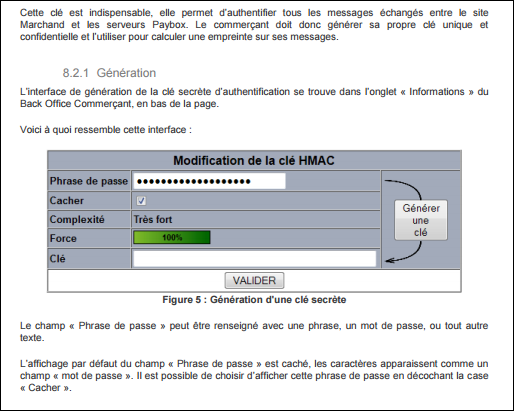
Then, generate the security key in the Paybox back office.
Here is the configuration screen to complete.
Limitations
Currently, the DoliPlus PayboxDoli module handles the connection with Paybox services. It enables Paybox online payments by credit card.
Specifically, the covered scope remains as follows:
- First, process a simple credit card payment from a customer invoice,
- Then, immediate payment, without automated instalment management,
- Finally, no association member payment management in DoliPlus at this time,
*Contact your support for more information about service types to subscribe to, as well as the “Limitations” chapter. Also, consult your support to confirm the setup fee for the Service, including training.
