 on 26 August 2026
 Bank reconciliation software: match your statement, clear your invoices
Bank reconciliation software matches your accounting entries against your bank statement. Moreover, DoliPlus turns six daily chores into a few clicks:
- matching: the engine links most entries on its own;
- collection: an unmatched line offers you the invoice to clear;
- direct debits: one recognised remittance clears every invoice of its batch;
- payroll and contributions: they are entered straight from the statement line, already filled in;
- transfers between your own accounts: both sides are recorded in a single gesture;
- your habits: each validation becomes a rule, so next month the entry arrives ready.
Therefore you save hours on a tedious task, and you cut down mistakes at the same time.
Why a bank reconciliation software pays off
Ticking a statement line by line eats up hours every month. A bank reconciliation software does that work for you instead.
DoliPlus is the enhanced cloud edition of Dolibarr, the open source management suite. Consequently, you keep a familiar tool, enriched with the features described below.
You gain on three fronts:
- time: the engine matches the majority of your entries;
- accuracy: matching relies on solid criteria, not on your eyes;
- up-to-date books: your accounts quickly mirror your real bank position.
Importing your bank statement
First, download your entries from your bank website. Then format the file as expected, for example date;label;debit;credit. You define the column order once, in the module settings.
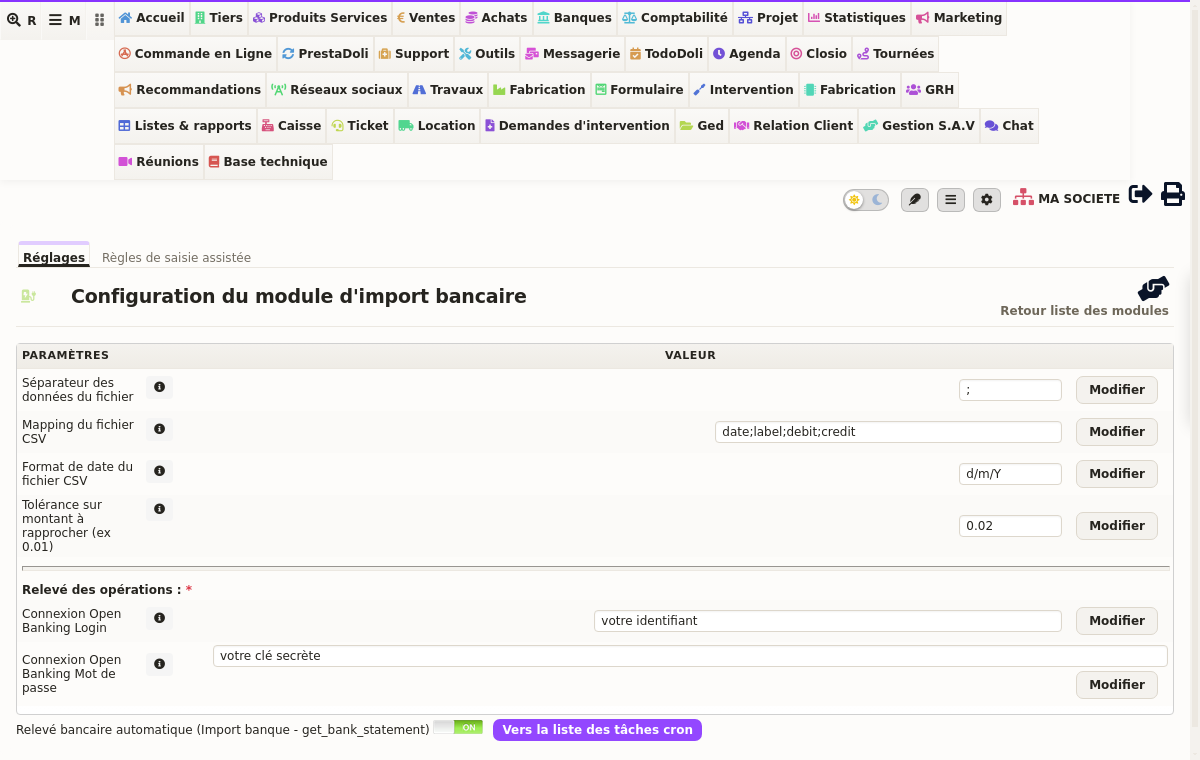
Next, drop the file into the document manager, then create a new import on the chosen account. From there, the bank reconciliation software takes over. Finally, check the file and enter the period. Dates matter here: the engine compares your account entries with the file over that exact window.
Alternatively, a banking connector imports your statements automatically. Read more about automated bank statement import
Every statement carries its bank name
With several accounts, a statement called “202607” says nothing about its origin. As a result, two statements from the same month become impossible to tell apart in the list.
DoliPlus therefore suggests a standard name as soon as you create one. The recipe stays simple: three letters from the account, then the year and month of the period start. You get “CMC-2026-07”, and next month becomes “CMC-2026-08”. Your statements then sort themselves, bank by bank.
The name remains yours, of course: DoliPlus suggests it, never imposes it.
Finally, a typo no longer forces you to start over. Indeed, a quill next to the name lets you correct it on the spot. DoliPlus then carries the new name everywhere, including onto entries you already matched.
Matching your entries
Several methods are available. Automatic matching links lines by cheque number, by direct debit or transfer reference, or by amount. Whenever two amounts clash, a tool lets you swap the allocations.
Manual matching, on the other hand, isolates the remaining lines. You then link several payments to one bank line, until you reach the right total. Conversely, reverse matching links several bank lines to a single payment.
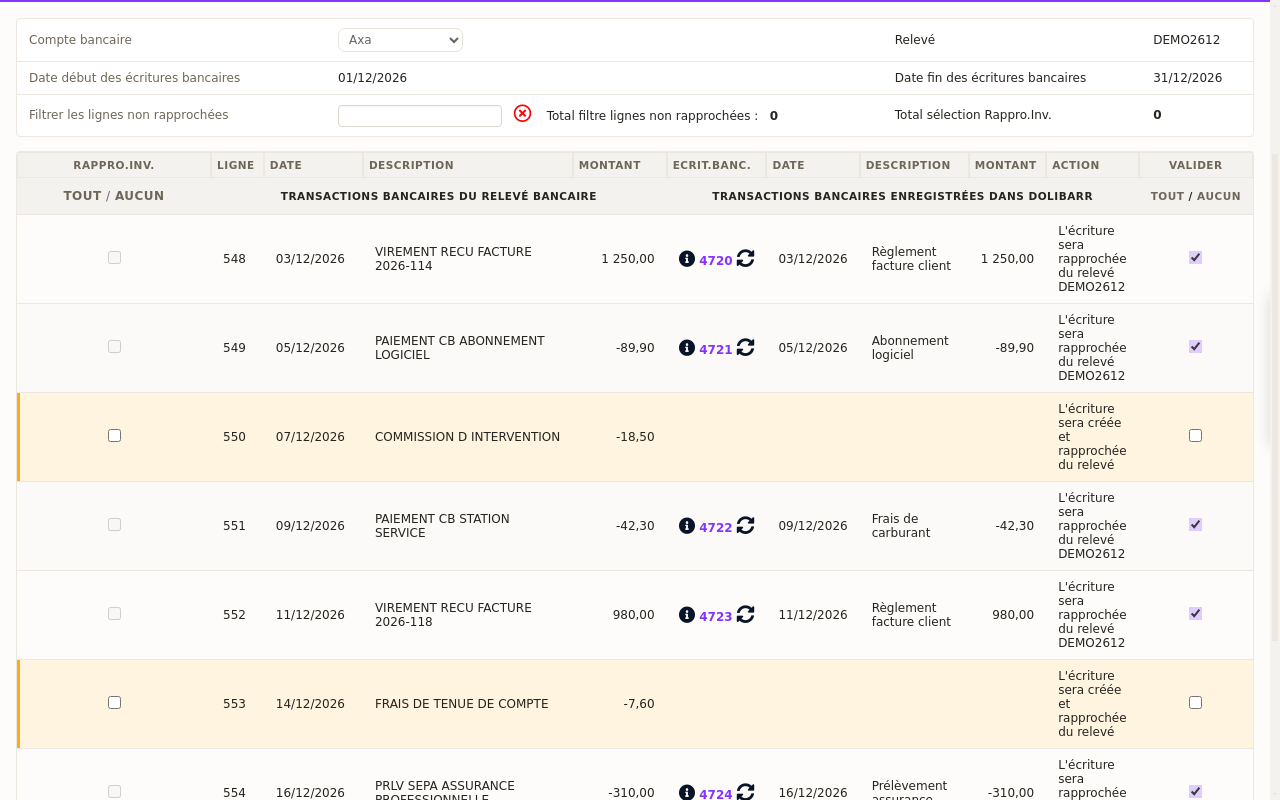
Clearing an invoice straight from a statement line
Sometimes a statement line finds no entry facing it. Often, it is an invoice payment nobody recorded yet. DoliPlus spots it for you.
Indeed, it looks for an unpaid invoice of the same amount, then displays it next to the line, with its customer and its date. Afterwards, a click on the add button opens a short window. The payment method comes pre-selected from your bank label: transfer, direct debit, card or cheque.
You validate, and DoliPlus does the rest. It records the payment, creates the entry on the right account, then closes the invoice once fully paid.
Clearing a whole direct debit batch in one click
Do your customers pay by direct debit? Your bank then credits the whole remittance as a single line, for dozens of invoices at once. Ticking that line by hand takes ages.
DoliPlus reads the batch reference inside the bank label. Consequently, the detection stays deterministic: no amount guessing, no rule to teach. The screen offers to credit that batch, and it announces beforehand what your validation will produce.
Read more about SEPA direct debitPayroll and contributions entered from the statement
An unmatched line that looks like a salary, a social contribution or a tax now offers you the matching entry, already filled in: nature, period, amount and label. You validate, and the amount immediately reaches your cash position.
Thus you remove a double entry, and above all the duplicate bank line it used to create.
DoliPlus remembers your habits
The first time, you complete the entry yourself. However, a “remember” box sits at the bottom of the window: by validating, you teach the recognition to DoliPlus.
Concretely, DoliPlus keeps the stable words of your bank label. It discards the references that change on every transaction. That pattern then becomes a rule.
In other words, your bank reconciliation software improves on its own, validation after validation.
Review, correct or add a rule
Your rules open straight from the matching screen. There, you see each pattern, what it pre-fills, and above all how many times it already served.
Right next to it, a second link opens the expense types dictionary. Indeed, that dictionary feeds the list of contributions and taxes offered in the window: a charge missing from it simply cannot be picked. Therefore you enrich it the moment the need shows up, without leaving your matching screen.
Both screens now sit behind a dedicated permission, “Configure bank import”. In other words, whoever keeps your books sets their own patterns and dictionary, without asking an administrator.
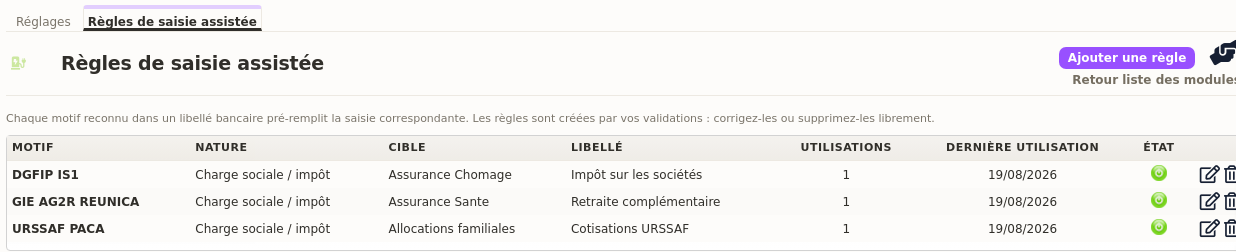
Three gestures await you there:
- the quill corrects a pattern or its target, without deleting anything;
- the switch puts a rule to sleep, while an organisation changes;
- the “Add a rule” button creates one from scratch, before the label even lands.
That last point deserves a word. Indeed, a learned rule comes from a real label: it necessarily matches. A hand-written rule stays a bet. Yet a lost bet never shows: the rule simply remains silent.
This is why DoliPlus tests your pattern at once against your last twelve months of statements. Then it tells you the result: “recognises 3 labels”, or a plain warning when none matches.
A transfer between your own accounts is not an expense
Moving money from one of your accounts to another costs you nothing: the amount changes pocket, it never leaves the company. Yet, keyed in by hand as an ordinary outflow, it drags your result down and distorts your cash position.
Therefore DoliPlus recognises those movements. Whenever your bank label names another of your accounts, the line offers you the “Transfer between your accounts” type directly, with the destination account already picked.
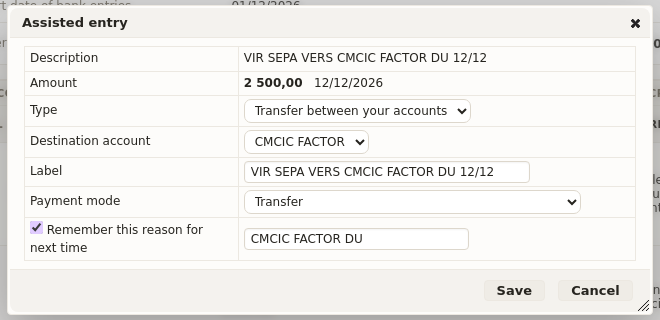
You confirm, and DoliPlus writes both sides of the movement in one go:
- the outflow on the account you are currently matching;
- the inflow on the destination account;
- the link between the two, so the operation still reads clearly months later.
Consequently, the day you import the statement of the other account, the matching line ticks itself off. You never key it twice.
The recognition does not merely spot the word “transfer”, far too common on a statement. Indeed, it compares the label against the accounts you actually opened: the tail of their IBAN, their name, their bank. Naturally, it rules out the account you are matching right now.
Finally, as with contributions, a “remember” box turns your validation into a rule. Next month’s transfer therefore arrives already qualified. Read more about internal transfers between accounts
Going further
- Automated bank statement import
- SEPA direct debit: collect without chasing
- Internal transfer between two accounts
- Accounting export
Related Entrées
