 on 5 September 2026
 Financial monitoring of production on Projects – Dolibarr & DoliPlus
Project financial tracking lets you measure the profitability of each project, month by month. This helps you spot early deviations and improve your forecasts.
Assessing project profitability
Tracking the financial balance of projects is a key challenge. In DoliPlus, the “References” tab of the project lists all commercial dependencies and purchases. Based on this data, a profitability assessment appears at the bottom of the page.
Depending on the case, this assessment includes:
- labour costs;
- expenses;
- stock consumption;
- other exceptional income or expenses.
This lets you estimate the final situation throughout the project’s lifecycle.
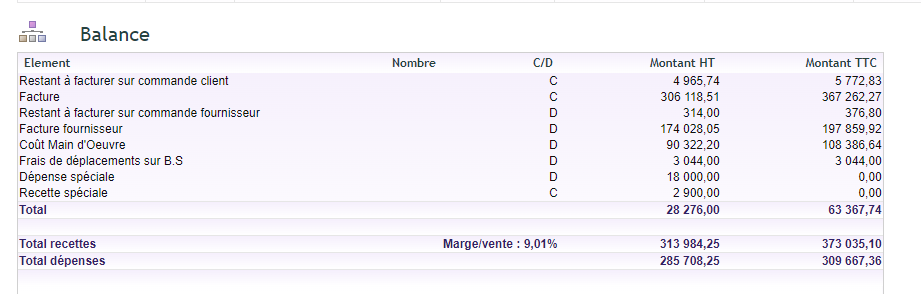
Additionally, the Projects → Financial Tracking menu complements this view. It provides a monthly summary for each project.
The principle of project financial tracking
The goal is to establish monthly snapshots. For this, project financial tracking involves project managers and simplifies the work of the financial controller.
Each month, an input period opens. Project managers then declare the FAE (invoices to be issued to customers) and FNP (unreceived supplier invoices) for the month. They base this on linked orders, from the “References” tab.
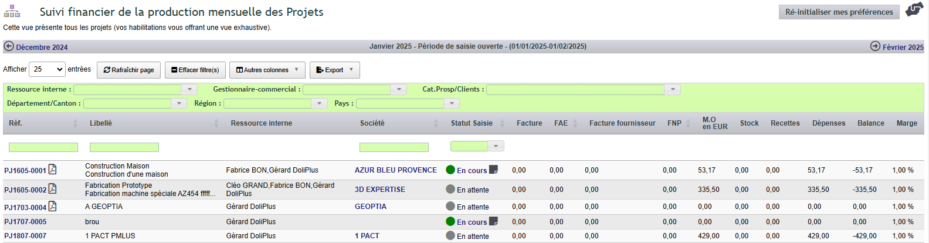
A table then groups all open projects, via a monthly selector. It includes the month’s income and expenses, as well as the declared FAE and FNP. The forecast margin therefore appears as early as possible. Additionally, filters and a status indicate the state of each input.
At month-end, the manager closes their input. The financial controller then takes over. Once their work is complete, they move each project to “Approved” status.
These monthly data serve to:
- determine project margins, month by month;
- spot early deviations from initial margins;
- verify the reliability of forecasts reported to management;
- establish monthly financial statements based on FAE and FNP.
Creating FAE and FNP records
Two methods exist for entering a forecast. The first is manual: you add the forecast from the project’s “References” tab. The second starts from the order: clicking the project reference takes you to the “References” tab.
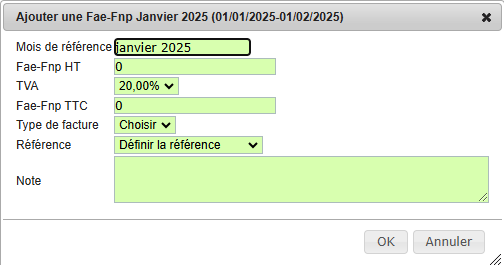
Additionally, from the order list, a green or orange icon indicates if an entry exists for the period. You then enter the amounts, type, and proposed reference. The data then appears in the table, grouped by month.
From tracking to invoicing
As soon as an invoice is issued, the corresponding FAE or FNP line is deactivated. At the same time, it’s linked to that invoice. It therefore no longer counts in the project’s balance, but remains viewable in the month’s summary.
Again, clicking from the project link on the invoice record preselects the correct reference. You then just need to deactivate the order to confirm.
Input periods and permissions
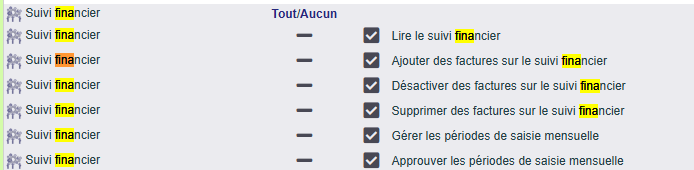
Finally, the module administrator opens the authorised input periods. For each period, they set the opening date, the closing date and the author. The monthly status steps are recorded (status, date, author).
The rights management also distinguishes between two roles. Project managers have the initial rights. The financial controller, meanwhile, has validation and chase rights.
Why track projects monthly?
Waiting until a project is complete to measure its margin is too late to react. Financial project tracking provides continuous profitability insights.
You benefit in three ways:
- early warning: issues are spotted as soon as the relevant month;
- reliable forecasts: FAE and FNP refine the actual margin;
- structured workflow: project managers and financial controllers collaborate.
Learn more about the management-focused profit and loss
To go further
