 on 5 September 2026
 Direct Debit via Banker’s Order (LCR) – Magnetic LCR – DoliPlus
The LCR direct debit feature in DoliPlus enables you to collect payments for your B2B invoices via Banker’s Automated Clearing Services (BACS), including magnetic format:
- you narrow the list of invoices to collect down to the due-date range of your choice;
- you prepare the file to submit to your bank in the standard format, with no re-keying;
- you track rejections and redirect them to another payment method;
- you settle every invoice in a batch as soon as the credit appears.
Therefore, you secure your payments and manage your cash flow from a single screen.
What is a Banker’s Automated Clearing Services (BACS) payment?
The Banker’s Automated Clearing Services (BACS) is the electronic version of a bill of exchange. In practice, it’s a deferred payment agreement between businesses (B2B), standardised by the CFONB.
What is it used for?
- It allows the customer to receive goods or services without immediate payment;
- It guarantees the supplier payment on the due date;
- It remains a useful cash flow tool for both parties.
Who is it for?
Moreover, BACS is reserved for businesses and professionals. It does not apply to private individuals.
How does it work?
- First, the supplier issues the BACS via their bank;
- The bank then sends the electronic file to the customer;
- The customer accepts or rejects it;
- Finally, on the due date, the amount is automatically debited.
Benefits and points to consider
On one hand, BACS offers deferred payment for the customer and secured payment for the supplier. Additionally, it allows for bank discounting, meaning early payment in exchange for a fee.
On the other hand, there is a risk of non-payment on the due date. In this case, the bank issues a notice of non-payment. The supplier can then initiate recovery proceedings, while the customer’s Banque de France credit rating may be affected.
The magnetic LCR direct debit module in DoliPlus
The BACS direct debit module automates the entire process:
- It creates the standardised CFONB electronic file from pending invoices;
- It generates this file for submission to your bank;
- It handles rejections: the invoice returns to pending status for a new direct debit, BACS request, or cheque payment;
- It credits invoices as soon as the bank confirms the payment.
Installation
First, activate the module (depending on your plan). Then, in the configuration, declare the default bank and the user responsible for direct debits.

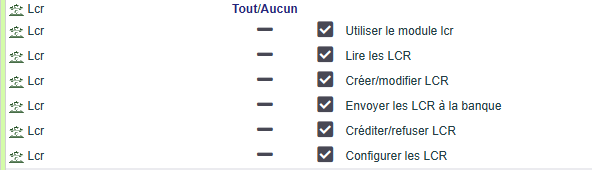
Finally, manage permissions to authorise the relevant users.
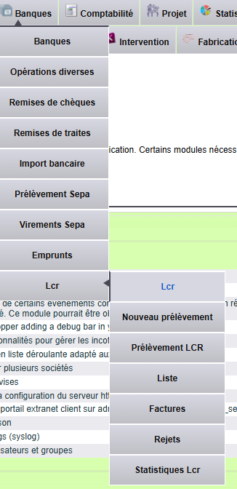
Then, a two-level menu provides quick access to the management interfaces.
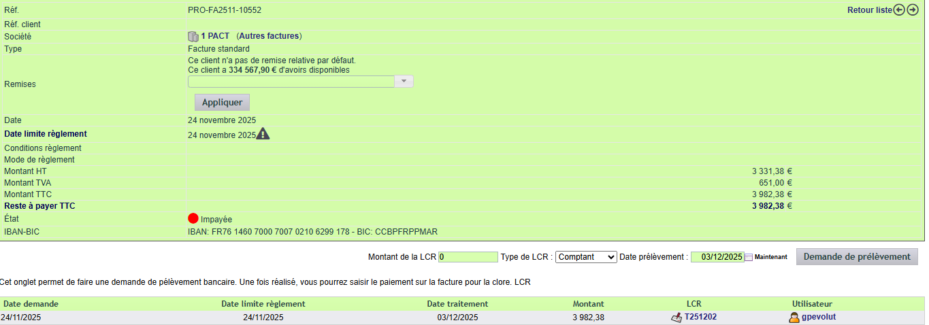
The BACS tab on the invoice
From the BACS tab on the invoice, you can add or remove the invoice from the pending file. Next, you specify the amount, the due date, and the mode:
- Due date “E-3” (code 27), to be processed 3 working days before the due date;
- Due date “E-2” (code 28), to be processed 2 working days before the due date.
Note: If the amount is modified, delete and recreate the request. Additionally, an indicator on the record shows if a BACS request exists.
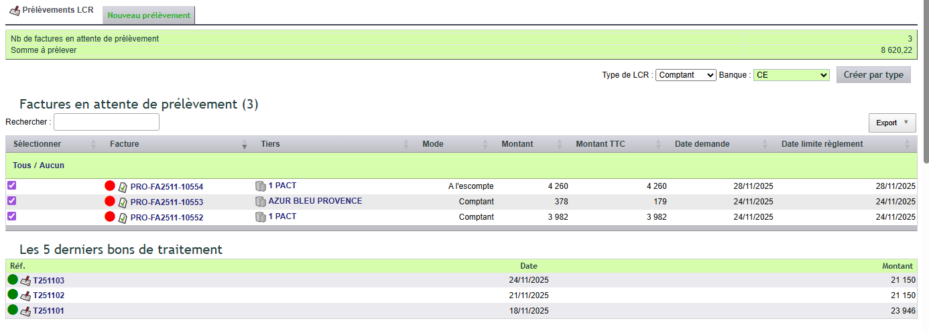
The BACS direct debit interface
This interface allows you to initiate a new direct debit from pending invoices. Invoices must be in a validated status. Additionally, checkbox selection narrows the scope of the debit.
Choosing the period to collect
Your invoices do not all fall due in the same month. Therefore, a date range filter frames the list: enter a start date and an end date, then click « Filter ». As a result, only the invoices due within that period stay listed and selected.

Moreover, the invoice count and the total amount shown at the top of the screen follow the chosen period. You therefore prepare the month’s LCR direct debit in a single step. Finally, the « Remove filter » link brings back the full list.
One useful reminder: a batch only keeps the requests matching the LCR type you selected (cash or discounted). If part of your selection belongs to the other type, the screen tells you so once the batch is created.
The deposit slip

In addition, this interface displays multiple tabs.
Document library tab
The document library tab gathers generated files: a .txt file for bank submission and a plain-language control file.
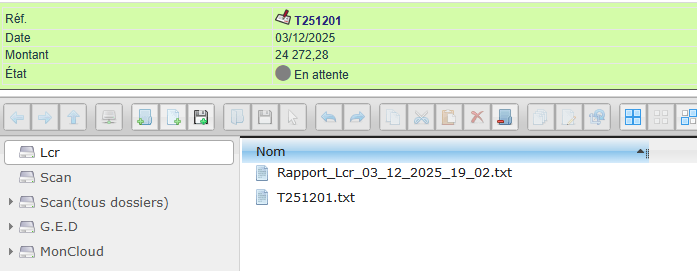
Once the file is submitted, confirm the bank deposit with a date. Then, once the amount is credited, click “mark as credited” to settle all related invoices.
Deposit structure
160-character payment orders issued consist of fixed-length 160-character records.
Deposits comprise a set of payment orders sharing these common features:
- Same sender account,
- Same payment type,
- Same settlement date.
Deposits must include at minimum:
• One Sender record per settlement date (record code: “03”) containing the ordering party’s details.
• One or two Recipient records per payment to process:
– Record code: “06” (mandatory), containing transaction details including bank details.
• One Total record (record code: “08”) showing the deposit’s total transaction amount.
160-character payment order files may contain 1 to n deposits. These deposits must all be of the same type.
Customer name precautions
The standard requires Latin characters: unaccented letters, numbers, and select symbols (/ – ? : ( ) . , ‘ +).
Therefore, you must monitor company names and references. Characters like “&”, “<” or “>” may trigger rejections. Rest assured: an automated process already removes accented characters.

Lines, Rejects and Invoices tabs
Finally, these tabs complete tracking. The Lines tab logs rejects and updates payments. The Rejects tab lists them, while the Invoices tab shows those included in the slip. A statistics tab also summarises your debits.
Tracking lists
To conclude, several lists provide an overview of your LCR direct debit activity:
- Payments by payment line;
- LCR debits;
- Invoices paid via LCR;
- Rejected debits;
- LCR statistics.
Going further
Other chapters complete the collection chain:
- SEPA direct debit, for another collection method;
- SEPA credit transfer, to pay your suppliers;
- Automated overdue invoice reminders, upstream of the debit;
- Bank statement import, to reconcile incoming payments.
