 on 5 September 2026
 Preventive invoice chase in Dolibarr && Doliplus
Preventive invoice chasing automatically sends a reminder to your customer before the due date. This maximises payments on time while preserving the business relationship.
The purpose of preventive invoice chasing
Preventive invoice chasing aims to secure payment by the due date. It automates the sending of a reminder before the deadline is missed. In practice, reminders are sent between 15 and 5 days before the due date.
Reminders can be sent by post or email. In fact, email achieves the highest response rate. Additionally, a log of sent reminders provides a full history.
This method offers two extra benefits:
- it preserves the relationship with the buyer, who is not late with payment;
- it helps identify potential disputes that could delay payment in advance.
Setting up preventive invoice chasing
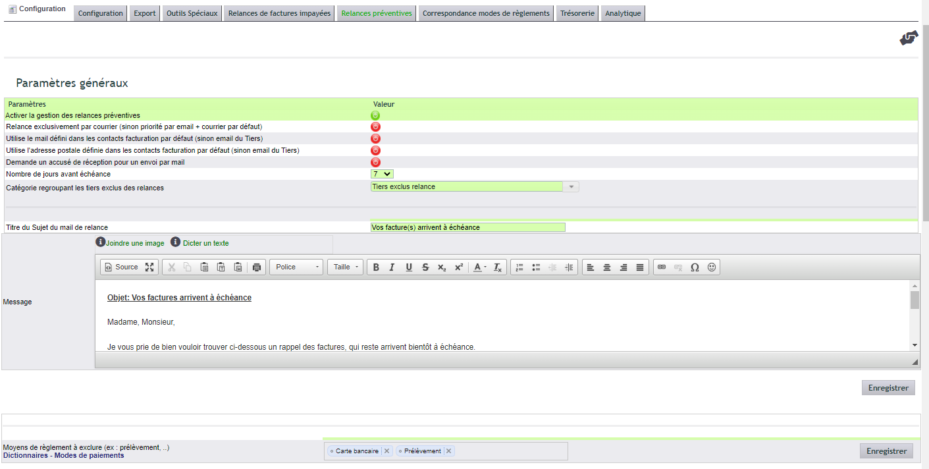
Configuration is done in the Accounting module console (Configuration → “Pre-due date chasing” tab). First, a general option sets the address used: either the customer or supplier record, or a dedicated contact.
In fact, default contact assignments specify which address to chase, especially if your customer uses a separate billing centre. Two types of contacts are involved:
- “Billing contact”: their address is used for invoicing;
- “Payment contact”: their email is prioritised for chasing.
You then set the tolerance period, the interval between reminders, and the maximum number of reminders. Finally, note that the invoice must be available in PDF format in the document library: the module does not regenerate it.
Where does DoliPlus get the reminder email address from?
Many users wonder where the preventive invoice chasing feature finds the recipient’s email address. Here’s the precise answer.
First, you select the source in the Accounting module console (tab “Pre-due date chasing”). Then, DoliPlus follows a strict priority order and stops at the first address found:
- The billing contact linked to the invoice subject to the reminder;
- If not, The default billing contact defined on the customer record;
- If not, The email address on the customer record (the customer or supplier);
- As a last resort, The first active contact with an email address.
Furthermore, if the customer has both a “billing” contact and a “payment” contact, DoliPlus will use the latter’s address. Additionally, you can send a copy of the reminder to the account manager.
Finally, if no email address is available, the reminder is sent by post. Therefore, to ensure reliable email reminders, set a default billing contact for each customer.
Customising the reminder message
The message uses substitution variables. The {relance} variable contains the reminder number. The {facture} variable contains the details of the invoices concerned.
Here’s an example message:
Subject: Your invoices are due soon
Dear Sir/Madam,
Please find below a reminder of the invoices that are due soon.
{facture}
Thank you in advance for your payment.
Yours sincerely,
The Billing Department.
Why chase before the due date?
Waiting for late payments harms cash flow and customer relationships. Proactive invoice chasing acts at the right time, before the due date.
You benefit in three ways:
- timely payments: reminders arrive before the deadline;
- preserved relationships: customers are never flagged as late;
- early dispute detection: payment blocks are identified sooner.
Learn more about automated invoice chasing
Further reading
