 on 25 October 2026
 Sales commission management: pay every seller by your own rules
Sales commission management: pay every seller by your own rules
Sales commission management in DoliPlus covers your reps, your agents and your business introducers, without a single manual calculation:
- The commission is calculated from the quote, then follows the order and the invoice.
- You choose the basis: gross margin, or revenue.
- Rates apply by default, by customer account or by product family — and line by line for exceptions.
- Printable journals follow what is due, what is collected and what is still owed.
- Introducers receive a statement, and their supplier invoice is created for you.
In short, each seller is paid on your rules rather than on a spreadsheet rebuilt every month. DoliPlus is the enhanced cloud edition of Dolibarr, so this sits on an open-source foundation.
Commissions for your sales force
DoliPlus drives commissions for your whole sales force. Moreover, the module refines your margin figures: it corrects the margin rate for the cost of the commission, according to the type of contract.
In practice, the calculation starts as soon as you enter a quote, an order or an invoice. You then choose between two bases: gross margin, or revenue.
Next, you decide at which level each rate applies:
- a default rate, for the general case;
- a rate on one specific customer account;
- a rate on a product category.
Furthermore, you adjust the rate directly inside a quote, order or invoice line. Therefore you handle exceptions deal by deal, without touching your general rules.
Setting a rep’s rate, step by step
- HR menu › Commissions › “Commission rate”: the rules for each rep. Click “New commission rate”.
- The rep: on a sale, the commission goes to the customer’s main sales rep (rank 1 on the third-party card). A customer without a rank 1 sales rep generates no commission.
- Which sales: the general case (all their sales), or a rate reserved for one customer account, or for one product category — then choose the customer or the category just below.
- The rate: the percentage, applied line by line on quotes, orders and invoices, on revenue excluding tax or on the margin, depending on the configuration.
- The priority (required): when a sale falls under both a customer rate and a category rate, it says which one wins.
- The contract: sales rep (VRP — the commission is increased by the charges set in the configuration) or sales agent (the commission alone).
- “Add”: DoliPlus asks for whatever is missing (rep, rate, priority).
The rule applies to the rep’s next sales lines. In the list, the status badge enables or disables a rule, and the pencil edits it.
Finally, sales commission management would be incomplete without follow-up. The commission journal therefore prints several statements so you can track payments:
- 1000 — commissions on cash collected, filtered by invoice date;
- 1010 — commissions still to be received (unpaid invoices);
- 1020 — commissions on cash collected, filtered by actual payment date.
Calculating the commissions to pay, step by step
- From the commission rates screen, click “Commission log”, then the line of the journal you need (1000, 1010, 1020; 2000 and 2005 for introducers).
- The previous month is suggested: enter the start and end dates of the period to pay (a quarter, for example).
- Choose a rep to prepare their statement, or leave “Tous les commerciaux”; the next list narrows it down to one company. “Excel” downloads the result instead of displaying it.
- “Run request”: one line per collected invoice, and below it the detail per product — rate (COM_TX) and commission (COM_MT). COM_TOT is the commission on the invoice, COM_A_PAY the share due according to what has been collected: an invoice paid in two instalments appears on two lines.
- In journal 1000, tick the lines to settle with your reps, then click “Pay commissions” (above the table): DoliPlus records the payment of the ticked commissions and recalculates the journal at once; paid lines show their settled commission (COM_REGLEE) and no longer have a checkbox.
Commissions for business introducers
DoliPlus also produces a commission statement for your business introducers, over the period you choose.
To do so, a sales service carrying the commission amount is included in the quote, then in the order and the final customer invoice. Naturally, the customer only receives the document without the price breakdown. The commission amount therefore stays confidential.
Report 2005 then selects the sales invoices containing that commission service over a given period. Meanwhile, report 2000 anticipates commissions sitting on orders.
From that report, you pick the paid invoices and build the statement. DoliPlus then creates a supplier invoice in the introducer’s name, automatically. If the introducer’s card is not yet ticked “Supplier”, DoliPlus ticks it and assigns it a supplier code along the way. The commission line takes the VAT rate of the commission service (20% when the service has none); an introducer not subject to VAT is invoiced without VAT.
The statement finally goes out by e-mail, with the detail of the sales invoices concerned. In addition, the sending stays traced on the supplier invoice.
In return, you expect the introducer’s own invoice for that amount. Like any purchase invoice, you then pay it by bank transfer straight from DoliPlus — see supplier invoices.
Setting up sales commission management
The configuration designates one or several sales services matching the planned commission. This service is valued from the quote onward, and it stays hidden in the document when needed.
An option finally confirms that the statement goes by e-mail to the supplier contact. In that case, remember to set the message, the subject and the sending account.
In detail (“Configuration” button on the rates page, administrator):
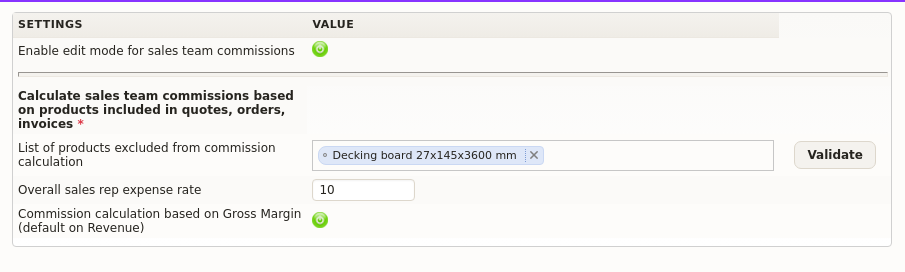
- Commissions for your sales reps: when on, DoliPlus calculates the commissions of the sales force and opens their statements and exports; the following settings only appear with it.
- Products without commission (shipping, fees, deposit…): add them, then “Validate”.
- The sales rep expense rate applied to their commissions in the statements.
- Revenue or margin: by default the commission is calculated on revenue; when on, on gross margin. Decide before the first statement: switching mid-year makes the statements impossible to compare.
- “Business referrers” tab: the services included in the calculation, the commission service (with its user account) used to build their statement, and the sending of the statement by e-mail to the third party’s supplier billing contact, with the subject and message written just below. When off, nothing is sent.
Going further
- Margin and cost price calculation
- Landed costs: the true margin on imported goods
- Supplier invoices
- Ready-made business reports
Related Entrées
