 on 2 September 2026
 Landed cost calculation: the true margin on your imported goods
Landed cost calculation: the true margin on your imported goods
A proper landed cost calculation beats a single flat rate applied blindly to every purchase line. Freight, forwarding and customs deserve better than an average. Therefore DoliPlus now matches each cost invoice with the delivery it actually paid for:
- Every freight or customs invoice is proposed against the right goods receipt, automatically.
- The real cost spreads over the goods received, by weight, by volume or by purchase value.
- Each product’s cost price updates on its own, shipment after shipment.
- A reliable margin appears on the very first quote line, with no blind flat rate.
- You stay in charge: any unusual gap is flagged before it counts.
In short, every product finally carries its real cost. Consequently the margin on your screen becomes a figure you can actually rely on. DoliPlus is the enhanced cloud edition of Dolibarr, so this sits on an open-source foundation.
Why one flat rate misleads you
When a company imports from abroad, or ships by sea or by air, transport and customs often make up a large share of the final cost.
However, many companies apply the same percentage to every purchase. The product, its weight and its origin change nothing.
That shortcut distorts reality. Indeed, a light and cheap-to-ship item gets penalised by a rate built for the average. Meanwhile a heavy or fragile one looks falsely profitable. Your pricing decisions then rest on a number that never matched the real cost.
Your costs, observed invoice after invoice
As soon as an invoice arrives from a carrier, a forwarder or customs, DoliPlus proposes it for matching against the corresponding goods receipt — same supplier, close dates.
When only one match is plausible, the software suggests it directly. However, if several candidates exist, you pick the right one in a single click. Nothing is ever applied at random.
An invoice that matches no delivery simply waits in a dedicated queue. Therefore nothing is ever guessed on your behalf.
A cost price that updates on its own
Once the match is made, the invoice cost spreads over the goods received. You choose the key that fits your trade: weight, volume or purchase value.
DoliPlus then keeps a rolling average over each product’s latest shipments. Consequently you get a stable figure, not a one-off reading skewed by an unusual shipment.
The product’s cost price updates automatically, as soon as enough shipments have been observed. Until then, DoliPlus keeps using your usual estimate. In other words, no gap and no value dropping to zero.
A reliable margin from the very first quote
This real cost feeds the margin already shown on your quotes, orders and invoices. Therefore no flat rate applies where a real figure exists. To go further on the margin itself, see the dedicated article.
Landed cost calculation keeps you in charge
A freight cost far above your usual average gets flagged before it counts. It is never averaged in silence. You judge: an exceptional shipment to ignore, or a new rate to take on board.
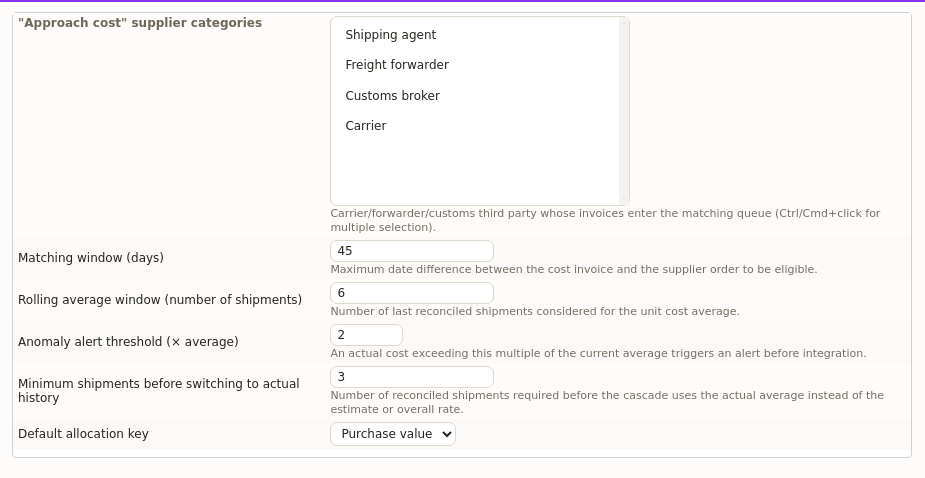
Finally, this automation builds on the goods receipts and supplier invoices already recorded in DoliPlus. Nothing to re-enter.
This landed cost calculation opens on request on your own DoliPlus: tell us you want it, and we switch it on for your installation.
Going further
- Margin and cost price calculation
- Managing goods receipts
- Supplier invoices
- Supplier orders
- Importing supplier price lists with AI
Related Entrées
