 on 5 September 2026
 Import supplier rates: keep your catalogue up to date in minutes
DoliPlus simplifies supplier price imports with artificial intelligence:
- Upload the supplier’s Excel or CSV file as-is, with no manual adjustments.
- AI automatically identifies each column in the file.
- Your selling prices recalculate from purchase prices using your own rules.
- A simulation checks your file and suggests corrections before saving.
- New: Before processing, a summary shows what will update your product records and actions needed for remaining items.
- Discontinued products can be marked “non-purchasable” with one click.
- Even large files up to 170,000 lines process smoothly.
No more manual data entry – what took hours now takes minutes, with complete reliability.
Why automate supplier price imports
Supplier price imports are tedious recurring tasks. Each supplier sends price lists in unique formats – different references, prices, quantities and layouts.
Previously, this required manual recopying or reorganising data before loading into your catalogue – a time-consuming and error-prone process.
DoliPlus provides a dedicated assistant to save time, ensure pricing accuracy and maintain up-to-date catalogues. Your team can focus on sales rather than data entry.
AI automatically identifies your file columns
First, simply drag and drop your supplier’s file. Then, artificial intelligence analyses the headers and identifies what each column corresponds to: reference, description, purchase price, quantity, retail price, discount or barcode.
The proposed mapping remains fully editable. So you can validate at a glance, or correct a column if needed. Moreover, DoliPlus remembers this setting per supplier and product range.
Notably, at the next delivery, the correct template recognises itself automatically. As a result, the header mapping is already prepared and you have nothing left to configure.
Next, you simply indicate how DoliPlus should recognise each product: by its supplier reference, internal reference or barcode. Most often, the assistant automatically selects the right option based on the column you’ve linked. Thus, each line correctly matches the right item in your catalogue, without ever creating duplicates.
Moreover, if you choose the wrong key, DoliPlus doesn’t leave you in the dark: a clear message tells you exactly which column to link to proceed. In other words, you’re never stuck without knowing why.
To go further, also check the price management in DoliPlus.
Adjust your selling prices with flexible rules
Receiving a new purchase price isn’t enough: you still need to derive the correct selling price. The assistant therefore includes a flexible rules engine, capable of covering all your business cases.
For example, you can apply a multiplier, target a specific margin, add a fixed amount, then round the result.
Additionally, a rule can apply only to a specific price range or category. The first matching rule takes precedence.
Furthermore, the margin is calculated in real time for each line. So you immediately see the effect of your rules before validating.
To learn more, see the margin and cost price calculation and dynamic pricing management.
Update your products and spot discontinued items
The assistant matches each line in your file with your database. It distinguishes between already listed products and new ones. You can then choose to import everything, or only update your existing products.
Crucially, the assistant flags references that have disappeared from the supplier’s catalogue. These products still exist in your database but are missing from the new file. However, you no longer want to recommend them.
DoliPlus automatically marks them as “non-orderable” in one bulk action. This lets you clear remaining stock without reordering. This logic perfectly complements product management and supplier orders.
Simulate supplier price imports before validation
Supplier price lists are never perfect: missing fields, duplicate references, incorrect prices. That’s why DoliPlus now offers a simulation before importing supplier prices, like a dress rehearsal. You check everything first, then validate with peace of mind.
The assistant remains instructive throughout. At each step, a banner reminds you where you are and what remains to be done. When a line blocks the import, a clear box explains the cause and required action, with a direct button to fix it. You’re never left facing just an error counter without knowing what to do.
First, click “Check all lines” to review each line. Then, DoliPlus displays a clear report, sorted by severity:
- Blocking (red): e.g. a line without a reference, making recognition impossible.
- Warning (orange): e.g. an empty purchase price, duplicate reference in the file, or selling price below purchase price.
- Information (blue): e.g. a malformed barcode or unusual VAT rate.
Importantly, DoliPlus doesn’t just highlight problems: it offers one-click fixes. You can ignore lines without references, exclude those without prices, or keep only the latest version of duplicates. A “Fix all” button chains these cleanups, and the assistant may even suggest solutions.
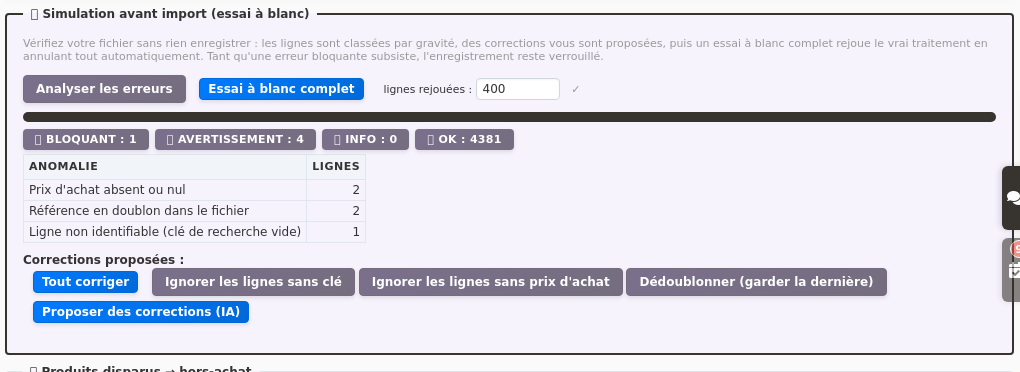
Finally, you can run a complete dry run. DoliPlus replays the actual process but saves nothing – everything is automatically rolled back. You’ll know in advance if your import will succeed, with zero risk to your data.
A mismatched column? You’ll know before you proceed
A supplier file sometimes places an amount in an unexpected column. The process then runs without any errors, but your prices don’t make it into the records.
That’s why DoliPlus now checks your mapping as soon as you save it, at step 2. You no longer have to wait until the final summary to discover a column was going nowhere.
Three scenarios are flagged in plain English:
- an empty column mapped to a price field: this field would receive no value;
- an amount placed in a column that only accepts yes/no responses, like “For sale” or “For purchase”;
- two columns mapped to the same field, where one would overwrite the other.
Crucially, each message names the affected column and shows the actual value from your file. If it’s a price, DoliPlus directs you straight to the right field: “Purchase price” or “Selling price tier 1”.
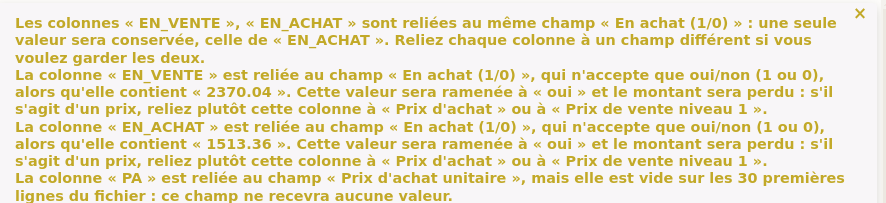
You can fix it in seconds, all on one screen. In other words, you avoid having to manually correct each product record afterwards.
See what will enter your records before saving
A pricing update affects multiple data points at once: purchase price, selling price, item type. Some depend on settings only you know.
That’s why DoliPlus now displays a summary before processing. At a glance, you see what will update your product records and what still requires your input.
For example, a purchase price always links to a supplier. If no supplier is assigned during import, the wizard flags this and lets you fix it with one click.
Similarly, a minimum selling price acts as a negotiation floor – it must pair with a standard selling price. If your price column points to “Minimum selling price”, DoliPlus suggests linking it to “Tier 1 selling price” instead.
Crucially, each alert shows the exact action needed and the button to complete it. You fix in seconds what might otherwise take hours of record-by-record troubleshooting.
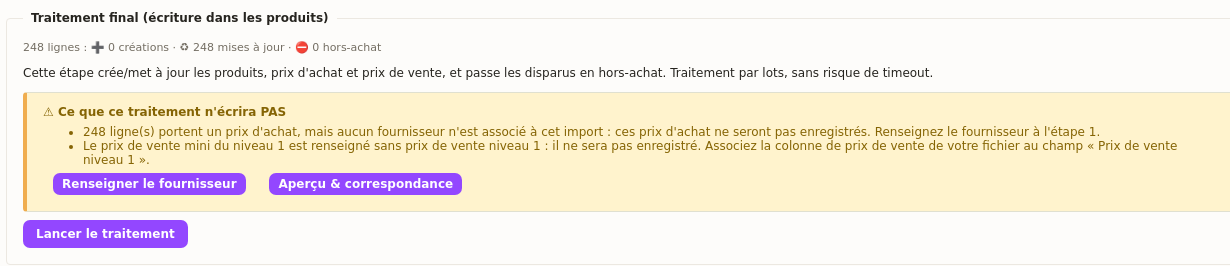
Moreover, manually linked selling prices import exactly as provided. Margin rules remain optional – if your file already contains selling prices, DoliPlus saves them directly.
Completing your product records while you import supplier rates
When you import supplier rates, you update more than prices. Indeed, the same operation classifies your items and fills in your own fields. First, the “Nature” column classifies each item:
- 0: raw material;
- 1: finished product;
- 2: semi-finished product;
- 3: packaging.
Be careful: a Nature column that is mapped but empty files every processed item as a raw material. That is why DoliPlus warns you right from the mapping step. So fill in the column, or map it to no field to leave your records unchanged.
Next, your custom fields can be filled in too. On the mapping screen, choose “➕ Custom field…” next to the column, then type the name of the field as it exists on the product record, in lower case and without accents. For example, your “Brand” column then feeds the “brand” field.
Finally, to update a catalogue that is already in place, recognise each product by its “Product reference (DoliPlus)”. Each line then finds its record: you can run the import as often as needed, without creating duplicates.
Import massive files without freezing
Some product catalogues are enormous. Yet DoliPlus handles 170,000-line files with ease.
First, the preview shows only initial rows for speed. Next, processing automatically splits into batches. Finally, a progress bar displays percentage completed and lines processed, so you track every stage.
This batch processing prevents page freezes regardless of file size. A final Excel report details created products, updated items, and discontinued lines.
How to run a supplier price import in DoliPlus
To get started, open the menu Tools → Import Prices (AI Assistant). You’ll find a list of your previous imports, along with a button to create a new one.
In practice, the supplier price import follows a few guided steps:
- First, create a new import and upload the supplier file.
- Next, check the preview and header row.
- Then, let the AI suggest column matches and adjust as needed.
- Set your pricing rules, then check the margin in real time.
- Review the simulation summary and correct any flagged errors.
- Finally, go through the recap, run the process, and download the report.
Learn more
- Managing prices in DoliPlus
- Dynamic sales pricing
- Margin and cost price calculation
- Managing products in DoliPlus
