 on 5 September 2026
 Set a customer credit limit
Setting a customer credit limit allows you to define a maximum authorised amount per customer and receive alerts when this limit is exceeded. This gives you better risk control without disrupting your operations.
What is a customer credit limit?
The credit limit represents what a customer owes you at any given time. Beyond a certain threshold, the risk of non-payment increases. That’s why DoliPlus lets you set a maximum credit limit for each customer.
Note that this is simply an alert. The process is never blocked when the limit is exceeded: the user is informed and remains free to proceed.
How to set a customer credit limit in DoliPlus
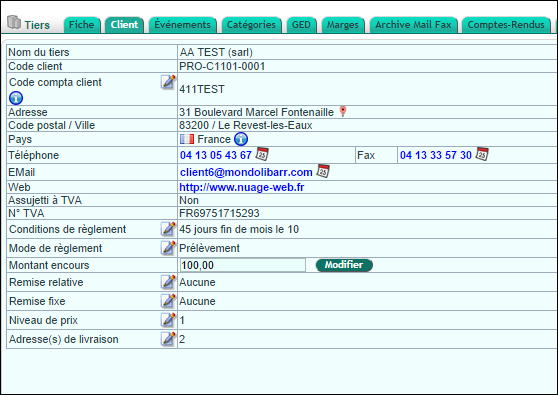
Setup is straightforward. First, open the “Customer” tab in the customer record. Then enter the authorised credit limit amount. Finally, validate.
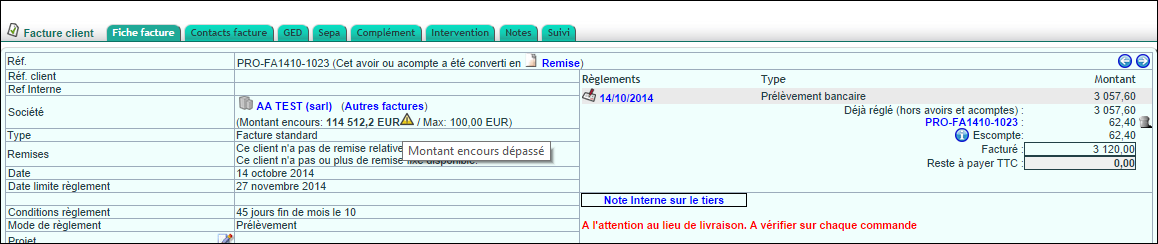
Once set up, the alert appears on invoices when the threshold is reached. This helps you monitor risk at the right moment.
Why monitor each customer’s risk?
Poorly managed credit limits quickly impact cash flow. The more unpaid invoices a customer accumulates, the greater the risk becomes. This monitoring helps you react early.
You benefit in three ways:
- timely alerts: notifications appear during invoicing;
- informed decisions: you can assess each case with full visibility;
- preserved relationships: alerts remain internal with no automatic blocking.
As a result, you can extend credit to customers while maintaining control over your risk. Learn more about managing customer credit limits
A tailored limit for each customer
Not all customers carry the same level of trust. A reliable, solvent customer might qualify for a higher limit. Conversely, a new customer often warrants a more cautious threshold.
Since limits are set per customer, you can adjust them case by case. This way, your credit policy reflects the reality of each business relationship.
Further reading
