 on 5 September 2026
 Customer outstanding management in DoliPlus
Managing customer receivables in DoliPlus helps you reduce payment delays and minimise disputes, giving you a clear view of your cash flow.
Receivables are a key indicator of financial health, measuring sales converted into liquidity. Regular, comprehensive tracking—by customer—makes all the difference.
What is customer receivables management?
Customer receivables include all payments your customers still owe you:
- overdue, unpaid invoices;
- unpaid invoices;
- invoices to be issued, linked to confirmed orders.
You subtract any advances or deposits already received:
Customer receivables = (overdue invoices + unpaid invoices + invoices to be issued) − advances, deposits, and partial payments
Note: DoliPlus includes a standard tool to set a receivables limit per customer. This module offers advanced management.
An overview
First, a list view opens from the menu Sales → Tools → Customer Receivables List. It displays all customers who still owe you payments.
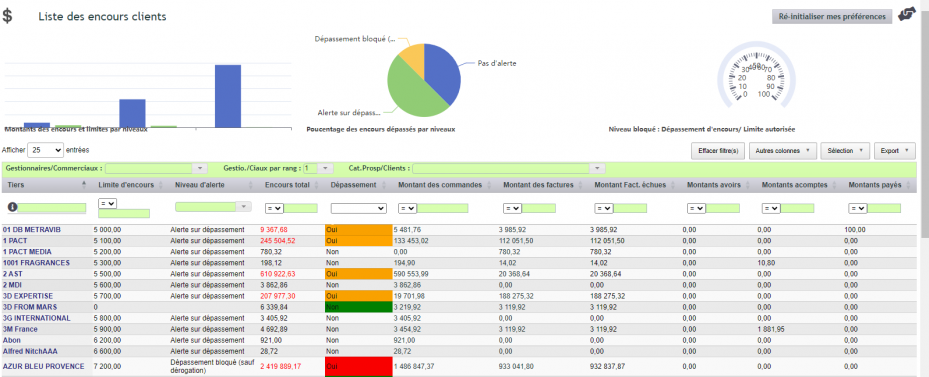
This list is highly readable:
- dynamic cross-filters quickly highlight customers to monitor;
- calculated columns can be hidden for clarity;
- a tooltip details each cell, showing the number of days overdue on unpaid invoices.
Three graphs complete the analysis:
- receivables amounts and limits by level;
- percentage of receivables exceeded by level;
- blocked level: excess over the authorised limit.
Finally, a dashboard widget displays receivables overruns directly on the homepage.
Customer-facing teams kept informed
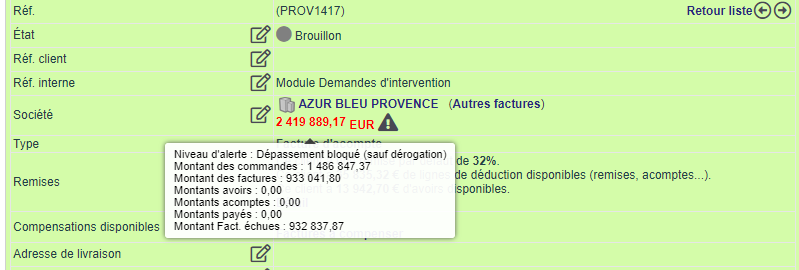
Your customer-facing teams stay fully informed. On hover, they access the same details on:
- the customer record: receivables limit, alert and authorisation level;
- the order record;
- the invoice record.
The receivables alert code
The alert code then grades the importance of follow-up, with three levels:
- no alert (code OUTS_NONE);
- alert on overrun (code OUTS_ALERT);
- block all overruns, except exceptions (code OUTS_BLOCKED).
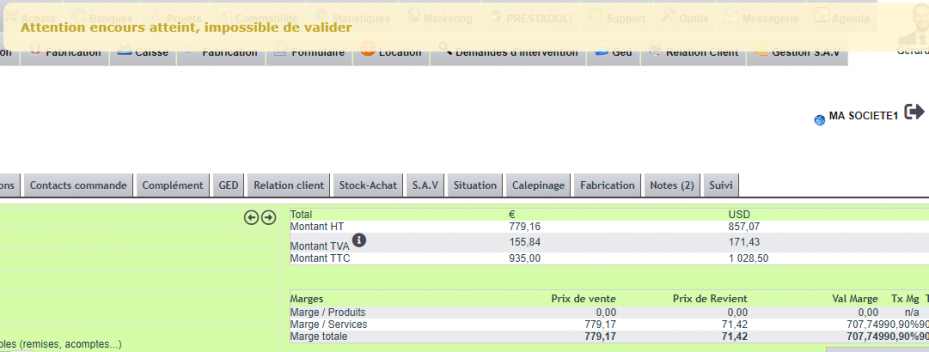
When validating an order or invoice, DoliPlus alerts or blocks as soon as the limit is exceeded.

To set the alert level, you have two options:
- individually, on the customer record (depending on permissions);
- in bulk, via a CSV file.
For bulk updates, follow these steps. First, extract customers via Tools → DoliPlus Export → 9351 (customer list by category). Then, fill in the ENCOURS_CODE column with the desired codes.
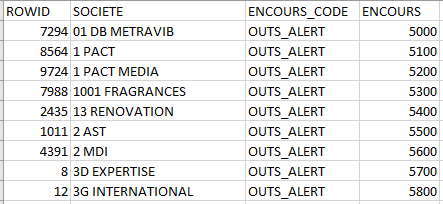
Finally, re-import the file via Tools → DoliPlus Import → 10010. Keep the ROWID column for reconciliation, and uncheck “Insert only”. You can also update the outstanding balance limit at the same time, using the ENCOURS column.
Configuration and permissions
First, set permissions to allow the right users to use the module.

Related tools for better control of your outstanding balances
To conclude, several tools enhance customer outstanding balance management:
- the manual chasing of unpaid invoices;
- the preventive invoice chasing;
- the automated chasing of unpaid invoices.
To go further
- Defining a customer outstanding balance — how a customer’s outstanding balance is defined.
