 on 20 August 2026
 Share files by link: host the file once, use it everywhere
Share files by link with the public zone of DoliPlus — a folder of your session that is reachable from the web:
- host non-confidential images and documents once,
- reuse them everywhere with a simple URL,
- keep your e-mails light: the picture is linked, not attached,
- give your e-mail signature a hosted logo.
Therefore, you send a file to the outside world without attaching it to a message. DoliPlus is the enhanced cloud edition of Dolibarr, and this capability is part of the standard toolset.
What is the public zone for?
Your DoliPlus CRM comes with a public zone. Concretely, it is a folder of your server open to the web, so you can share files by link instead of attaching them.
However, keep one simple rule in mind: never place a confidential document in this space. Indeed, it remains reachable by anyone.
Two common uses
This zone answers two everyday needs.
Your e-mail signature
First, when you drop an image there, it can illustrate your e-mail signature. Then, DoliPlus uses it transparently with every message you send.
A direct link to a document or a picture
Moreover, this folder lets you share files by link. To do so, place the non-confidential file in the Public Images folder, via the Tools menu → Documents and templates management → Public images.
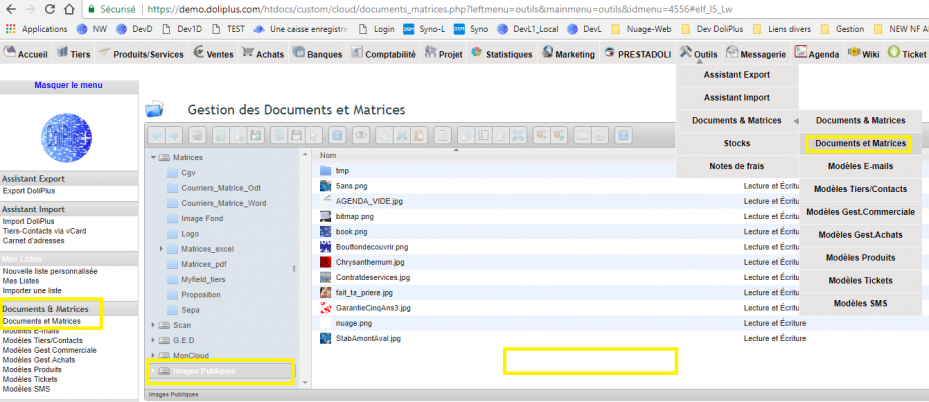
For example, your file is named xx.png and your session address is https://demo.doliplus.com/?dplang=en. As a result, the file becomes reachable at the URL https://demo.doliplus.com/images/xx.png?dplang=en.
Why use the public zone?
Sharing a picture by e-mail makes every message heavier. This zone solves the problem: you host the file once, then you reuse it everywhere.
You win on three fronts:
- light e-mails: the image is called by a link, not attached;
- a polished signature: your logo appears in every message;
- simple sharing: a link is enough to hand over a document.
Consequently, you can polish your e-mail signatures without weighing down your messages.
To go further
