 on 5 September 2026
 Snom Phone (CTI) Integration
The Snom telephony integration directly connects your Snom phone to DoliPlus. This boosts your productivity and enhances customer relationships.
This solution is 100% cloud-based. You get next-generation telephony that’s simpler and more powerful.
What’s more, setup is lightweight. No software is required on your PC or Mac. It even works on tablets with no installation needed.
How does the Snom telephony integration work?
You have an online phone system and standard handsets, such as:
- Snom,
- Yealink.
With the Snom telephony integration, DoliPlus communicates directly with your phone. It performs three key actions:
- One-click calling: click a number in DoliPlus, and your handset rings immediately to connect the call.
- Remote hang-up: end a call instantly when needed.
- Record display: when a contact calls, their record appears on screen with all relevant details.
What are the benefits?
This solution is quick to set up. For example, it connects to a 3CX system with no technical constraints. You can get started fast.
For more, explore the CTI telephony module and the Click-to-Call feature.
How to learn more?
Don’t hesitate to contact us, whether you’re a user or a telecoms professional.
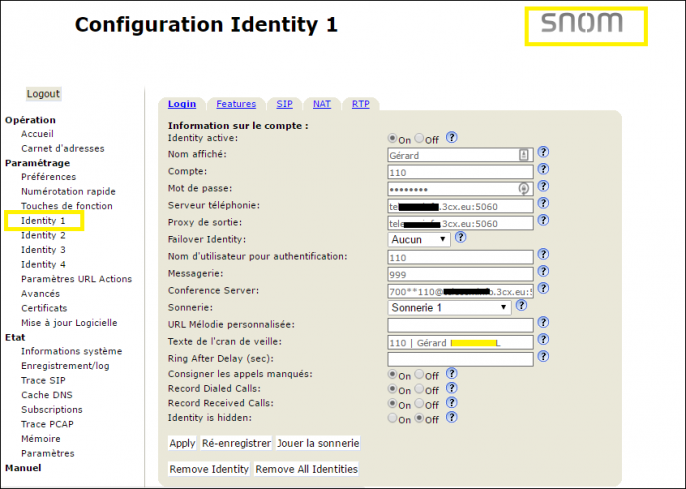
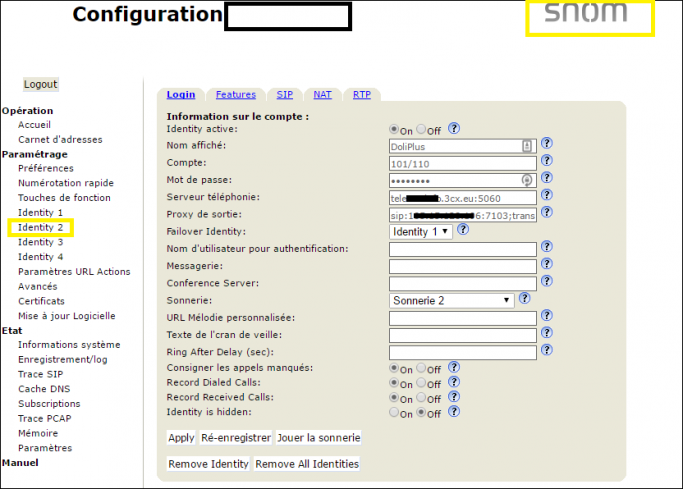
Technical installation illustration
Finally, a second identity is added to the phone. This ensures commands from DoliPlus are sent to the device.
Technical specifications
Compatible with Snom SIP phones
- Snom 300 (300, 320, 370)
- Snom 700 (710, 720, 760)
- Snom 800 (821, 870)
Minimum supported firmware: 8.7.3.25
Compatible with Yealink SIP phones
- T2x
- T3x
- T4x
- Other supported handsets: any device supporting URL actions.
Minimum supported firmware: x.70.x.x.
Service pricing
Please contact us.
