 on 5 September 2026
 CTI telephony module – DoliPlus – Click-to-Call integration
Connect your telephony to your DoliPlus management software
The CTI telephony module links your phone system to your DoliPlus management software. This way, your calls are made with a single click, and incoming calls display your contact’s record.
Several methods exist to establish this connection via VoIP (Internet telephony). The chapters listed below detail each configuration.
What does the CTI telephony module allow?
- Outgoing call: a single click on a contact or customer’s number rings your business phone, then connects you with your interlocutor. Learn more about Click-to-Call
- Incoming call: DoliPlus notifies you of the call and immediately recognises the caller.
- In both cases, an event is created in your customer tracking. It records the call and enriches the customer relationship history.
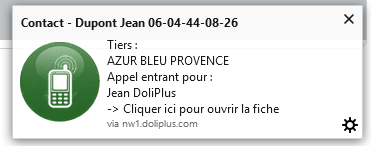
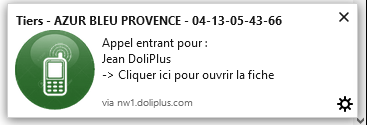
The incoming call: the record opens while the phone rings
Until now, the scene was always the same. The phone rings, you answer, then you search for your interlocutor’s name while they speak. Only then do you find their file.
Now, DoliPlus recognises the caller’s number and directly displays the corresponding record. You can therefore greet your customer by name, with their history in front of you. The benefit is not just comfort: a delayed order, a pending quote, or an open support request are immediately visible. Consequently, the conversation starts on the real subject, without preamble.
Just one address to paste into your phone system
The setup takes three simple steps.
- Open the Telephony module settings in DoliPlus: the address to use is displayed, ready to copy.
- Paste this address into the setting provided by your phone system. For example, on a 3CX system, the path is Settings > Integration > Open contact in a custom CRM.
- Choose the on ring trigger rather than on answer. This setting gives you those precious seconds of advance.
You keep your current telephony
There’s no need to change lines, transfer numbers, or subscribe to a new service with us. You keep your operator, your numbers, and your phones.
Moreover, your phone system continues to work exactly as before. DoliPlus simply listens for incoming call announcements, then opens the right record. That’s why setup takes minutes, not days of project work.
What the record lookup does not do
We also highlight the limitations to avoid any unpleasant surprises.
- The record opens in a new tab. Your ongoing work is never interrupted, but the display does not replace your current screen.
- If the caller’s number does not exist anywhere in your database, nothing opens. Therefore, the more complete your contact file, the more effective the recognition.
- A blocked number remains, by nature, unidentifiable.
These limitations are acknowledged. However, they do not detract from the essential: in the vast majority of calls, you know who is calling before you say hello.
Without CTI: Finding a Customer by Their Number
You haven’t yet connected your phone system, or the number appears on your mobile? DoliPlus’s search bar finds a customer using their phone number.
Type all or part of the number, then click on the Phone (customer/supplier/contact) entry. It is at the top, just below “Customer/Supplier”.
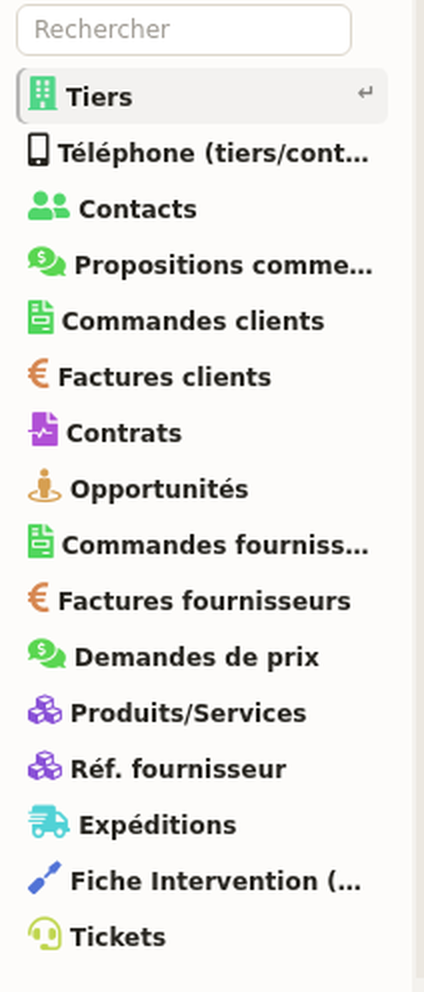
DoliPlus then searches for the number everywhere it can be recorded: the customer/supplier’s main phone, then their business, personal, and mobile numbers for their contacts. The list displays the customer/supplier, the associated contact, and the numbers found — each line being a direct link to the record.
Thus, a partial number is enough: the last six digits of a mobile find the right contact, even when multiple people share the same company record.
Why Link Your Telephony and Customer Management?
Without integration, your teams manually dial numbers, search for the customer record during the call, and sometimes forget to log the conversation. With the CTI telephony module, these steps are eliminated.
In practice, you benefit in three ways:
- you save time: no manual dialling, so fewer input errors;
- you provide better customer service: the caller is identified before you even pick up;
- you keep a record of every interaction: the customer/supplier’s history is automatically updated.
CTI Telephony Module Setup
First, enable the module. Then, depending on your phone system, refer to the corresponding chapter:
- Telephony – DoliPlus Pabxware
- Telephony – Pabx Vodia
- CTI Phone for Snom
- Keyyo Telephony
- OVH Telephony
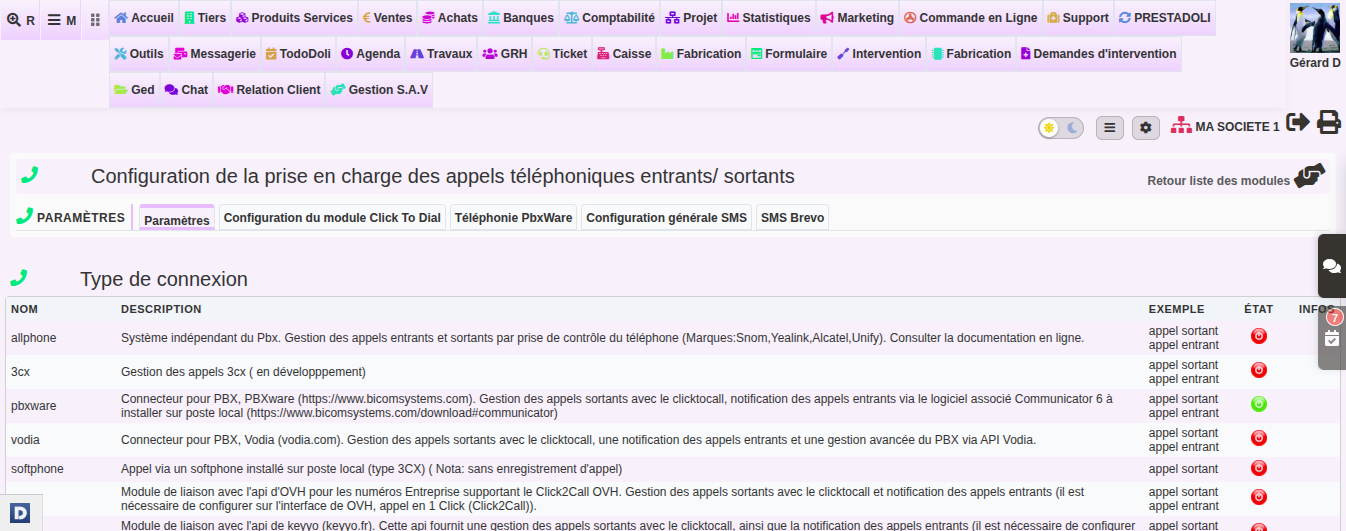
The CTI telephony module configuration screen centralises the supported connection types. Therefore, you select the method suited to your operator, then enter your credentials.
To go further
Recognition relies on numbers stored in your records. Therefore, keeping an up-to-date contact file directly improves the results.
- Importing contacts into your DoliPlus CRM
- Outbound calls: Click-to-Call
- Sending SMS from DoliPlus
- Customers and contacts in DoliPlus
- Default contact management
