 on 5 September 2026
 Keyyo Telephony for DoliPlus
The Keyyo Telephony links your phone system to DoliPlus. This lets you dial numbers with one click and instantly recognise callers.
This CTI integration works with Keyyo telephony services using VoIP. It handles both incoming and outgoing calls.
Click to Call: dial with one click
Click to Call initiates dialling with a single click on any number displayed in DoliPlus. This saves valuable time on every call.
The process is simple. First, click a number on screen. Then, your physical phone or softphone rings. Finally, when you pick up, the connection is made automatically.
Automatic customer record display on incoming calls
The Computer Telephony Integration (CTI) also pops up the customer record when a number is recognised in your database. This lets you greet every caller by name.
Crucially, the customer record remains the heart of your CRM. You can instantly access their document library, quotes, orders, invoices and reports during the call.
Setting up your Keyyo lines
We have no commercial agreement with this brand. Our sole aim is to provide a productivity solution for your business. Here’s what you need to know:
- keep your existing ADSL/SDSL connection and provider, then simply add a telephony service;
- or subscribe to a complete Keyyo package (ADSL/SDSL + telephony).
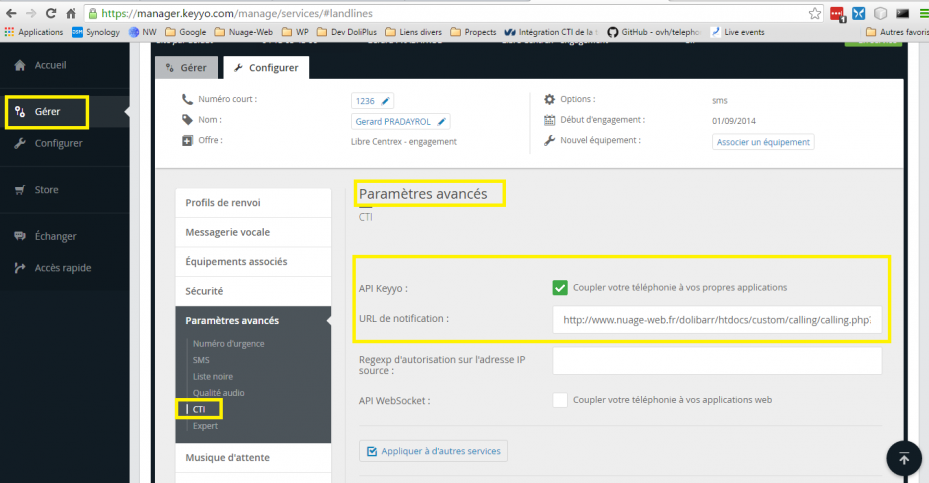
Once your lines are active, return to the Keyyo interface to enter the notification URL provided by the DoliPlus module configuration.
Configuring the Telephony module in DoliPlus
Start by enabling the Telephony module in DoliPlus. Then, configure the settings described below.
« Settings » tab
- select the « Keyyo » connection type;
- define the display of the incoming call popup (e.g. left menu popup);
- enable call logging to create an action for each call.
« Click To Dial Module Configuration » tab
Next, check that the variables listed in the « Variable Management » chapter are correctly set here.

From the user record
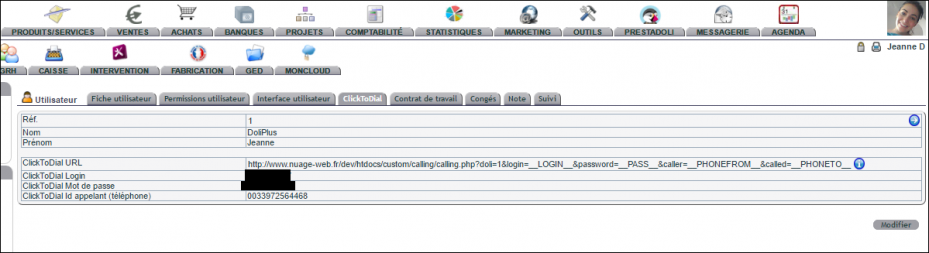
Configure each account from the « ClickToDial » tab in the user record. The login and password match those set in your Keyyo interface.
Learn more
- OVH telephony with DoliPlus
- Sending faxes with DoliPlus
- SMS and email alerts for interventions
- Synchronised calendars and schedules
This connector is part of the DoliPlus Click-to-Call telephony, which supports all operators: OVH, Keyyo, Vodia, PBXware, 3CX and SIP phones (Snom, Yealink…).
