 on 5 September 2026
 PBXware Telephony – DoliPlus
The PBXware telephony system connects your Bicom Systems switchboard to DoliPlus. This lets you make calls with a single click and identify incoming calls directly from your records.
What does PBXware telephony offer?
PBXware establishes a CTI link in VoIP with DoliPlus. It relies on the PBXware connector from Bicom Systems, as well as the Communicator software, which must be installed on your local machine.
In practice, the link provides:
- outbound calls: clicking a contact’s number dials your phone and connects the call;
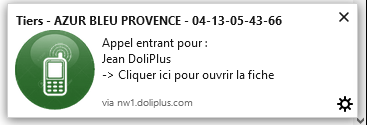
- inbound calls: DoliPlus notifies you of the call and identifies the caller;
- in both cases, an action is created in your customer follow-up to enrich the history.
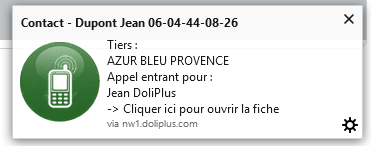
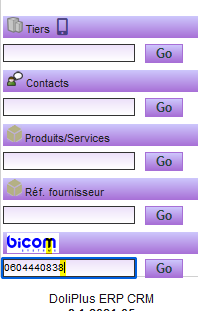
Additionally, clicking the notification opens the customer or contact record. You can also dial a number not in your CRM, or access your Bicom management space from the left menu.
Setting up PBXware telephony
Configuration takes place in two locations. First, in the Telephony module of DoliPlus, enable the dedicated option. Note that the notification module must be activated and working.
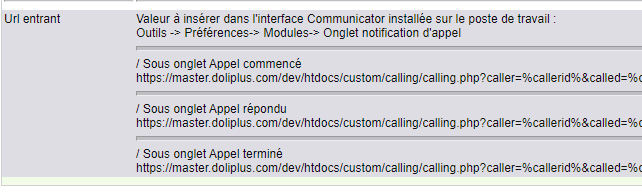
Then, in Communicator (Tools Menu → Preferences → Modules, “Call Notifications” tab), copy the configuration phrase obtained in DoliPlus, then check the indicated boxes.
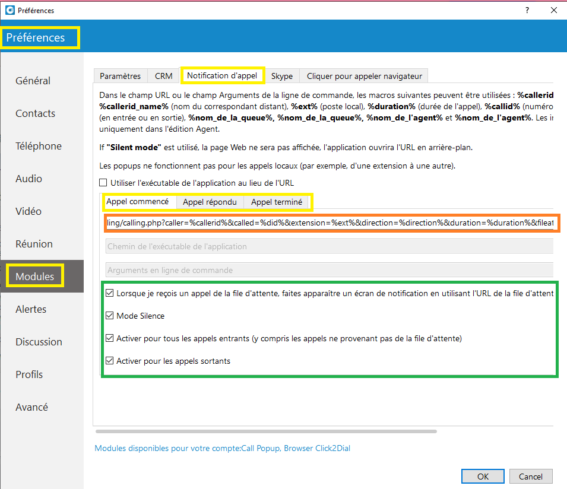
Finally, for each user, configure their extension and password via the “Click To Dial” tab in the user record.


Why connect PBXware and DoliPlus?
Without this link, your teams manually copy numbers and search for records during calls. PBXware telephony eliminates these steps.
You benefit in three ways:
- time savings: calls are made with a single click, no dialling required;
- improved reception: callers are identified before answering;
- complete history: every call is added to the customer record.
Learn more about the CTI telephony module
Further reading
