 on 26 August 2026
 Supplier quote comparison: see the real cheapest offer, terms included
Supplier quote comparison, done for you in one screen
Supplier quote comparison rarely takes five minutes: you open three offers, copy the prices into a spreadsheet, then decide. DoliPlus now does it for you:
- one request sent to several suppliers at once;
- their answers side by side, item by item;
- the best price flagged on every line;
- the incomplete offer exposed, even when its total looks lowest;
- the quote received as a PDF filling the prices in on its own.
The result: a purchase consultation drops from two hours of spreadsheet work to five minutes of reading, and you sign knowing exactly why. DoliPlus is the enhanced cloud edition of Dolibarr, the open-source ERP & CRM used across Europe.
Three offers, three tabs, and a decision made on a hunch
The usual path never changes. First, you duplicate your request for quotation once per supplier. Then each of them answers by email or as a PDF, in their own format.
Finally, you retype everything into a spreadsheet to see clearly. Nobody ever finds that spreadsheet again six months later, when the choice has to be justified.
The problem is therefore not missing information. Supplier quote comparison turns into a memory exercise, because everything stays scattered at the very moment you decide.
Supplier quote comparison on a single screen
From a request for quotation, the “Consult other suppliers” button lets you tick the ones to ask. DoliPlus prepares a request for each of them. Above all, it ties them together into a consultation.
That link is what changes everything. Thanks to it, a Comparison tab appears, showing one column per supplier and one row per item.
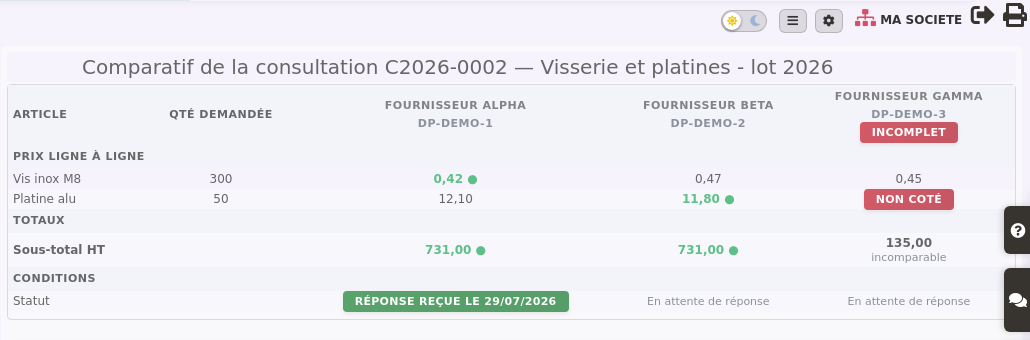
On each line, the best price appears in green. Besides, DoliPlus works every amount out from your own data. Not one figure in the table comes from the assistant.
The trap of the lowest total
Here is the most frequent purchasing mistake, and the most expensive one. A supplier does not price every item requested, often because they only carry part of the list.
Mechanically, their total becomes the lowest of the lot. In the screenshot above, one offer shows €135 against €731 — simply because one item is missing.
DoliPlus refuses to present it as the cheapest. It is therefore marked Incomplete, the missing line carries the words Not quoted, and its total is declared not comparable.
Drop in the quote you received, the prices fill themselves
Retyping the answers stays the longest chore. That is why the “Import the answer” button reads the PDF, the scan or even the photo of the quote you received.
The assistant finds each price, then shows a reconciliation table. There you read the price requested, the price read, and the gap as a percentage.
You then tick the lines to keep, and confirm. Nothing enters your database without your agreement, line by line.
Note this useful detail: a line the supplier did not price stays empty. The assistant never guesses a missing price.
What the assistant never does in your place
Supplier quote comparison commits your money. The house rule is therefore strict: the assistant prepares, you decide. It holds in three points.
- The figures come from your database, never from the assistant. An invented price is therefore impossible in the table.
- Every amount read is checked, then displayed next to the previous one.
- Nothing is written without your click. No order is ever placed automatically.
Under the table, a short written analysis sums the situation up and points out the traps. It comments on your figures; it calculates none of them.
Switching the comparison on
This feature is switched on when you ask for it on your DoliPlus: tell us that you consult several suppliers, and we open it on your installation. No technical work on your side.
Then supplier quote comparison takes four gestures:
- create your usual request for quotation, with its items and quantities;
- click “Consult other suppliers” and tick them;
- as answers arrive, drop each one in through “Import the answer”;
- open the Comparison tab and decide.
The consultation stays available afterwards. Six months later, you will still know who answered, and at what price.
Further reading
- The request for quotation, the starting brick: read the chapter
- Filling your purchase prices automatically: read more
- Supplier invoices received: read the chapter
Related Entrées
