 on 22 September 2026
 Edit or delete products in bulk: a whole range in one click
Delete products in bulk, take them off sale or align a supplier’s entire catalogue: in DoliPlus, each operation runs in one go, without opening a single item record.
- put a whole range on sale or take it off sale in one click;
- align a supplier’s entire catalogue at once when it changes its terms or disappears;
- build your product selections by combining categories, without ticking items one by one;
- clean up your catalogue without ever touching a quotation, an order or an invoice.
In other words, you keep a clean, up-to-date catalogue, even with thousands of references. DoliPlus is the enhanced cloud edition of Dolibarr.
Delete products in bulk without touching your invoices
All bulk operations rely on the same principle. First, you gather the items concerned in a product category. Then you act on the whole category from its Management tab.
To delete products in bulk, four steps are enough:
- in the catalogue, create a product category, for example “To be deleted”;
- from the product list, select the items concerned, then use the bulk assignment to a category offered below the table;
- open that category, then its Management tab;
- in the “Product/Service action (database)” section, click Launch next to “Permanently delete unused Products/Services in this category if no dependencies exist”.
This section is reserved for an administrator. However, the temporary category stays in place: you reuse it for the next batch, or delete it afterwards.
What protects an item from deletion
Nothing is ever deleted blindly. Indeed, DoliPlus checks each item before removing it. It keeps any item that is still present:
- on a customer quotation, order or invoice;
- on a contract;
- on a supplier order or supplier invoice;
- in stock, as soon as some quantity remains in a warehouse;
- as a component of a manufactured product.
Note that it is the stock on hand that blocks deletion, not the history. So an item whose stock is at zero is deleted normally, even if it had stock movements in the past. At the end, a report lists the references deleted and those kept.
See the chapter Category management
Put a whole range on sale or off sale in one click
A collection ends, a seasonal range comes back? Rather than editing each record, change the status of the whole category at once.
Still in the category’s Management tab, “Product/Service action (database)” section, two lines are available:
- “Change status to For sale”: you then choose “For sale” or “Not for sale”;
- “Change status to Purchase”: you then choose “Purchasing” or “Not for purchase”.
DoliPlus then applies the chosen status to every product in the category. As with deletion, these two actions require an administrator account.
Build your selections by combining categories
To prepare a bulk operation, you first need an accurate selection. Your existing categories already do much of the work. The “Product/Service category management” section of the Management tab offers three actions:
- copy the products of this category to another category, chosen from the list (inclusion);
- exclude from this category the products that also belong to another category (exclusion);
- empty the category with “Remove the content from the category”: the products stay in your catalogue, only their classification disappears.
For example, copy the “Summer” category into “Clearance”, then exclude the “New arrivals” from it. You thus get a precise selection without ticking a single item. Copying and excluding require the right to create categories; emptying requires the right to delete them.
Align a supplier’s entire catalogue at once
Your supplier changes its terms, drops a product line or disappears? You then handle all its products in a single operation.
To do this, open the third party record, then the Supplier tab. Next, at the bottom of the page, click the “List of purchased products” button. You can also use the product list from the Products menu, filtered on this supplier.
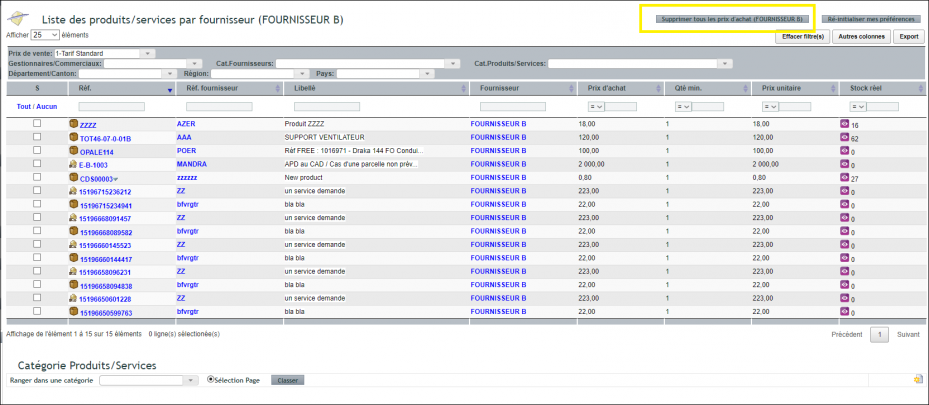
The buttons sit at the top of the list, to the right of the title:
- “Change status to sales” puts all the supplier’s products on sale or off sale;
- “Change status to purchase” sets them as purchasable or not;
- “Force sales status if in stock” puts back on sale those that still have stock;
- “Delete all purchase prices” removes the supplier’s purchase prices, without deleting the products themselves.
These buttons are visible to everyone, but only an administrator can run them. Any other user receives a refusal message.
Finding the items when they are hard to spot
To delete products in bulk, you first have to find them in a catalogue holding thousands of items. There are two ways.
First, from a standard or pre-filtered product list, use the bulk assignment to a category below the table. This is the fastest route when your duplicates are easy to spot.
Second, for finer sorting, export your items to a spreadsheet. Go to Tools → Export Wizard → DoliPlus Export, then choose query 505. You can then work on the file at your own pace, with your own filters.
Note: for a large file, choose the “Deferred CSV” mode. You then retrieve the file from the document management area once you receive the email.
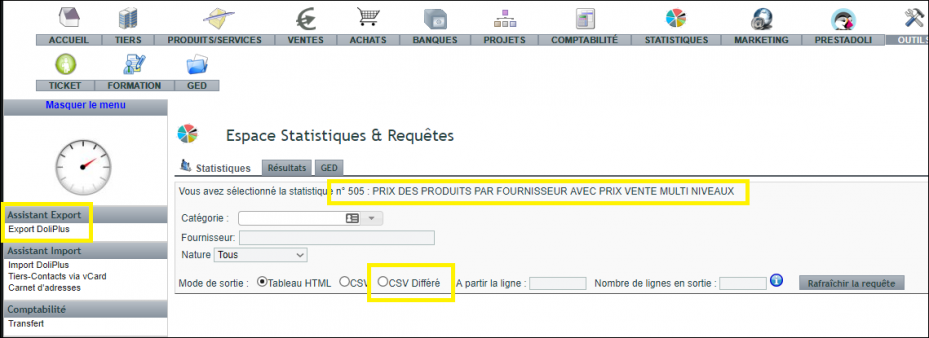
Finally, add a column holding the temporary category name to this file, then re-import it: your items join the category in one go. See Sales and purchase price management — imports and updates to re-import this file into DoliPlus.
Going further
You now know how to edit or delete products in bulk without any risk for your commercial documents. Your catalogue deserves as much care as your sales, however. Therefore, these chapters usefully complete this one:
Related Entrées
