 on 25 October 2026
 New lead acquisition – Website
Lead generation often starts with a web form. Thanks to DoliPlus’s Linkweb gateway, every online enquiry becomes a lead record in your CRM.
This way, you never lose an incoming contact. Plus, you can process it immediately, without rekeying.
Turn web forms into qualified leads
As soon as a contact comes in, you can act with just a few clicks. You can:
- track communication history with a summary report;
- send documentation by email or post using the built-in messaging and document library;
- issue a quote, then schedule a follow-up;
- schedule a phone call linked to the new contact;
- qualify the lead and assign it to a category.
So you harness your CRM’s full power from the very first contact.
How Linkweb works
The gateway works with many websites: PrestaShop, osCommerce, OpenCart, SPIP or WordPress. It connects to their forms without complex development.
Crucially, you can collect contacts from multiple sites at once. The process is simple:
- you dedicate a mailbox to receive form submissions;
- your site routes each form’s content there;
- an automated task checks this mailbox at regular intervals;
- DoliPlus extracts the contacts and creates records in your CRM.
Additional form fields (ID, message, etc.) are added to the contact notes. Plus, a dashboard widget on your homepage displays the latest incoming contacts. To display it, add the “Contacts from the website” card to your homepage (customizable dashboard): it lists the latest contacts created by the collection.
Each new customer/supplier is also assigned to a category. This prepares your next steps: statistics, email follow-ups or targeted campaigns.
Setting up lead generation
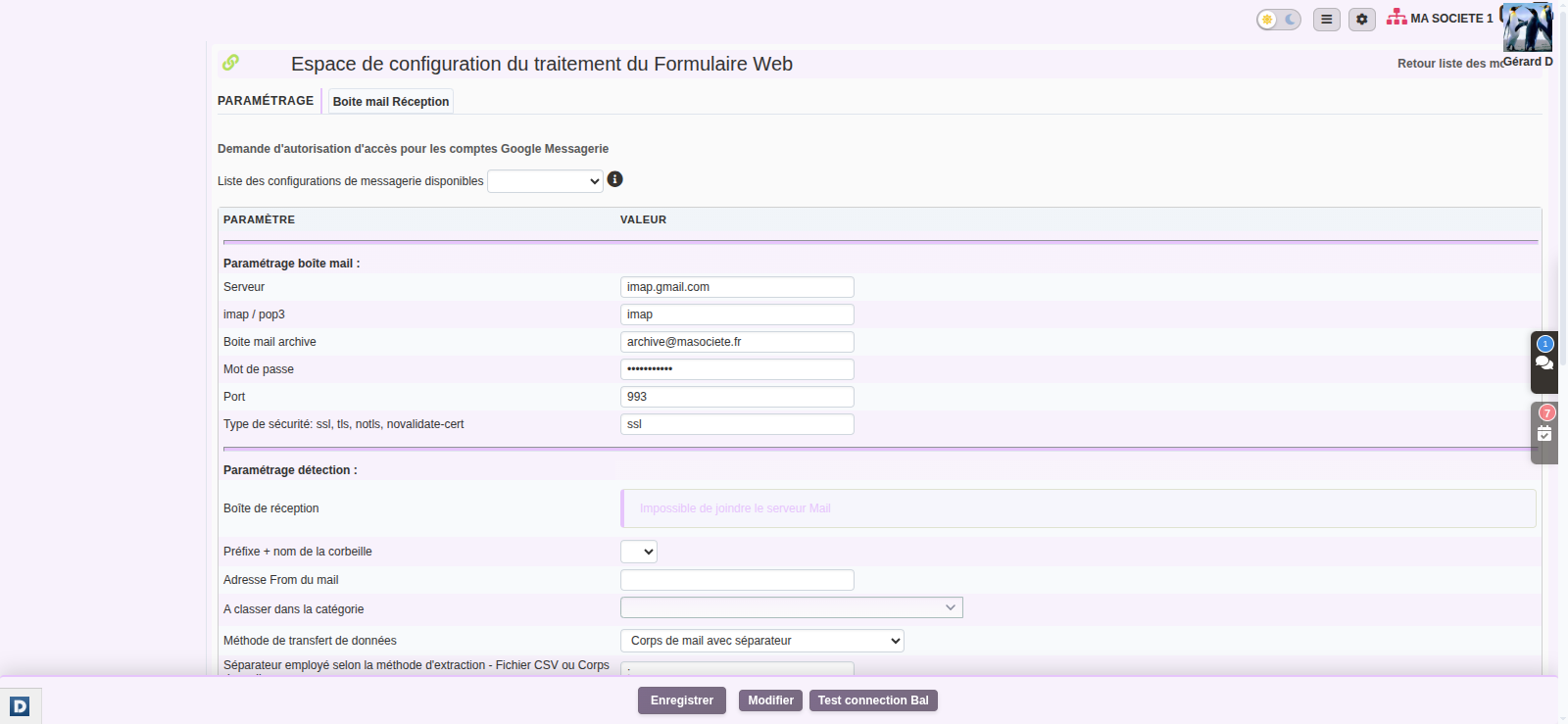
Configuration is done in the Linkweb module, both in DoliPlus and on your website. You specify the dedicated email inbox, the detection frequency, and the category for new contacts. Our team will assist you in connecting your forms.
The “Web Form processing configuration area” page (administrator) reads from top to bottom:
- “Mailbox settings”: the server and account of the dedicated mailbox; “Test mailbox connection” checks access and lists its folders;
- “Detection settings”: how each message is read — email body with separator, email body in HTML table, CSV file attached — and the keys that identify a form;
- “Web form matching configuration”: which form field fills which record field (name, address, phone, email…);
- the category assigned to new customers/suppliers, and the creation of a summary report containing the form message.
Further reading
- The Linkweb module in detail
- Importing contacts into your CRM
- Managing your sales team
- Sales teams and representatives
