 on 5 September 2026
 Offsetting receivables and payables – Dolibarr & DoliPlus
Offsetting receivables and payables lets you settle what you owe a partner and what they owe you in a single operation. This way, you clear your mutual accounts without unnecessary cash movements.
What is offsetting receivables and payables?
Offsetting receivables and payables is the mechanism that allows two businesses to clear their mutual debts. In practice, one company offsets the amount they owe with the amount the other owes them.
This situation often occurs when the same partner is both a customer and a supplier. Instead of exchanging two payments, you settle the difference, or nothing if the amounts balance out.
Activating offsetting receivables and payables
Activation is done in the settings. Go to PDF/Interface Settings, then enable the following option in the Invoice section:
PG87: Enable supplier invoice payment by offsetting
Paying an invoice by offsetting
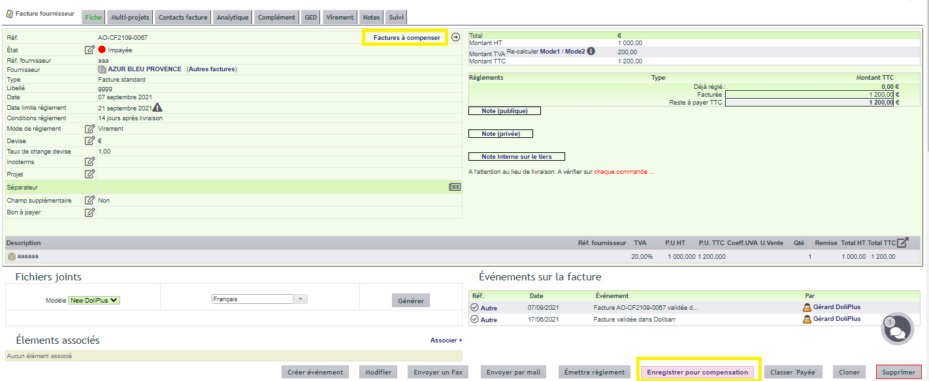
The process takes two steps. First, open the supplier invoice, then click “Save for offsetting” at the bottom of the page. The invoice is then set aside to be offset.
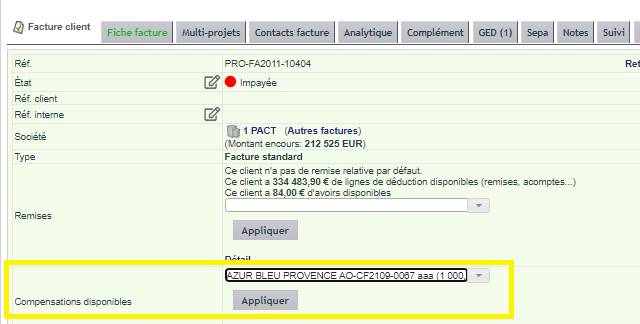
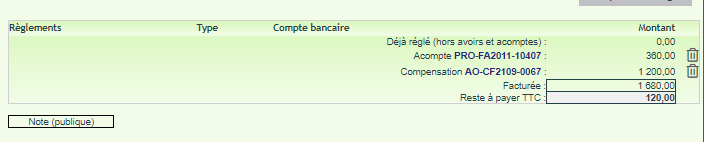
Next, open the customer invoice. In the list of available invoices, search for the invoice to offset, then apply. You will then see the payment by offsetting.
Tracking offset status
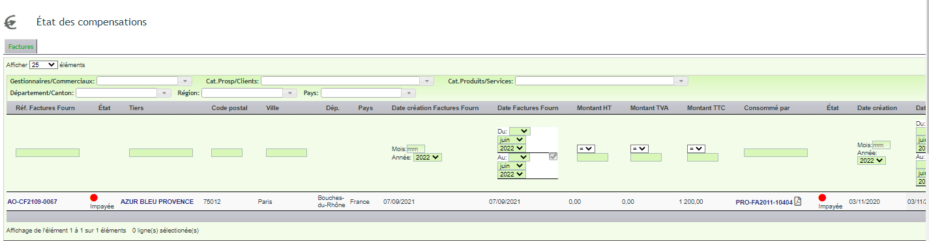
DoliPlus then provides a clear view. On the customer or supplier record, a tab shows invoices to be offset, as well as those already offset.

Additionally, the Invoices menu provides a general list of offset invoices. This way, you keep an overview.
Why offset receivables and payables?
Paying and then being paid for similar amounts wastes time and cash flow. Offsetting receivables and payables simplifies these situations.
You benefit in three ways:
- fewer transactions: one payment, or none, instead of two;
- clear accounts: mutual balances are settled properly;
- reliable tracking: each offset remains recorded and accessible.
Learn more about managing customer receivables
Further reading
