 on 26 August 2026
 Orders ready to ship: see what can leave today
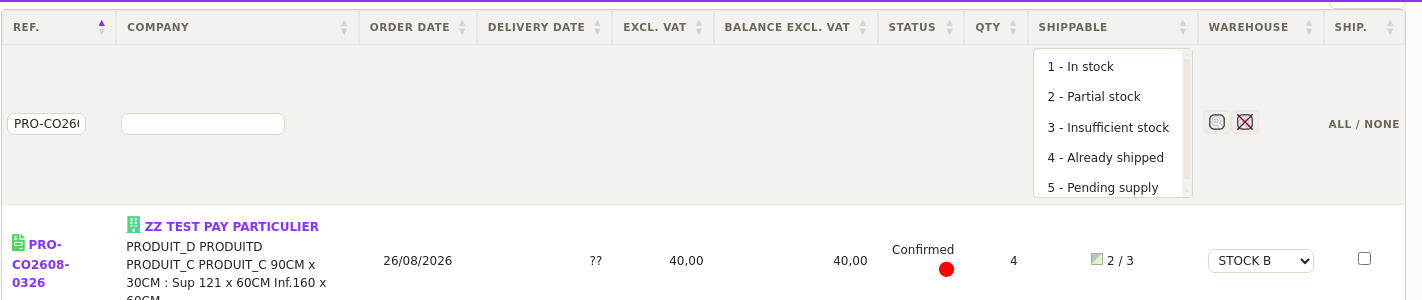
The orders ready to ship list gathers every order you can send out, on a single screen:
- the stock status of each order, at a glance;
- the contents of an order, one click away, without leaving the list;
- shipments created straight from the table;
- a warning that names any item running short.
Therefore, you drive your shipping from real stock levels, and the parcel leaves complete.
Reviewing your orders ready to ship
Once the module is enabled and configured, you reach the list through Sales → Orders to ship. Orders already handled drop out of the list automatically.
For each order, DoliPlus shows the stock status of the products:
- In stock, Partial stock or Insufficient stock;
- orders already shipped in full, or currently being shipped.
Moreover, a colour code — explained by a legend at the foot of the page — tells you whether each order can be shipped from the warehouses you selected in the settings. Finally, you create your shipments directly from this table, according to the options you defined.
Order contents, one click away
Before launching a shipment, you often want to check exactly what an order contains. A click on the row therefore opens a summary panel on the right of the screen.
You read the essentials at a glance:
- the customer, the date and the order reference;
- amounts excluding and including tax;
- the name of every product ordered, with its quantity and amount;
- the invoicing status.
As a result, you decide without leaving your preparation screen: your filters and your position in the list stay untouched. A second click closes the panel, so you move straight on to the next order.
Besides, this same preview follows you on your other lists, notably your customer orders and your invoices. Discover the new DoliPlus design.
The parcel leaves complete, even when stock moves
Between the moment an order appears as shippable and the moment you start preparing it, stock can change. Another order in the same batch has taken the last piece, for example, or an online sale has gone through meanwhile.
DoliPlus therefore reads stock again at the exact moment you create the shipments. If an item is no longer available, a message tells you on screen, and it names the item.

Consequently, you spot the order that needs your attention straight away, instead of hearing about it from the customer a few days later.
Moreover, a configuration option goes further. It sets the order aside until every item is available: no delivery note is issued for it, and the missing item appears on screen.
This setting suits picking operations where the delivery note doubles as a packing list. Indeed, the picker packs what the document says, so the document must mirror the whole order.
Configuring the list
The settings adjust how your orders ready to ship are handled. In particular, you can define:
- the warehouses whose stock counts (all of them if the field stays empty);
- the document template used to generate the shipment;
- a global PDF gathering every shipment created;
- the automatic “delivered” status for a fully shipped order;
- permission to ship even when stock falls short;
- a ban on issuing an incomplete delivery note;
- the automatic move of shipments to the “to be invoiced” status.
Thus, you fit this list to your own logistics organisation.
Why centralise your shipping preparation?
Without an overall view, preparing shipments turns into guesswork. Instead, your orders ready to ship sit on one screen, with everything you need to decide.
You gain on four fronts:
- clear priorities: you see what can leave right now;
- fewer mistakes: stock status prevents promises you cannot keep;
- parcels true to the order: a missing item is reported to you by name;
- time saved: shipments are created straight from the list.
Afterwards, you move on to the shipments to be invoiced.
DoliPlus is the enhanced cloud edition of Dolibarr, with its own modules and interface.
Going further
Related Entrées
