 on 25 October 2026
 GDPR record of processing activities: it fills itself from your modules
Your GDPR record of processing activities now fills itself from the modules you already use, instead of starting from a blank page. DoliPlus — the enhanced cloud edition of Dolibarr — brings you five concrete tools:
- a pre-filled register: DoliPlus reads your installation and proposes one sheet per detected activity;
- a request desk: access, rectification, erasure and portability, with the one-month deadline tracked automatically;
- a breach register with its 72-hour countdown;
- an automatic purge of data kept too long, which you test before switching it on;
- a sealed log: every erasure actually carried out leaves a trace that nobody can quietly rewrite.
In other words, your business software no longer merely stores data: it helps you prove that you handle it properly. Moreover, these tools switch on when you ask for them — simply tell us you want to use them, and we open them on your installation.
Your compliance at a glance
Home menu, then “GDPR Compliance” in the left menu: four cards sum up where you stand.
- “Processing register”: the number of processing activities and those still pending validation, with “Open register”;
- “Data subject requests”: open requests and overdue ones, with “Open requests”;
- “Data breaches”: breaches still in progress, with “Open violations log”;
- “Data retention”: whether the purge is active or not and the date of its last run, with “Simulate and enable purge” and “Configure durations” (administrator only).
The left menu also leads to the “Processing register”, the “Data subject requests”, the “Data breaches” and the “Sealed log”.
The GDPR record of processing activities you don’t have to write
Every company that handles personal data must keep a register of its processing activities. In practice, therefore, this concerns almost every small business: as soon as you invoice, prospect, employ staff or install a camera, you are concerned.
That is precisely where the exercise stalls. Faced with an empty spreadsheet, nobody knows where to start.
DoliPlus takes the problem from the other end. Since it knows which modules you run, it also knows which data you process. Consequently, one button walks through your active modules and creates a sheet per detected activity: customer management, prospecting, payroll, email campaigns, video meetings, support tickets, and so on.
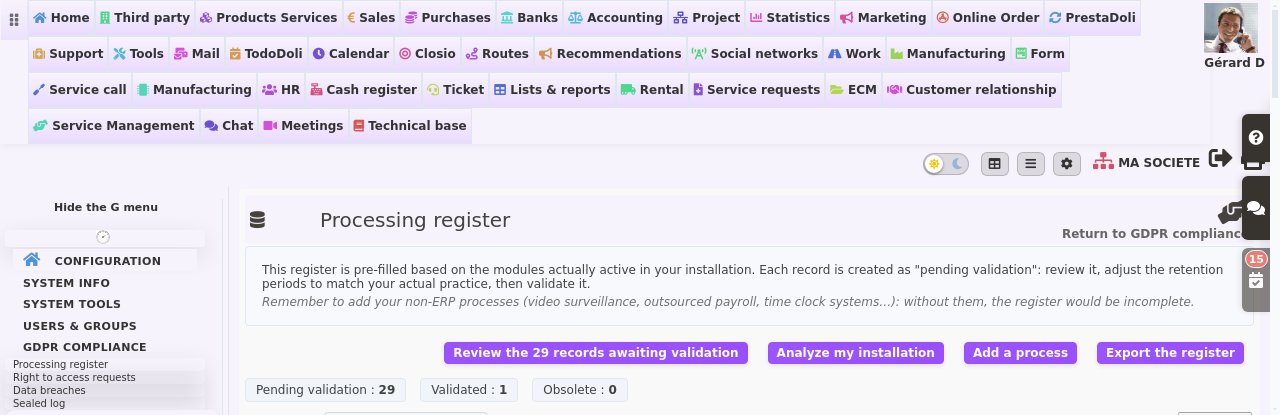
Each sheet arrives as pending validation, never as validated. This distinction matters: a register signed without being read is exactly what a supervisory authority criticises. You therefore review the sheets one after another, adjust the retention periods to your actual practice, then validate.
Finally, remember to add what happens outside your software — video surveillance, outsourced payroll, time clocks. Without them, the register would be incomplete.
Add a processing activity that happens outside the software, step by step
- Home menu › “GDPR Compliance”, then “Processing register” in the left menu, and “Add a process”.
- Give it a meaningful name, for example “Warehouse video surveillance”: it is the only mandatory field.
- “Purpose”: what this processing is for. “Legal basis”: what entitles you to carry it out (contract, legal obligation, legitimate interest, consent). Then state who is concerned, which data are processed and who receives them.
- Enter the actual “Retention period” (for example 30 days for video surveillance footage), the security measures and the processors involved.
- The status: leave “Pending validation” if someone has to review the sheet, choose “Validated” if it is correct, and “Obsolete” for a discontinued processing activity, which stays on record.
- Click “Save”. The sheet shows “Entered manually” as its origin: “Analyze my installation” will never touch it. “Edit” lets you correct it, and it appears in the register export.
Answer a request without spending three hours searching
Someone asks you for a copy of their data, or asks you to erase it. You then have one month to answer, and the clock starts on the day the request arrives.
DoliPlus opens a request desk. Above all, it does more than record the request: it goes and looks. It gathers what your installation actually holds about that person — third party sheet, contacts, invoices, quotes, tickets, email exchanges, documents — and hands you the file, ready to send.
However, two safeguards stand before any action. First, a human must state how they verified the requester’s identity. Second, a request filed through the public form only becomes actionable once the requester has confirmed their email address. Consequently, nobody erases anyone else’s data by simply typing their name.
Access, portability, objection, rectification: the other requests
On the request sheet, once identity has been attested (“Attest identity verification”) and the person’s records have been linked, the button on offer depends on the type of request:
- access or portability: “Export the person’s data” downloads a file (JSON format) that gathers, for each linked record, the data held, the documents and the retention obligations. The export is written to the sealed log. Send this file to the person yourself: it is not attached to the reply;
- objection: “Save objection” excludes each linked record from bulk mailings (DoliPlus and Brevo campaign targeting now leaves it out) and notes on it the objection to prospecting, with the date. The action runs on the first click and is written to the sealed log. If the person already appears in a list at Brevo, remove them in Brevo as well: the objection does not do it there;
- rectification: a “Correct record” button for each linked record opens the third party or contact record in edit mode; make your correction, then save.
Finally, “Close the request” asks for confirmation, then sends the requester the reply written in the settings (or the default text).
The 72 hours that count after a data breach
A stolen laptop, a mailbox opened by the wrong person, a file sent to the wrong address: a breach is rarely spectacular. Yet the deadline is strict — 72 hours from the moment you became aware of it.
DoliPlus therefore opens a breach register with a visible countdown. It also asks the questions the authority will ask: what happened, which data, how many people, what you did about it, and whether those people must be informed.
See what the purge would erase, before you run it
Keeping data forever breaks the rules. Erasing blindly, on the other hand, destroys your address book. That dilemma stops most companies from ever starting.
DoliPlus settles it with a simulation. In one click, you get the exact table of what would be touched: rule by rule, the number of records concerned, separating those that would be anonymised from those that would be deleted.
The activation button only appears underneath that table. Therefore you cannot start the purge without having seen the figures. It stays switched off until you decide, and its activation is recorded with the name of the person who approved it.
Does your DoliPlus run several companies? Each one then applies its own retention periods, never those of a neighbour. From the main company, the simulation reads company by company: the detail of each, then the grand total. From a secondary company, you only see your own. Finally, activation is driven from the main company, since it commits them all.
Set the durations, the public portal and the messages, step by step
- On the “GDPR Compliance” home page, click “Configure durations” (administrator only).
- “Open the public portal for rights requests”: when ticked, a public page lets anyone request access to their data, its rectification or its erasure; each request arrives in “Data subject requests”. An hourly cap limits abuse.
- The subject and message of the reply to the requester: if you leave them empty, DoliPlus uses its default text.
- For each kind of third party (customer, prospect, supplier…) and then of contact, the period beyond which a record with NO EVENT AT ALL, and linked to no document, is anonymised by the purge. “Never” keeps it.
- The “Neither prospect nor customer” line, for its part, carries a DELETION period: these records with no business relationship are erased, not merely anonymised. The icon next to it calculates how many records would be affected today.
- “Message settings” tab: the GDPR manager chosen in “GDPR manager’s email inbox” is the sender of consent requests and confirmations. There you write the text of the two links (“I accept” / “I withdraw my consent”) and three messages: the request, the acceptance confirmation and the refusal confirmation. The variables (__CIVILITY__, __LASTNAME__…) are replaced with the recipient’s record; each block is saved with its own button.
- The durations only apply if the automatic purge is enabled. On the purge page, first click “Simulate purge”: it calculates what would be done today, per company and per kind of record, without changing anything. If a figure surprises you, review the durations.
- Only then does “Enable purge” (after confirmation) run it every night, irreversibly: this is a decision for the GDPR manager, and it is recorded in the sealed log.
Prove, six months later, that the erasure really happened
Here is the question that always comes last, and always at the worst moment: “prove to me that you really erased my data”. A dated line in a table proves very little, since whoever administers the database can rewrite it.
DoliPlus therefore writes every action actually carried out into a sealed log: an erasure, an objection to prospecting, a data file handed to someone, the activation of the purge, and the outcome of each of its runs.
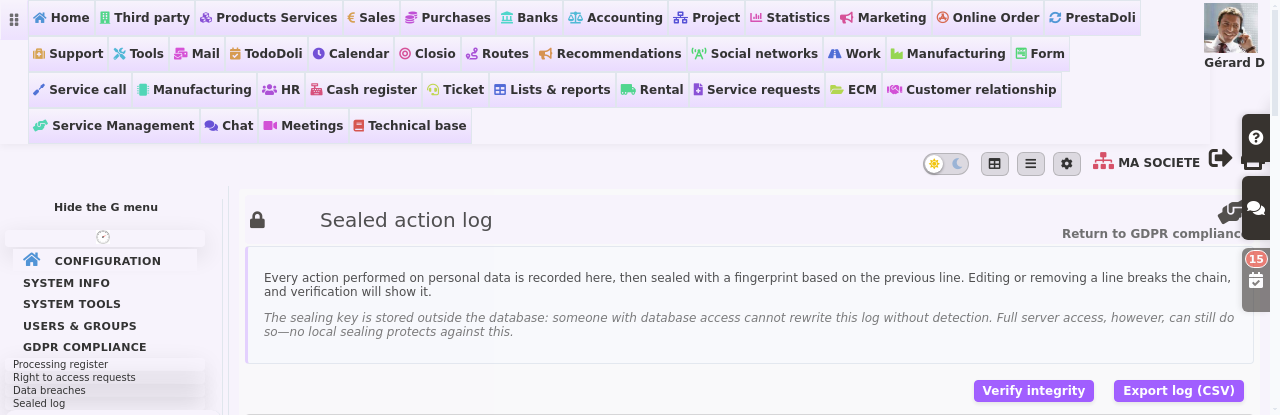
Each line carries a fingerprint computed from the previous one. As a result, editing or removing a line breaks the chain, and the verification screen names the first break. The sealing key lives outside the database, so someone with database access alone cannot rewrite this log without it showing.
Verify and export the log, step by step
- Home menu › “GDPR Compliance”, then “Sealed log” in the left menu.
- Each line is one action: the date, the user, the action (erasure, data file export, purge…), the record concerned and the details. The last column shows the beginning of the fingerprint.
- Click “Verify integrity”: DoliPlus rereads the whole chain without changing anything. The message “Chain intact: … action(s) verified” means that every action is there, in order and unaltered; otherwise the frame turns red and shows where the chain breaks.
- In the event of an inspection, “Export log (CSV)” downloads the entire log, full fingerprints included.
Your GDPR record of processing activities: what DoliPlus covers, and what it does not
DoliPlus covers the register, data subject requests, breaches, retention periods and the proof of execution. In short, it covers what an ERP can actually do, because it holds the data.
By contrast, it does not carry out impact assessments, and it does not manage website cookie banners. These two subjects belong elsewhere, and free tools already cover them well — the French data protection authority publishes its PIA software for impact assessments, for example.
Further reading
- Managing contacts — the records most directly affected by your retention periods.
- Email marketing with Brevo — consent and unsubscription in your campaigns.
- Automatic email archiving — the exchanges kept in your customer history.
- Importing contacts into your CRM — where the data you collect comes from.
💡 Ready to start your register? Just tell us the subject interests you: we switch these screens on in your DoliPlus, we run the analysis of your installation together, and we look at the purge simulation before any decision. You leave with an exportable GDPR record of processing activities, without having written a single line in a spreadsheet.
Related Entrées
