 on 5 September 2026
 Online invoice payment with DoliPlus: your customers pay in one click
Online invoice payments in DoliPlus now include a new, even simpler and more comprehensive payment solution. Alongside the existing Paybox option, you can now offer modern payment processing with a wider range of payment methods:
- an automatic “Pay this document online” link added to your invoice and order emails;
- a secure payment page with multiple options: credit card, PayPal, bank transfer, direct debit, Apple Pay…;
- automatic direct debit for recurring invoices, set up and verified from your usual direct debit mandate;
- one-click sending of your bank details to customers who prefer to pay by transfer;
- automatic payment recording: payment created, invoice marked as paid, bank account updated;
- tracking of all transactions, with email confirmation if you wish.
In short, you get paid faster, without follow-ups or manual data entry: the customer pays as soon as they receive their invoice, and your accounting stays up to date automatically.
How does online invoice payment work?
Today, a customer receiving an invoice by email must log into their bank, enter a transfer, copy the reference… The result? Longer payment times and repeated chases on your part.
With online invoice payments, DoliPlus removes all these obstacles. Your customer receives their invoice with a payment link. They click, check the amount, choose their preferred payment method, and confirm. That’s it.
This service is powered by Mollie, a trusted European payment provider. This means your customers’ banking details never pass through your software: security is guaranteed end-to-end.
Mollie, Stancer or Stripe: you choose who collects
DoliPlus does not lock you into one provider. Indeed, three collection services are now connected, and they all work in exactly the same way: the payment link in your emails, the direct debit slip, the bookkeeping entry that happens on its own. Therefore, you can switch provider without changing your habits.
- Mollie — the widest range of payment methods on the checkout page: card, PayPal, bank transfer, Apple Pay…
- Stancer — a different pricing grid, often cheaper when your invoices are numerous and small.
- Stripe — newly available: cards and direct debits with the same provider, under one contract and one statement to follow.
With Stripe, the invoice settles the moment your customer pays
That is the difference you will see on screen. Stripe notifies DoliPlus itself, as soon as the money is taken: the payment is recorded, the entry lands on the right bank account, and the invoice turns to “paid” straight away. Nobody needs to be logged in, and you reconcile nothing.
The reverse works just as well. A rejected debit reopens the invoice with its reason; a refund reverses the entry and puts the invoice back to be collected. Consequently, your books follow the real money, in both directions.
These three services are switched on for you on request. Simply tell us how you collect today: we open the right module on your installation and help you choose, because the best provider mostly depends on the average amount of your invoices and on what rejections cost you.
Read more: the four ways to collect a SEPA direct debit and direct debit through Stancer, with no bank file.
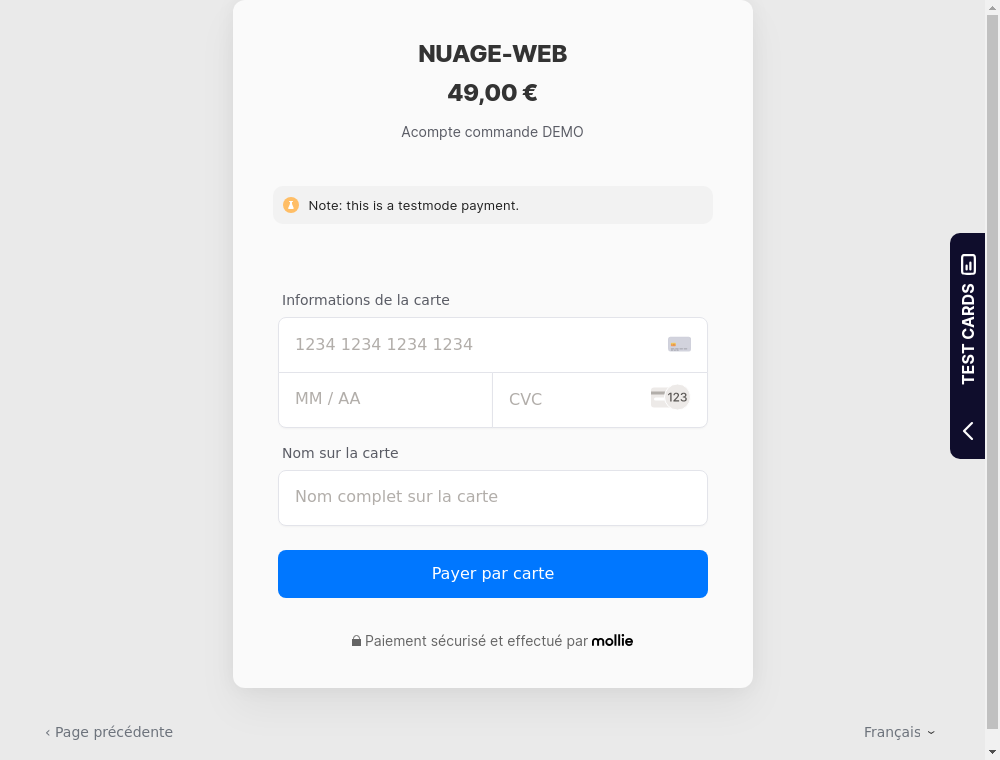
A payment link in your invoice emails
This is the core feature. As soon as the option is enabled, every invoice or order email includes a “Pay this document online” link. Your customer can then pay immediately, without creating an account or searching for their chequebook.
Additionally, DoliPlus automatically calculates the correct amount: if a deposit or credit note has already been recorded, the payment page only shows the remaining balance. Your customer can never pay the same invoice twice.
The link only appears for invoices with a card payment method. Customers paying by direct debit or bank transfer are not affected: you stay in control.
Automated direct debits for recurring invoices
For customers paying by direct debit, DoliPlus goes further: it collects payments for recurring invoices without requiring any manual input. And most importantly, it does so using your usual direct debit mandate, exactly as you’re accustomed to.
In practice, you prepare your direct debit mandate as usual. You check the invoices it includes, the amounts and due dates, then trigger the collection with a single click. Nothing is processed without your approval: you retain full control over each debit and verify your entries before execution.
If you prefer fully automated processing, an option lets DoliPlus trigger these collections on a scheduled basis, without manual intervention. This remains disabled by default: the verified direct debit mandate process remains the primary method, leaving nothing to chance.
Once collection is initiated, you have nothing more to do: the direct debit is processed by the bank, and when confirmed, DoliPlus automatically records the payment and marks the invoice as settled — even if no one is logged into the software at the time. You simply find your invoices marked as “paid” and your bank account updated when the time comes.
Set up all your mandates in one go
You may already have dozens, even hundreds of signed direct debit mandates from your customers. To collect payments online automatically, each mandate must first be linked to the payment service. But linking them one by one would be tedious.
That’s why DoliPlus offers a single button to activate them all at once. From your list of mandates, a simple click on “Sync mandates” prepares all your active mandates. The already signed mandate is reused as-is: your customers don’t need to sign again.
During processing, a progress bar tracks the status. Afterwards, a detailed report shows the result for each mandate: linked, already up-to-date, or needing verification. So you can see at a glance where things stand.
You stay in control: prepare first, switch later
Before launching the sync, a checkbox gives you the choice, with full safety:
- Prepare only (default option): your mandates are linked to the service but remain collected exactly as today. So nothing changes until you decide.
- Switch to automatic collection: by ticking the box, your mandates switch to online automatic collection. From the next due date, DoliPlus collects payments automatically and records the settled invoice.
This way, you can first prepare everything with zero risk, then switch gradually at your own pace.
Offer bank transfer in one click
Some customers prefer paying by standard bank transfer. From the invoice record, a “Suggest bank transfer” button emails your customer your bank details (IBAN and BIC) with the invoice reference pre-filled as payment label.
Your customer just needs to copy-paste your details into their bank: fewer input errors, easier reconciliation for you, and faster payment.
Online transfer: paid, and you know immediately
There are two ways to receive payments by bank transfer, and they’re not equal.
The traditional bank transfer: you send your IBAN, the customer transfers from their bank. It’s simple and free — but then you have to manually match each incoming payment to the right invoice on your bank statement. A missing reference or a rounded amount, and reconciliation becomes a headache.
Online bank transfer (via the payment page): the customer selects “bank transfer” on the payment page. The payment is automatically linked to the invoice from the start — no manual copying — and DoliPlus marks the invoice as “paid” as soon as it’s confirmed. No more manual bank reconciliation, no more misallocations.
Payments are automatically recorded in your system
This is where online invoice payments save the most time. As soon as the payment is confirmed, DoliPlus automatically processes all entries:
- the payment is created on the invoice, with the transaction reference;
- the amount is posted to the correct bank account, even when receiving in multiple currencies;
- the invoice status changes to “Paid” once settled;
- if you wish, a confirmation email notifies your team.
In short: no more manual payment entries. Additionally, a dedicated screen lists all transactions (amount, status, linked invoice) for instant tracking.
You’re notified as soon as a customer pays
With online invoice payments, you no longer need to monitor your receipts. As soon as a customer pays, DoliPlus notifies you automatically.
In practice, as soon as a payment is confirmed, a notification instantly appears in your internal messaging: “invoice paid”, along with a direct link to the relevant invoice. This way, you access the details with a single click, without having to search for it.
Moreover, if you’re not in front of DoliPlus at that moment, the alert follows you: it displays on your browser or mobile. So you never miss a payment, even when on the move.
Thanks to this automatic alert, you can relax: the software comes to you instead of requiring manual checks. This notification works as soon as internal messaging (the chat) is enabled.
Invoices, orders, contracts, subscriptions… and open payments
Online invoice payments are just one possible use. The same payment page also accepts:
- payment for a customer order;
- renewal of a contract or subscription;
- member subscriptions for associations;
- an open payment: you specify an amount and description, DoliPlus generates the link to send.
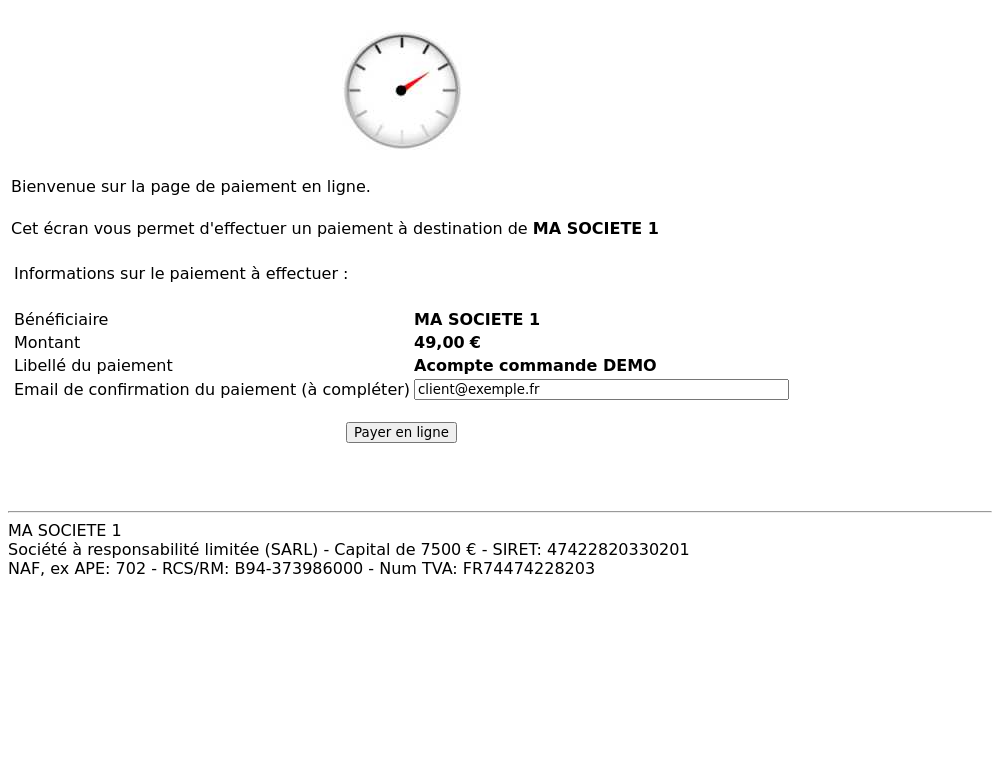
Before confirming, your customer always sees a clear summary: beneficiary, amount, description. Then they choose their payment method on the secure page.
Quick and easy setup
Configuration takes just minutes from the module’s admin screen:
- create your account on Mollie’s website and retrieve your access key;
- enter this key in DoliPlus, then select the receiving bank account – a button can even detect it automatically for you;
- enable the “Add payment link in emails” option;
- optionally choose which payment methods to offer customers (leave empty to offer all);
- optionally customise messages displayed after successful or declined payments.
Finally, a test mode lets you trial the entire process with a dummy card, without charging anyone. You switch to live mode when everything meets your requirements.
Going further
- Customer invoices in DoliPlus
- Online payments via Paybox with credit cards
- SEPA mandate generation
- Automated quote follow-ups via email and SMS
