 on 5 September 2026
 Connect your software together: no double entry or coding
Connect your software without writing a single line of code
Connecting your software no longer requires a single line of code: DoliPlus’s exchange gateway handles it all from a simple configuration page. Here’s what it does for you:
- it notifies your other tools as soon as an event occurs: invoice validated, customer created, order signed, intervention completed…;
- it receives external data and directly creates the customer or contact in DoliPlus;
- it signs every message, so the recipient knows it comes from you and not an impersonator;
- it automatically retries for over 24 hours if the other tool doesn’t respond;
- it logs every attempt: what was sent, what arrived, what failed and why.
Result: you enter the information once, and it reaches every system where it’s needed. Consequently, evening re-entries and Monday morning oversights disappear.
This connector links DoliPlus to a tool we don’t develop. It requires a setup fee, followed by a monthly subscription: this is how we keep up with the other tool’s updates without bothering you. Contact us to discuss.
What you stop copying by hand
Today, businesses rarely use just one tool. There’s the website, the email platform, the shared spreadsheet, sometimes the accountant’s software.
Yet, these tools often don’t communicate. As a result, the same customer address gets re-entered three times, and the third version contains a typo.
This is exactly what the gateway eliminates. In other words, connecting your software means deciding once and for all who needs to be notified and about what.
Your other tools notified the instant it happens
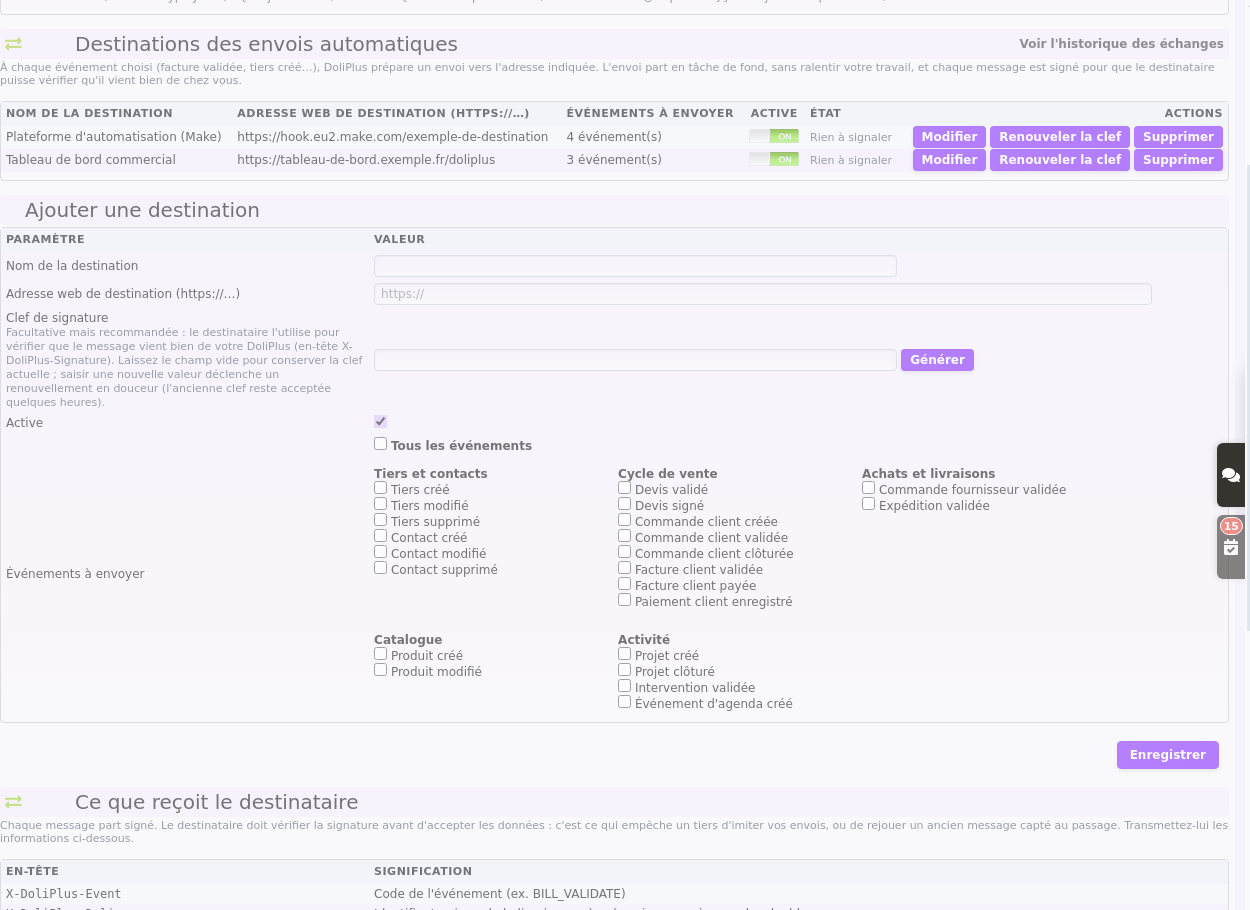
The first use case involves automatic sending. In practice, you specify the destination address, then select the events that should trigger it. Then, DoliPlus handles everything.
You precisely choose what gets sent
Events are grouped by category: customers and suppliers, sales cycle, purchases and deliveries, catalogue, and activity. For example, you send an invoice as soon as it is validated, or a lead as soon as it is created.
Additionally, a “All Events” option sends everything in one click, when the receiving software can handle the sorting itself.
A signed message, impossible to imitate or replay
Each transmission includes an electronic signature and the exact time of dispatch. This allows the receiving software to verify two things: that the message comes from your DoliPlus, and that it is recent.
In other words, a message intercepted in transit cannot be resent later by a malicious actor: after five minutes, the recipient rejects it.
Furthermore, you can renew the signature key whenever you want, without any disruption. Indeed, the old key remains valid during the recovery period, giving your provider time to update theirs.
A follow-up that persists for over 24 hours
A server restart, overnight maintenance, or network outage: it happens to everyone. That’s why the gateway doesn’t give up after the first failure.
It first retries after 5 seconds, then 5 minutes, 30 minutes, 2 hours, and so on for nearly 28 hours. This way, an overnight outage won’t cause you to miss anything.
Additionally, it remains polite: if the recipient asks to wait, it does. Finally, if an address stops responding entirely for five days, DoliPlus pauses it and notifies the administrator by email—rather than repeatedly sending to a dead end. A single successful delivery clears the record.
The log: who responded, what, and when
The exchange history shows each transmission, its status, and the time of the next attempt. Additionally, a log details every attempt: the response received, the response time, and whether it was an automatic follow-up or a manual resend.
Consequently, in case of a dispute with a provider, you no longer rely on memory: you show the record.
Your forms create your records, without any manual input
The gateway also works the other way around. Indeed, your website’s contact form can directly create the record in DoliPlus.
To do this, DoliPlus provides a unique, password-protected receiving address. This key grants access: no one can create a record without it. If in doubt, you can regenerate it in one click.
This address is pasted as-is into the automation platforms you already know, such as Make or Zapier. So, a visitor who fills in your form at 10 PM appears as a prospect record in your system at 10:01 PM, ready to be contacted.
Gateway, API or AI assistant: which for which need?
DoliPlus offers three entry points, often confused. Yet, they answer very different questions.
- The exchange gateway — this is DoliPlus taking the initiative. As soon as an event occurs, it notifies the tool you’ve chosen. You set it up yourself by ticking boxes, no developer needed. This is the right choice for “when something happens in my system, alert the other tool”.
- The API — this is the other software accessing data when needed. It provides full access to your management (quotes, orders, stock, products…) and allows both reading and writing. However, it requires a developer: access is granted on request and on quote. This is the right choice for “my application needs to fetch or deposit specific data”.
- The AI assistant connection (which experts call “MCP”) — this is you asking the question in plain English. The assistant then queries your data to answer or prepare a document. This link is activated case by case, with a token dedicated to your instance. This is the right choice for “I want to query my system without opening ten screens”.
In short: the gateway pushes information automatically, the API makes it available on demand, and the AI assistant makes it conversational. Plus, all three can coexist without conflict — many customers use the gateway daily and the API for specific projects.
Connecting your software: where to start
- Open the gateway configuration from DoliPlus administration.
- Add a destination: a clear name, the web address provided by the other tool, then the events to forward.
- Click “Generate” to create the signature key, then share it with the recipient.
- Enable the sending service at the bottom of the page. From then on, messages are sent automatically.
- Check the first exchange in the history. This way, you can proceed with confidence.
For receiving, simply copy the address displayed at the top of the same page, then paste it into your form or automation platform.
Going further
- The bidirectional communication API — the entry point for developers when the gateway isn’t enough.
- Artificial intelligence in your management — what the assistant can do with your data.
- Capture leads from your website — the most common inbound use case.
- The connector for your online shop — when a dedicated link beats a generic gateway.
In summary, connecting your software tools is no longer an IT project: it’s now just a setting. This way, your applications work together — and you no longer need to copy anything manually.
