 on 23 August 2026
 Service contract management software: never miss a renewal date
Selling a service over a defined period is one thing; never missing its renewal is another. The service contract management software built into DoliPlus, the enhanced cloud edition of Dolibarr, therefore gives you:
- a validity period for every service, coming from the signed quote or the sales order;
- the status of each contract spelled out — active, late, closed — on the customer record and in the list;
- statuses you read at a glance for every service: inactive, running, expired, closed;
- automatic renewal reminders, by e-mail or by post, with a simulation mode;
- a link with your equipment park and with recurring invoicing;
- a measured follow-up of your portfolio, month by month and over three years.
As a result, tacit renewal stops being a sticky note and becomes a process that runs on its own.
What a service contract management software handles
Service contracts manage the sale of a service over a period of validity, usually issued from a customer order or from a signed commercial proposal.
Common examples include the sale of a maintenance contract, the sale of a warranty period, or the sale of any service over a defined period.
The module must be enabled first. Its submenus then appear in the Sales menu. Moreover, list views give you the overall picture, while statuses show whether each service is running.
A service may also be attached to one or several items of your equipment park.
Two lists, one for contracts and one for services
- the list of contracts;
- the list of services, with filters: inactive, running, expired and closed services.
Knowing at a glance whether a contract is still live
A contract has no status of its own to maintain: your service contract management software derives it from the services it holds and spells it out, next to the usual count.
- Active — at least one service is running.
- Late — a service has passed its end date without ever being closed. This is the case that costs you money: either you invoice the renewal, or you close the service.
- Closed — every service is closed, the contract is over.
- To activate — the services are recorded, none has started yet.
- Draft — the contract is not validated yet.
On the customer record, the status comes before the service count: you know whether the contract is still live before you even open it.

The same status appears everywhere in the same place: on the customer record, in the contract list, on the contract itself, on the quotes, orders and invoices linked to it, and on your dashboard.
In the list, the status column can be sorted and filtered: ask for every late contract and you get the renewals left to deal with.
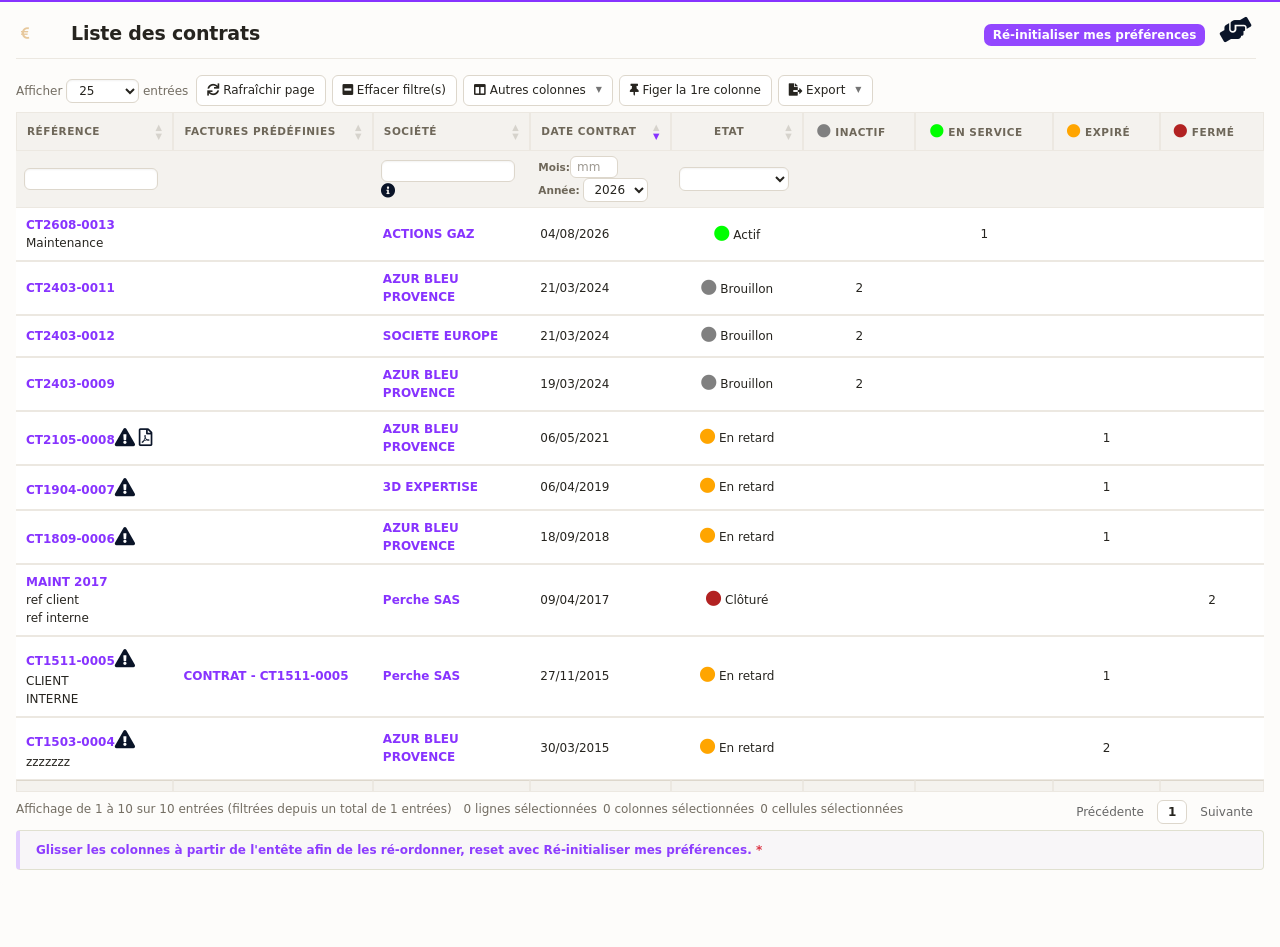
Because the status is derived from the services, it stays right on its own: close the last service and the contract turns to closed; reopen one and it becomes active again. Nothing to tick, nothing to keep up to date.
Nothing to switch on: the status shows up as soon as your DoliPlus is updated, including on the oldest contracts in your database. Not sure what your own installation displays? Get in touch and we will look at it together.
Chasing renewals automatically
Your contracts renew tacitly, and nobody wants to keep that calendar by hand. DoliPlus warns the customer for you — by e-mail, or with a letter to post — the number of days ahead of the service end date that you choose.
Three steps: set it up, try it without sending anything, then switch it on.
1. Set the reminders up
This screen is reserved for administrators. Open the configuration of the Contracts module (Home ▸ Setup ▸ Modules, Contracts row), then the Contract expiry reminders tab.
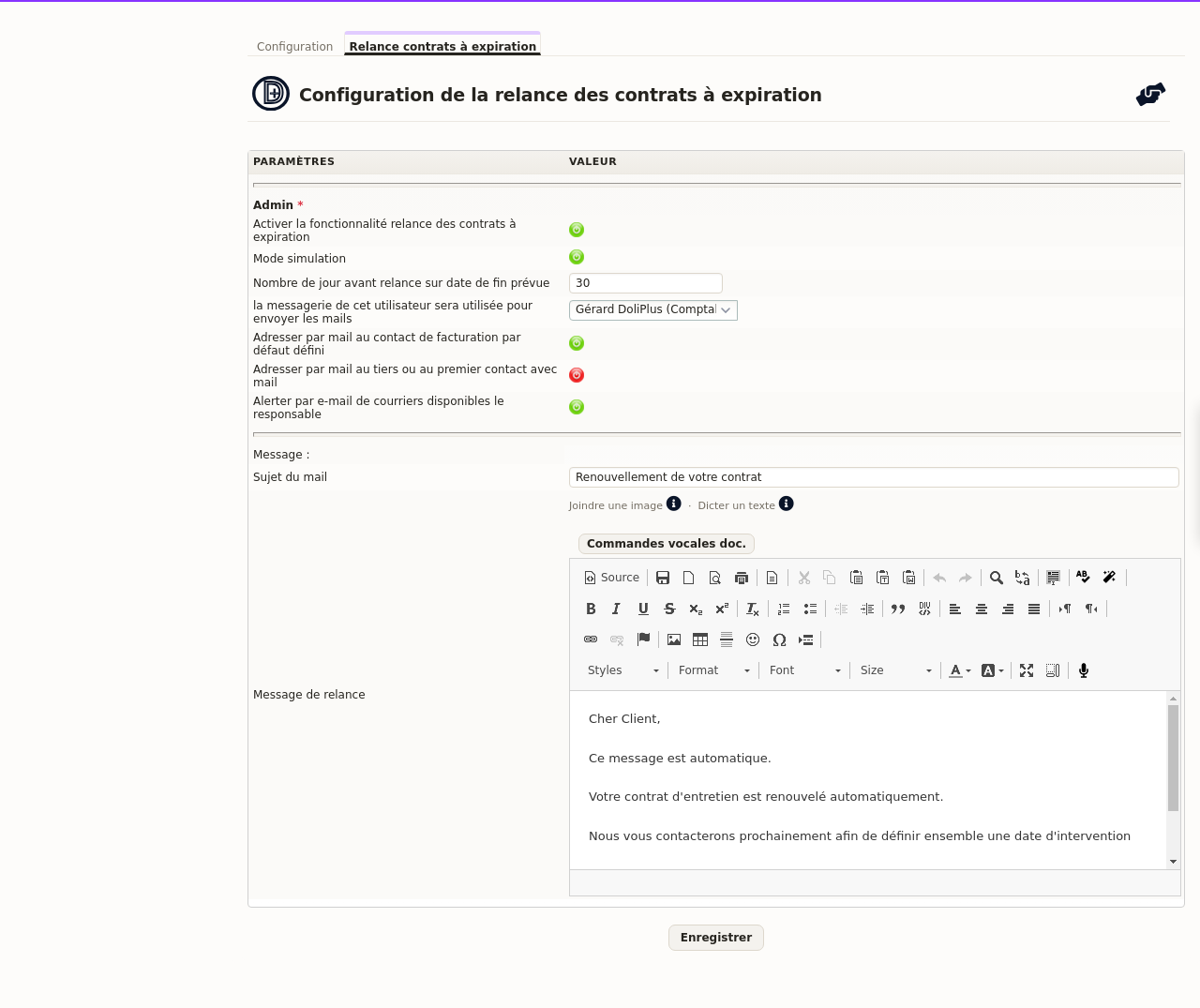
Read it from top to bottom, in the order of the decisions to make:
- Enable the feature — the master switch. While it stays red, no reminder is ever sent.
- Simulation mode — leave it on for your first runs: DoliPlus prepares everything but sends nothing (see step 2).
- Number of days before the reminder — the notice period, counted back from the planned end date of the service. You set it yourself.
- The sender — the user whose mailbox carries the sending; reminders leave from their address, and they are the one warned when letters are waiting to be posted.
- The recipient — two options that exclude each other: either the billing contact set on the customer record, or the company itself, falling back to its first contact with an e-mail address. Turning one on turns the other off automatically.
- Warn the manager — when paper letters are waiting, the sender receives an e-mail about it.
- Subject and message — free text, with the substitution variables listed below.
⚠️ The green and red switches apply on click, but the notice period, the sender, the subject and the message are only kept once you press Save at the bottom of the screen.
2. Try it without sending anything
That is what simulation mode is for, and it is where you should start. It blocks e-mail sending and records no action on the contracts: you see what would have gone out, without a single customer receiving anything.
From the service list, open the Documents tab and click Test reminder. DoliPlus produces the report of the contracts concerned and the PDF of the assembled letters, so you can check the notice period, the recipients picked and the layout of your message in one go.
3. Switch the service on
Settings alone chase nobody: a daily automatic task does the work. On that same Documents page, the Automatic reminder service button arms it. From then on it runs once a day and asks you nothing.
Once you are happy with it, turn simulation mode off — the sending becomes real.
With the feature active, the service list gains a Last reminder column: contract by contract, you know when the customer was last warned.
Personalising the message
A set of substitution variables personalises each message and subject line.

A reminder action is attached to the contract. Furthermore, a report and a daily PDF gathering the assembled letters land in the related document folder, and the manager receives an e-mail whenever postal letters are waiting.
Measuring your subscription portfolio
A subscription portfolio is steered with figures. That is why DoliPlus opens a dedicated statistics page, in the Sales menu, under the « Statistics » entry of the contracts.
There you read, year after year, the number of contracts, their total amount and their average amount. Two monthly charts complete the picture and compare the last three financial years.
The amount of a contract equals the sum of its service lines, excluding tax. In addition, three filters refine the result: the customer, the author of the contract and the account manager. Clicking on a year finally opens the month-by-month detail.
This page is also reachable from the home dashboard, where the « Contracts » label points straight to it.
Documents, equipment and recurring invoicing
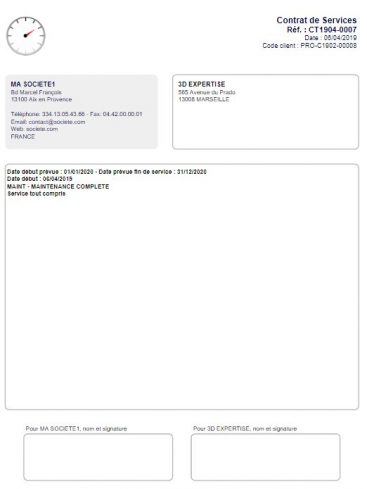
Commercial terms usually live in the quote or in the sales order. However, you can also print a document from the contract itself, either from the standard PDF template or from a customisable « .odt » matrix.
A service contract may serve as the basis of a recurring invoicing model — see Recurring invoicing. It may also be linked to installed equipment — see Interventions and equipment park management.
Used this way, a service contract management software turns a renewal calendar into revenue you actually invoice.
Further reading
- Recurring invoicing — invoice the subscription without thinking about it.
- Interventions and equipment park management — link a service to installed equipment.
- General terms and conditions of sale — add your terms to the printed contract.
