 on 2 September 2026
 VAT rate setup: the right rate on every invoice, without thinking about it
VAT rate setup starts long before the return: it plays out on every invoice line, at the moment DoliPlus picks a rate. Here is what you settle once and for all:
- your VAT rates, country by country, with their accounting codes;
- the local taxes, on two levels, for the territories that apply them;
- the moment VAT falls due: on invoice, or on payment;
- the automatic rule that puts 0 % on a cross-border sale between businesses.
The right rate therefore lands on its own, on the quotation as on the invoice. You no longer wonder, line after line, whether this one should carry VAT.
DoliPlus is the enhanced cloud edition of Dolibarr, and this setup lives in its core.
How DoliPlus picks the VAT rate of a line
Before any setup, you need to know the rule applied by default. It reads in order, and the first case met wins:
- your company is not liable for VAT: the rate is 0 %;
- seller and buyer sit in the same country: the rate is the one of the product sold;
- both sit in the European Union and the goods are a new means of transport (car, boat, aircraft): 0 %, because the buyer pays the tax in their own country;
- both sit in the European Union and the buyer is a private individual: the product rate applies;
- both sit in the European Union and the buyer is a business: 0 %;
- in every other case: 0 %.
Adding or editing a VAT rate
The whole VAT rate setup rests on a dictionary of rates, which you open with an administrator account: Home → Setup → Dictionaries → VAT or sales tax rates.
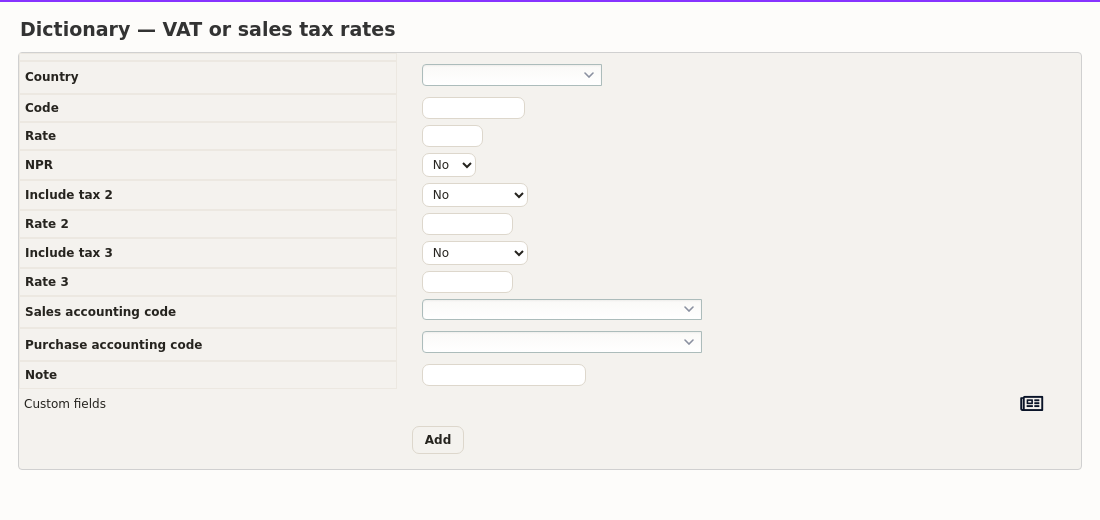
An entry form sits above the list of existing rates. There you fill in:
- the country concerned;
- the code: leave it empty, unless a local tax shares the same reference rate;
- the rate itself;
- the accounting codes for purchases and sales, which your accounting export needs;
- a note, so you can recall later why this rate exists.
The button at the end of the row adds the rate. Moreover, the NPR column marks recoverable non-collected VAT, applied in French overseas departments among others.
The case of local taxes
Some territories add one or two taxes on top of the main rate — Canada, for instance, applies GST together with QST. DoliPlus therefore handles two levels of local tax beyond the reference rate.
The entry uses the same fields, plus the type and the rate of each local tax. The code then becomes mandatory: it is what tells apart two rows sharing the same reference rate. Write it in capitals, without spaces — for example GST/QST.
The type describes what the local tax hits:
- 1: goods and services;
- 2: goods and services, VAT included on the discount;
- 3: goods only;
- 4: goods only, VAT included on the discount;
- 5: services only;
- 6: services only, VAT included on the discount.
Choosing your scheme: on invoice or on payment
A business liable for VAT collects the tax from its customers, then pays it over. What remains is knowing when it falls due. Two schemes exist, and that choice depends on your tax situation.
VAT on invoice (on debits) falls due when the goods are delivered, that is when ownership passes. In practice, the invoice date applies.
VAT on payment (on receipts), by contrast, is only due once the invoice is settled. A service involves no physical delivery: its tax therefore naturally follows the payment.
The gap matters for your cash. Indeed, on invoice, you may pay over tax your customer has not yet paid you. On payment, you only pay it over once you have been settled — a real comfort for a service business. That is why this setting weighs as much, in your VAT rate setup, as the rates themselves.
Where the scheme is set in DoliPlus
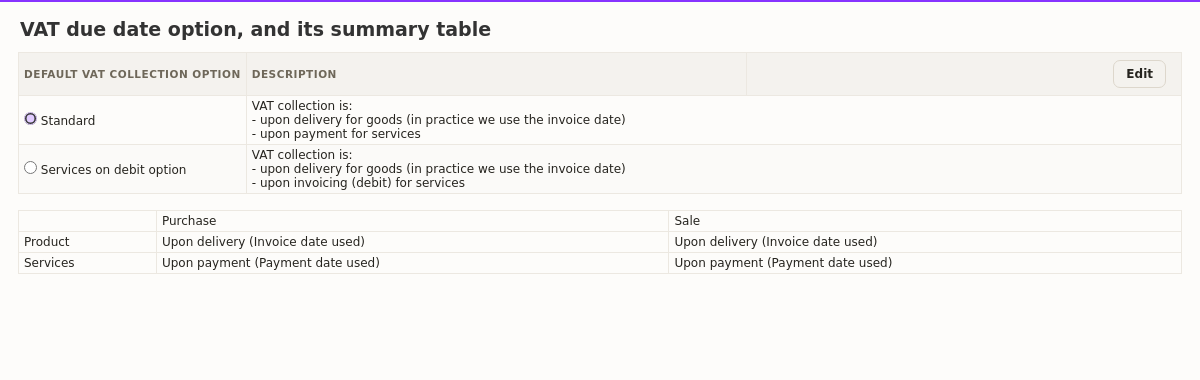
Open the settings of the Taxes, social contributions and dividends module. Two options appear:
- Standard: VAT falls due on delivery for goods, and on payment for services;
- Services on debit option: it falls due on invoicing, services included.
A summary table then shows, on purchases as on sales, the moment retained for goods and for services. Check it after any change: it governs your VAT statements.
VAT rate setup day to day: track, check, declare
Once your rates are in place, the work continues by itself:
- the report by third party details collected and deductible tax, customer by customer — see the chapter;
- e-reporting files your cross-border transactions, the very ones that come out at 0 % — see the chapter;
- the accounting codes entered on each rate feed your journals and your accounting export — see the chapter;
- finally, the rounding rule explains the one-cent gap you sometimes notice between two calculations — see the chapter.
Going further
- Gross total calculation and VAT rounding
- The VAT report by third party
- E-reporting for your cross-border transactions
- Exporting your accounting entries
Related Entrées
