 on 7 July 2026
 Automated payment reminders for unpaid invoices
Automated payment reminders: stop chasing unpaid invoices by hand
DoliPlus includes automated payment reminders that chase your unpaid customer invoices for you:
- reminders by email and by post, following a protocol of up to 4 escalation levels;
- a “Recipient” column showing, invoice by invoice, the address each reminder will actually use;
- ready-made reminder letter templates, fully customisable with substitution variables;
- overdue invoices grouped per customer and per reminder level;
- copies sent to the account manager, plus a complete reminder history;
- exclusions by customer category or by payment method.
Consequently, you protect your cash flow without spending hours chasing late payers. DoliPlus is the enhanced cloud edition of Dolibarr, the open-source ERP & CRM used across Europe.
Chasing unpaid invoices is essential. Indeed, it prevents cash-flow tension and late payments. That is why you should make it systematic.
You customise the letter templates with substitution variables. Then DoliPlus sends the reminder as soon as the payment deadline has passed.
For example, you access the configuration from the accounting module settings.
As for the summary table of reminded invoices, you find it here: Sales menu -> Customer invoices -> Overdue invoice reminders.
Here is a view of the reminder table in your ERP.
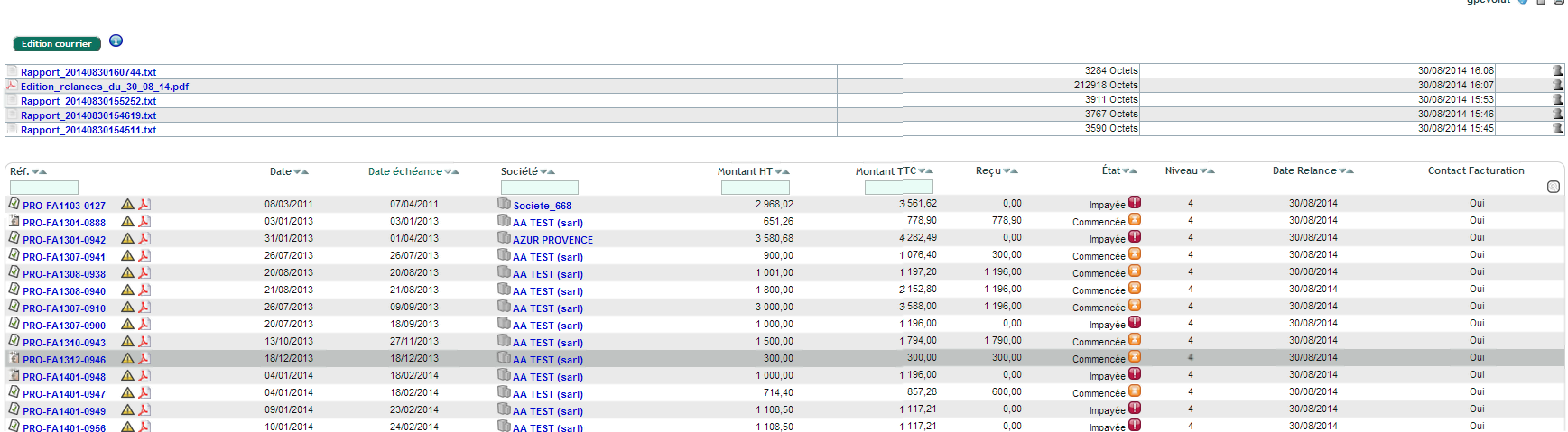
How automated payment reminders work in your ERP
DoliPlus chases the customer invoices that are overdue. To do so, it follows a series of predefined letters.
Thus, the system manages up to 4 reminder levels.
First, you have two operating modes:
- Automatic mode: your DoliPlus support team sets up a background task, on request, to run at a defined frequency (for example every day or every week).
- Manual mode: you launch the reminders through a button on the interface. However, only postal reminders work in this mode.
Furthermore, a customer may have several invoices under reminder. In that case, DoliPlus groups the invoices by level. Then it sends one reminder for each reminder level.
The administration console of the reminder module
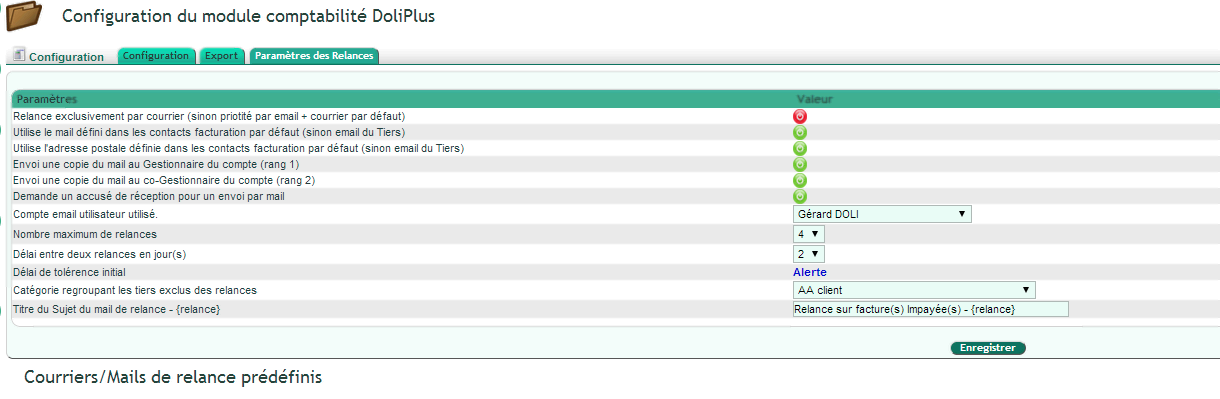
The administration console of the accounting module lets you set the different options. To do so, go to Configuration / “Overdue invoice reminders” tab.
First, a general option defines the address used for the reminders. Thus, you choose either the email or postal address of the third-party card, or the one of a default contact.
Consequently, you should assign default contacts on each customer. Indeed, this specifies the postal or email address of the contact to remind. Moreover, it proves especially useful when a customer uses a billing centre different from the third-party card.
In practice, here is how to proceed.
First, to designate a contact of company A whose address matches the billing address, select the type “Customer invoicing contact”.
Then, to designate a contact in charge of payment follow-up, select the type “Customer contact in charge of payments”.
Please note:
- If a third party only has a contact of the type “Customer invoicing contact”, then DoliPlus uses that postal (and/or email) address.
- However, if a third party has both types of contact, then the system keeps the email address of the “Customer contact in charge of payments”.
- Initial tolerance period: this delay before an invoice counts as overdue is defined in the administration console, for all customers.
- Delay between two reminders, in days: afterwards, the reminders follow each other according to this delay, also set in the administration console.
- Maximum number of reminders: you can reduce this number.
- Finally, the PDF invoice is mandatory in the document folder of the customer invoice. Indeed, the module does not regenerate it.
Therefore, check the invoices with the “Payment started” status, because DoliPlus reminds them too.
Reminders by email
First of all, you can automate this process 100%.
Moreover, the automated payment reminders can send a copy to the manager or co-manager of the customer account.
In addition, the system always attaches a copy of the invoice to the message.
Finally, if no email address is found, then the postal reminder applies by default.
Where does DoliPlus find the email address for the reminders?
This is the most frequent question. So here is, precisely, where DoliPlus looks for the recipient email address before each reminder.
First, you choose the strategy in the administration console of the accounting module (“Overdue invoice reminders” tab). Thus, two modes exist:
- “Invoice contact” mode: DoliPlus starts from the invoicing contact attached to each invoice, then applies the cascade below.
- “Default contact” mode: DoliPlus starts from the default invoicing contact defined on the customer card, then applies the same cascade.
Then, in both cases, DoliPlus follows a strict order of priority. In other words, it stops as soon as it finds a valid email address:
- The invoicing contact of the invoice — that is, the “Customer invoicing contact” attached directly to the reminded invoice. For example, an invoice addressed to a specific department.
- The default invoicing contact of the customer — the “Customer invoicing contact” (or “Customer contact in charge of payments”) designated by default on the third-party card. This is particularly useful when the customer has a separate billing centre.
- The email address of the customer card — in other words, the email entered directly on the third-party card.
- The first contact of the customer with an email address — as a last resort, DoliPlus keeps the first active contact of the third party that has an address filled in.
Furthermore, when a customer has both an “invoicing” contact and a contact “in charge of payments”, DoliPlus favours the address of the latter.
Finally, if none of these sources provides an email, the reminder automatically switches to postal mail. In addition, you can send a copy of each reminder to the manager and co-manager of the customer account.
See where each reminder will be sent, before sending it
Until now, this cascade was a rule you had to know. From now on, it is simply displayed.
Indeed, a “Recipient” column appears in the reminder list. Therefore, you read the address DoliPlus will use for each invoice, without opening a single customer card.
Concretely, the column shows one of three results:
- An email address: the reminder will be sent by email, to that exact address.
- “Letter”: no email address was found, so the reminder will go out by post.
- “No recipient”, in red: neither an email nor a usable postal address. Consequently, this invoice is skipped.
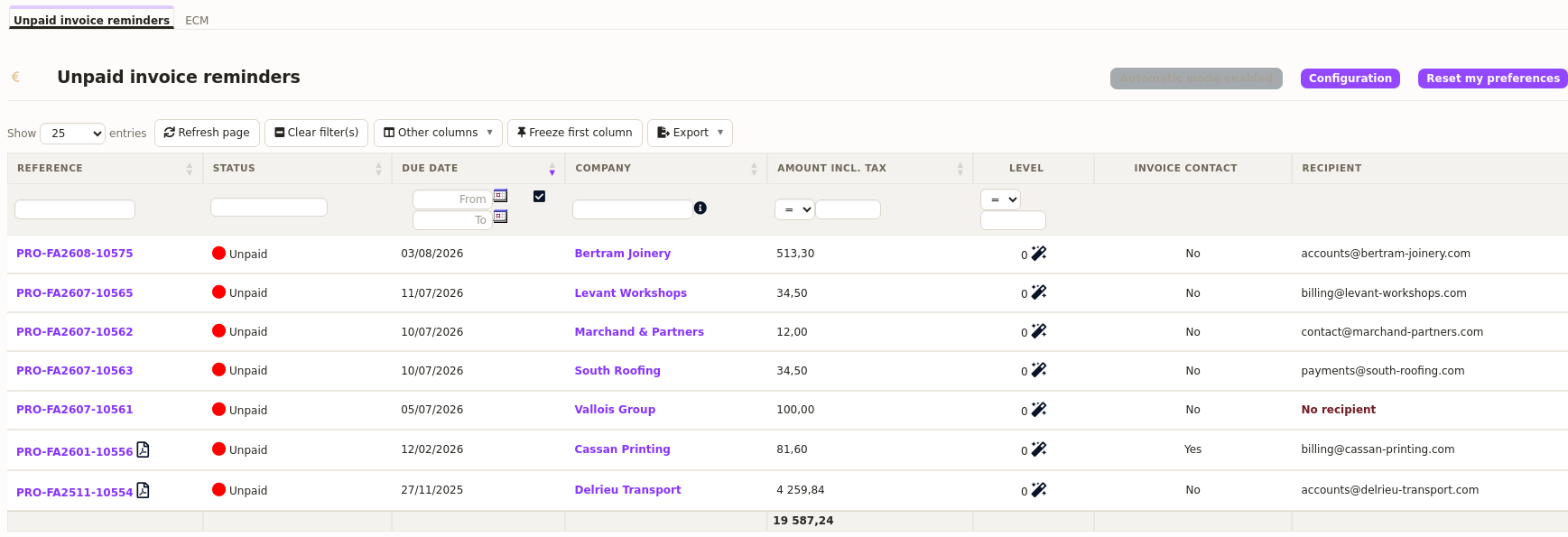
Moreover, the origin of the address stays available: hover over the cell, and DoliPlus tells you where it comes from. Thus you know whether it is the invoice contact, the customer’s default contact, the third-party email or the first contact found.
This matters, because the same address may come from several sources. In other words, you check not only where the reminder goes, but also why.
The column follows your own setup. Indeed, if you change strategy in the administration console, then the display changes accordingly: what you read always matches what will actually be sent.
Finally, the same column equips the preventive reminder list. Therefore, you check your pre-due reminders with exactly the same reflex.
Switch your reminders on without sending anything by mistake
The worry is legitimate: nobody wants to discover that a clumsy letter went out to 200 customers. Therefore, DoliPlus lets you rehearse everything, then go live once you feel confident.
1. The settings to fill in before the first rehearsal
First, open the accounting module configuration, tab “Unpaid invoice reminders”. Then fill in these four points, because they drive everything else:
- The sending account — the user email account used to send reminders. Indeed, without it, no message can go out.
- The maximum number of reminders — beyond it, DoliPlus stops chasing the invoice. For example, three levels are often enough before handing over to debt collection.
- The delay between two reminders, in days. Thus you avoid writing twice in the same week to the same customer.
- The address strategy described above: invoice contact, customer default contact, or postal mail only.
Moreover, two settings save you commercial blunders. On one hand, a category of excluded third parties keeps your sensitive accounts out of reach. On the other hand, you exclude some payment methods, notably direct debit, since the money arrives anyway.
2. Test mode: see what would go out, without anything going out
Then, tick “Test mode for fine-tuning letters”. Concretely, this mode changes three things:
- no email leaves your server: everything switches to letter output, so no customer receives anything;
- the batch is capped at ten invoices, which is plenty to judge the result;
- nothing is recorded: reminder levels do not move forward, and dates stay put.
Therefore, you can rerun the rehearsal as often as needed. In other words, you fix a word, run it again, read it again — without ever damaging your data or disturbing a customer.
Concretely, launch the reminder from the unpaid invoice list. DoliPlus then produces the PDF of every letter, plus a detailed report explaining, invoice by invoice, the address retained and the reason for any exclusion.
3. Check the recipients, then go live
Before unticking test mode, go back to the list and scan the “Recipient” column. Indeed, this is the moment to complete the customer records shown in red, because those invoices would go nowhere.
Then untick test mode. From then on, reminders really go out — by email when an address exists, and by post otherwise.
Finally, a button starts the automatic service. From that point, DoliPlus handles your unpaid invoices every day, with no action from you. However, you keep control: the manual launch button stays available while the automatic service is stopped.
Reminders by post
For paper reminders, DoliPlus generates a merged PDF. Thus, it gathers all the reminder letters and the related invoices, dated the same day, on the interface.
Then you carry out the postal reminders. To do so, you simply print the whole batch and put the letters in envelopes.
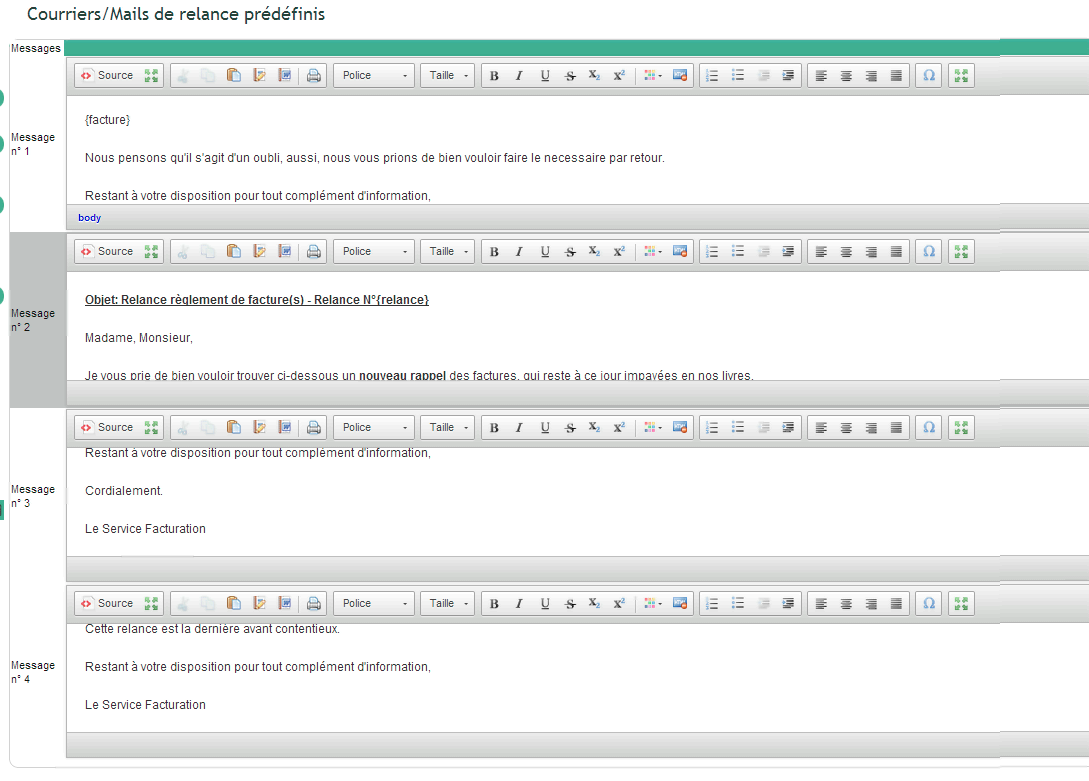
Substitution variables
DoliPlus uses two types of variables:
- {relance}: this variable contains the reminder number.
- {facture}: this variable contains a set of lines. They correspond to the unpaid invoices, with detailed information.
Here is, for example, a concrete application.
Subject: Reminder on unpaid invoice(s) – {relance}
Object: Payment reminder for invoice(s)
Dear Sir or Madam,
Please find below a reminder of the invoices that remain unpaid in our books to date.
{facture}
We believe this is an oversight. Therefore, we kindly ask you to settle the matter by return.
Finally, we remain at your disposal for any further information.
Yours faithfully,
The Invoicing Department
Excluding third-party accounts
Do you want to exclude some third parties from the automatic reminders? Proceed as follows.
First, create a category. Then assign these third parties to that category. Finally, designate it in the administration console of the accounting module.
Excluding payment methods
Likewise, you can exclude the direct debit payment method. To do so, simply specify its exclusion.
Substitution variables used in the letters
First, a test mode remains available in the configuration, in order to fine-tune the letters. In practice, only the postal mode is enabled, limited to one sending, without any status recording.
Then, to customise the predefined letters and the email subjects, you use the following substitution variables:
{facture} = the list of invoices, with the amount including tax and the payment deadline. Always place it on its own line, because this field may group several invoices.
{relance} = the reminder level (1, 2…).
Furthermore, the $ symbol may precede the variables, for compatibility with other DoliPlus variable conventions.
Please note:
On the one hand, the program records every reminder action. Thus, you consult the history at any time on the interface.
On the other hand, a text report, dated the same day, summarises the actions. You can also consult it whenever you wish.
Here, finally, is a preview of the result in the interface.
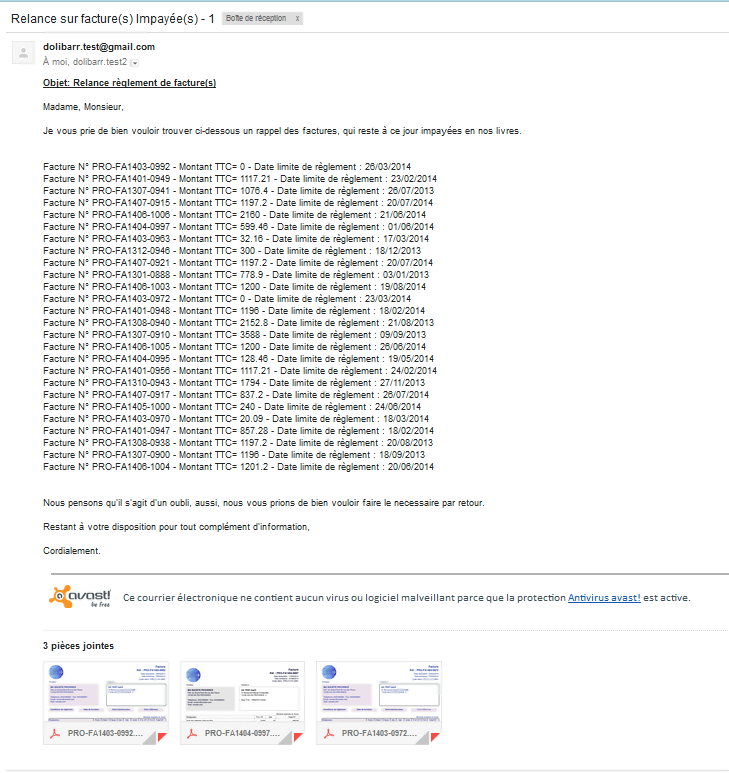
Example of a reminder letter for unpaid invoices
Here is, for example, a reminder letter generated by DoliPlus.
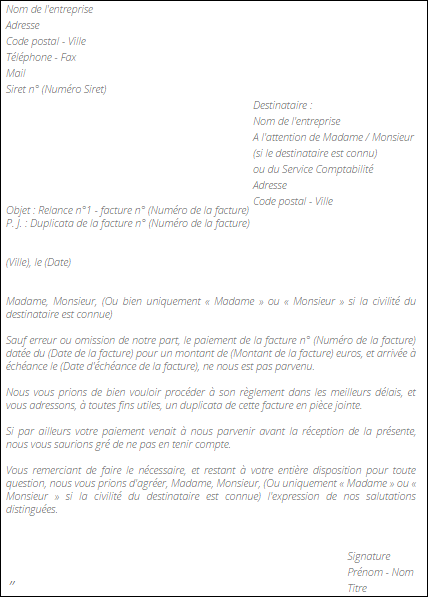
Manual reminders for unpaid customer invoices
To go further, see the chapter Manual reminders for unpaid customer invoices.
Preventive invoice reminders
Finally, see the chapter Preventive invoice reminders.
To go further, read the definition of debt collection on Wikipedia.
Related Entrées
