 on 21 August 2026
 Automated Direct Debit Collection with Stancer
Automated direct debit collection with Stancer now takes your recurring invoices in on its own, with no bank file to upload anywhere:
- your existing mandates carried over as they stand, with no new signature from your customers ;
- one slip per collection mode, so nothing ever mixes with your bank deposit ;
- the collection triggered by a single button, from the slip you already know ;
- the payment recorded on its own: invoice settled, bank entry created ;
- a card payment link inside your invoice emails ;
- Stancer, a French provider with a solidarity model, free for non-profits.
In other words, the monthly chore of uploading a file to your bank’s website disappears. Therefore your subscriptions come in by themselves, and your accounts stay up to date.
DoliPlus is the enhanced cloud edition of Dolibarr.
Automated direct debit collection: who is it for, and why?
Every month, the same ritual comes back. First you prepare the direct debit file, then you upload it to your bank’s website, and finally you tick off the returns a few days later.
With Stancer, that round trip disappears. Indeed, your software talks straight to the payment provider, with no file in between.
Moreover, Stancer is a French provider with a solidarity model. As a result, the service stays free for non-profits, and your customers’ bank details are never stored inside your software.
Your existing mandates carried over, with no new signature
This is usually the question that blocks everything: do you have to get every customer to sign again? The answer is no.
DoliPlus indeed carries the existing mandate over, with its reference and its original signature date. A mandate signed in 2013 therefore remains a 2013 mandate, and your customer receives absolutely nothing to sign.
Consequently, the switch is invisible to them. You simply change the way the money is called in, never their agreement.
One slip per collection mode, nothing mixed
You pick the collection mode customer by customer: your usual bank deposit, Stancer, or another provider. A dedicated column shows it on your list of mandates.
Then, when you issue your direct debits, DoliPlus creates a separate slip for each mode. Each slip therefore carries its own amount, its own reference and its own collection button.
That separation changes everything day to day. Indeed, the total you read on screen matches exactly what goes out, and you always know which amount is waiting on which channel.
To go further on this mechanism, see our chapter on SEPA direct debit.
Payments settle themselves, every day
A direct debit never lands the very second you launch it. Your customer’s bank indeed has a few days to execute it.
DoliPlus therefore watches every operation on your behalf, once a day. As soon as a collection succeeds, the invoice turns to paid, the payment is created and the bank entry appears on the right account.
In the same way, a rejection surfaces on its own in your usual overdue follow-up. In other words, you no longer tick anything off by hand.
No risk of collecting twice
This is the legitimate fear as soon as two collection channels are in play. DoliPlus therefore deals with it at the root.
An invoice already sent inside a file deposited at your bank indeed becomes impossible to collect a second time online. The software rules it out automatically, even if you change that customer’s collection mode later on.
As a result, an invoice always follows a single path: your bank or the provider, never both.
A card payment link inside your emails
Direct debit does not suit everyone. For occasional customers, each invoice email can therefore carry a card payment link.
Moreover, DoliPlus works out the right amount at the moment of the click. If a deposit has already been paid, the page only offers the balance, and a settled invoice can no longer be paid.
Switching on automated direct debit collection
Automated direct debit collection with Stancer is switched on for you on request: tell us you want to collect by card or by direct debit, and we open it on your installation.
Then, getting started takes three moves. First, open your Stancer account and copy your connection key across. Next, state the bank account your collections land on. Finally, switch on the daily check that settles your invoices.
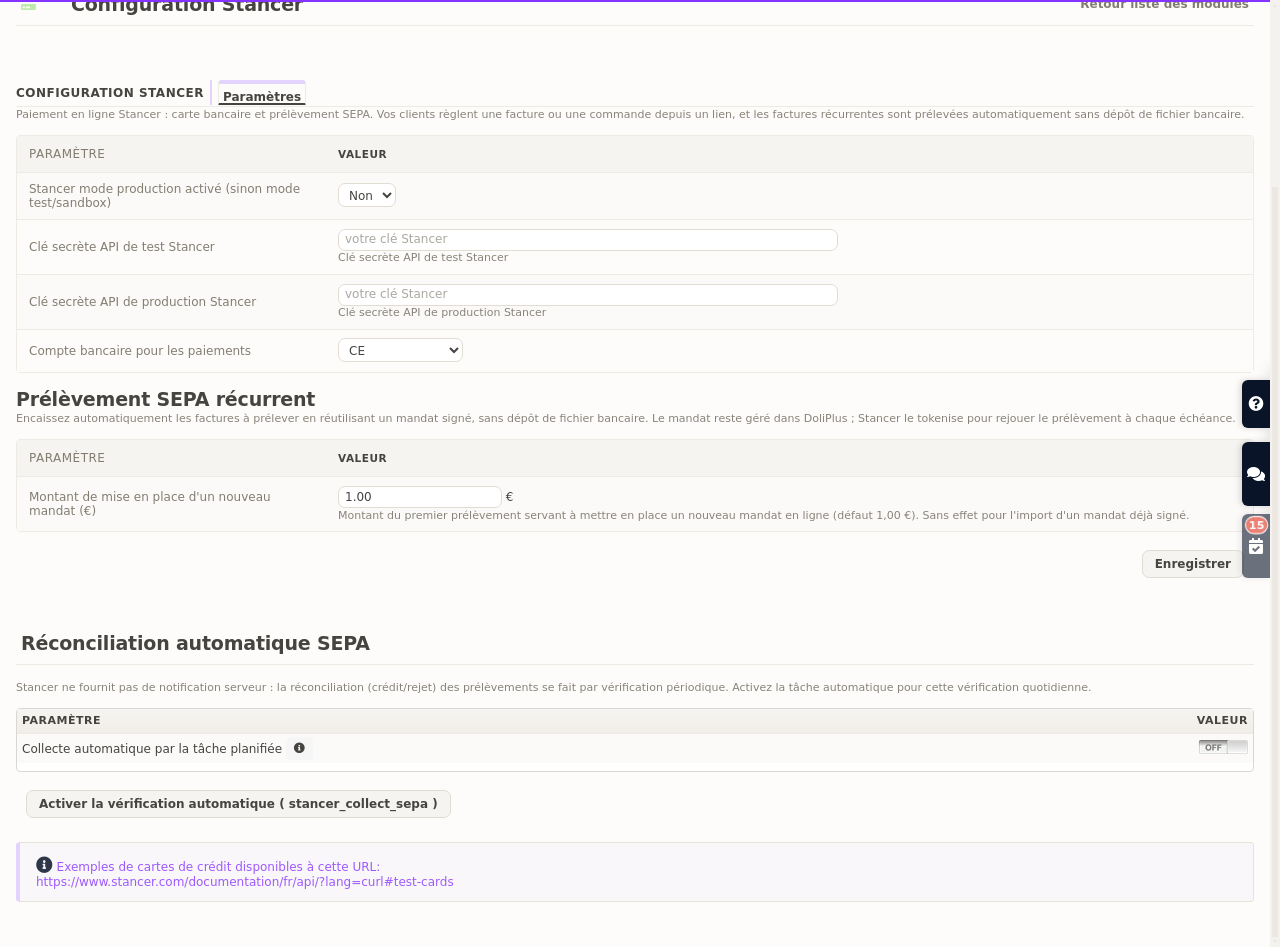
A test mode moreover comes with the whole setup. Therefore you validate a first payment end to end before collecting a single real euro.
Going further
- Online invoice payment in DoliPlus — the overall picture of collecting online.
- SEPA direct debit — how direct debit slips work.
- Editing the SEPA mandate — getting your customer’s written agreement.
- Automated bank statement import — reconciling your collections without retyping.
Still collecting your subscriptions through a bank file? Let’s talk: we switch automated direct debit collection on for your DoliPlus, and you collect from the very next due date.
Related Entrées
