 on 21 August 2026
 Prepaid training hours: your credits stay yours until you use them
Your prepaid training hours follow your DoliPlus contract for as long as it runs, and you stay in full control:
- a live balance in hours, available whenever you want to check it;
- every session dated, with the topic actually covered;
- each purchase linked to its invoice, one click away;
- time counted in quarter hours, never in whole sessions;
- a quote or an appointment requested in one click, from that same screen;
- hours that stay yours, with no expiry date.
In other words, you buy hours when it suits you, then you spend them at your own pace. Therefore, training follows the life of your business instead of constraining it.
DoliPlus is the enhanced cloud edition of Dolibarr, so these training hours cover both the standard features and the DoliPlus additions.
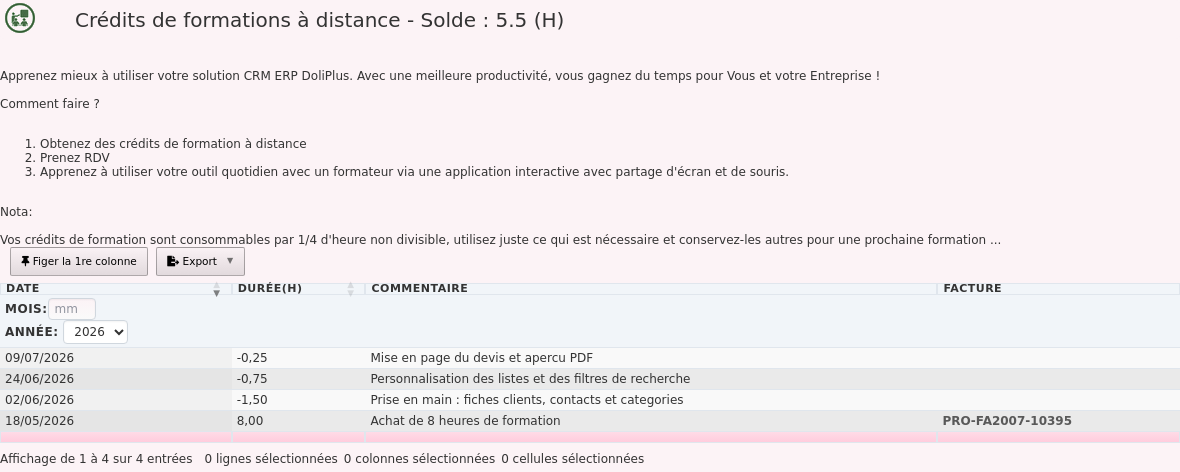
Your prepaid training hours, always up to date
A dedicated tab in DoliPlus shows your training account. At the top of the screen, the balance appears straight away, expressed in hours.
That balance recalculates on its own. Indeed, DoliPlus adds up your purchases and subtracts each session you use. Therefore, you keep no spreadsheet on your side.
The screen stays read-only. So you check your hours with complete confidence, without any risk of changing something.
Prepaid training hours that stay yours
Here is the point that reassures most of our customers: your hours carry no expiry date. They remain available for as long as your DoliPlus contract stays active.
This rule changes how you buy. First, you can take a comfortable volume without racing against a deadline. Then, you spread it over several months, according to your real needs.
For example, a balance opened in spring may well train a new recruit in the autumn. Moreover, a busy period costs you nothing: your hours simply wait for you.
Every session leaves a written record
The table shows the full history of your account, line by line. Each line carries its date, its duration and a comment describing the topic covered.
Thanks to this history, you easily find what was covered, and when. Moreover, each purchase points straight to the matching invoice: one click opens it.
This traceability serves the manager as much as the internal key user. Indeed, both see at a glance which topics are already covered.
You only spend what you actually need
Hours are counted in quarter hours, never as whole sessions. In other words, a question settled in ten minutes costs you a quarter of an hour, not a full one.
This flexibility allows very short formats. For example, getting to grips with a new feature sometimes takes twenty minutes, and the rest of your balance stays untouched.
How a remote training session works
The principle stays simple. First, you agree on an appointment with a trainer who knows DoliPlus inside out.
Then, the session runs with screen and mouse sharing. So you follow the explanations live, and you work on your own data yourself.
Finally, audio goes through the sharing tool or over the phone, as you prefer. This format avoids travel entirely and suits two or three people particularly well.
No syllabus is imposed. However, you announce the topic you care about, and the trainer builds the session around it.
The most frequent needs remain the same: discovering the software, training a new colleague, switching on a module, or going deeper on one precise point.
Request hours or an appointment in one click
Two buttons sit at the top of the screen, right above your prepaid training hours. Therefore you need no address to look up and no form to fill in.
- Get a quote for training credits — to add hours to your account;
- Appointment request — to book your next session.
Each one opens a message already drafted and already addressed to our training team. So you simply state what you need, then send.

Going further
- How to request support from inside your application
- After-sales service and customer support with DoliPlus
- Report an issue from your mobile and follow its resolution
