 on 26 August 2026
 Best selling products report: your team sees the winners while they type
A best selling products report answers a question your sales people ask every day: of the hundreds of references in the catalogue, which ones actually sell? DoliPlus answers it twice — once as a ranking you read, once as a colour your team sees while typing a quote. DoliPlus is the enhanced cloud edition of Dolibarr.
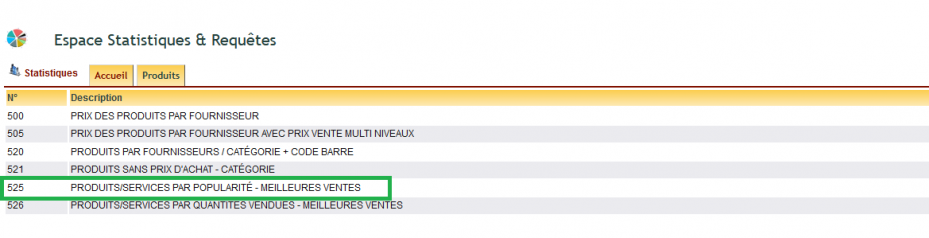
- Statistic 525 — Products/services by popularity: best sellers, over the period of your choice.
- Popularity at selection time — a colour code on the products that sell best across your full sales history, shown as you pick a line in a quote or an order.
The ranking: statistic 525
Statistic 525 ranks your references over a period you set. You therefore see what carried the last quarter, not what carried the last five years — which is what you need before a season, a catalogue refresh or a purchasing decision.
The colour code: popularity where the decision is made
How it works
A report only helps the person who opens it. That is why the ranking also travels to the moment of the sale: when your colleague picks a product in a quote or an order, a colour code shows how popular that product is. Hovering over the colour spells the tier out.
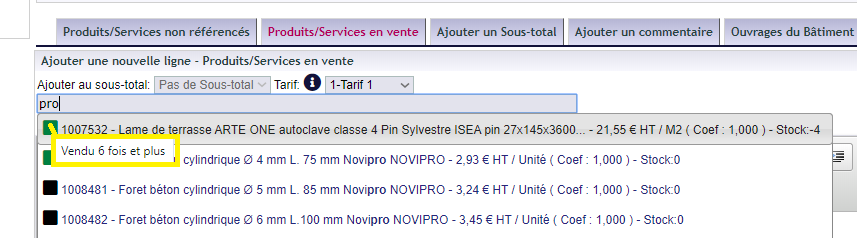
Two calculation modes drive that colour:
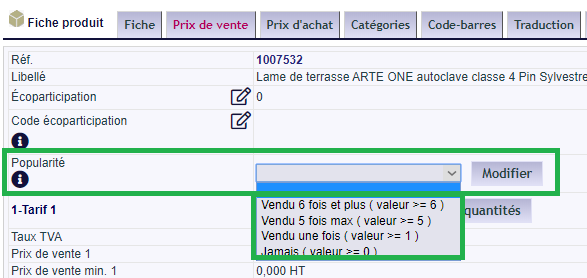
- A value you force, on the product or service record: this is how you promote favourites — a new range, a high-margin item, a product you need to clear — regardless of past sales.
- A value DoliPlus computes from your invoices and your complete sales history.
Setting it up
- Switch on feature PG75 in PDF and interface parameters: « Show best selling and popular products ».
- Then adjust the values of the dictionary « Nomenclature of best selling and popular products ».
The first value (Val) is 0; the following ones set the tiers of the ranking. In other words, you decide yourself where « sells well » begins for your trade.

Import or bulk update
In the Excel sheet, fill the FAVORI column:
| FAVORI | Sales favourite — popular product → enter the code from the dictionary « Nomenclature of best selling and popular products » |
You can therefore set hundreds of products in one pass, instead of opening each record.
Why follow your best sellers
Concentrating your commercial effort on the best sellers follows the Pareto principle: a minority of references generates most of the turnover. By spotting popular products at a glance, your teams steer the customer towards the items that are both the most profitable and the most available.
Read more
Related Entrées
