 on 5 September 2026
 Product and service catalogue: items ready to sell, no re-keying
The DoliPlus product and service catalogue keeps your items ready to sell, from quote to invoice:
- each item carries two separate statuses, one for sales and one for purchasing;
- you clone a record to create a close variant without re-keying everything;
- you add the item to a quote, an order or an invoice straight from its record;
- you sell a bundle as a single item thanks to composite products;
- your records can be translated, and your price history stays clean.
As a result, you control sales, purchases and stock from a single place, with no double entry. DoliPlus is the enhanced cloud edition of Dolibarr.
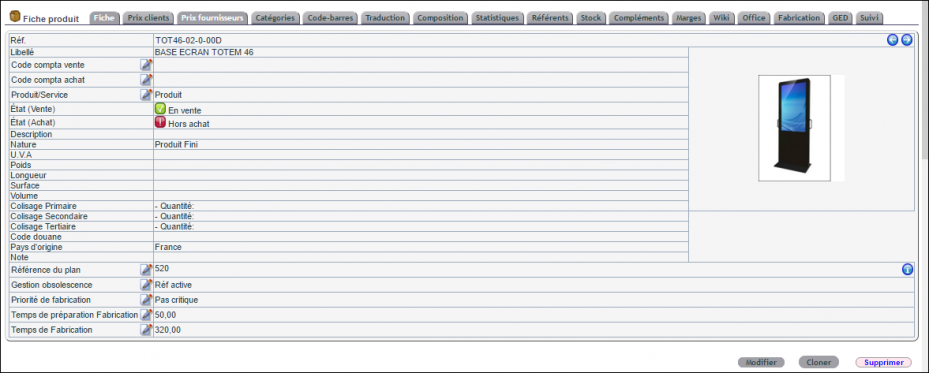
Products vs services: what’s the difference?
DoliPlus clearly separates both catalogues:
- a product is a physical item, managed in stock where relevant;
- a service is intangible, for example consultancy; by default it is not stock-managed, but an option lets you track service stock too;
- in both cases, the item can be sold, purchased or given away.
Set up the catalogue once and for all
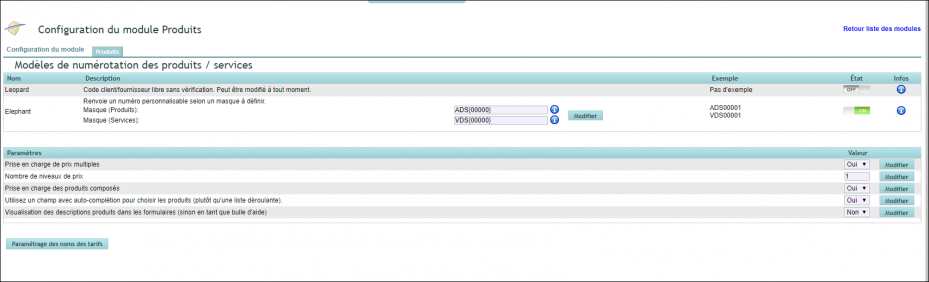
References in the format you choose
By default, you enter each item’s reference freely.
To standardise your references, your administrator instead selects the “Elephant” numbering model, under “Numbering templates for products / services” in the Products module configuration. You then define a mask, for example PREFIX{0000}, where the zeros set the number of counter digits.
Comfortable forms
In addition, the administrator sets two general options in the same configuration, valid for every user:
- “Use a field with auto-completion to select products”: you type a few letters instead of scrolling a long list;
- “Display product descriptions in forms”: the description appears in full rather than as a tooltip.
Create an item: type, statuses, price
The item type
The “Type” field specifies the kind of product. It offers four basic values: Finished Product, Raw Material, Semi-Finished Product and Packaging.
Moreover, the list grows to seven values when the rental or manufacturing modules are active. In practice, finished products are for sale, while semi-finished products and packaging serve as components.
Two statuses: sales and purchasing
Each item carries two independent statuses:
- the sales status: “For sale” or “Not for sale”;
- the purchasing status: “Purchasing” or “Not for purchase”.
For example, an end-of-line item switches to “Not for purchase” while staying “For sale” to clear the stock.
Price and VAT
Most installations use several price levels. In that case, you do not enter the price at creation: you set it afterwards on the “Selling price” tab, with the “Change standard price” button.
Furthermore, the item’s VAT automatically takes your company’s rate. So there is nothing to choose for an everyday item.
Save time every day
Clone a record: create a close variant without re-keying
On an item’s record, click “Clone”. Then enter the new item’s reference in the “Clone product/service” window and confirm.
The copy takes over the original’s information and prices. You then only adjust what differs, for example a colour or a capacity.
Add the item to a quote, an order or an invoice
At the bottom of a “For sale” item’s record, DoliPlus lists your draft documents: “Add to my quotes”, “Add to my orders”, “Add to my invoices”. Depending on your rights, the “Add to other…” blocks also give access to your colleagues’ drafts.
Choose the document, enter the quantity and any discount, then click “Add”. This way, you complete a quote without leaving the product record.
Composite products: sell a bundle as a single item
A composite product is a “parent” product that groups several other products. It defines bundles or kits: you work with one item instead of the many products it contains.
Build a kit, step by step
First, the administrator enables the “Composite product support” option in the Products module configuration. A “Composition” tab then appears on each record. Next:
- open the parent product’s record, then its “Composition” tab;
- click “Compose”;
- search for components by keyword or by category;
- tick the “Add/Remove” column and enter the quantity of each component;
- finally, click “Add/Edit”.
What the kit changes in your documents and stock
When added to a document, only the parent product line appears. Meanwhile, component stock levels change automatically with the composite product.
For example, approving a supplier order for a composite product also increases the stock of all its components. Moreover, a composite product can itself contain other composite products.
Note, however, that this is not a manufacturing feature. Indeed, components are only deducted when the parent product is consumed. They therefore remain available on their own, which is not the case in production.
Organise your product and service catalogue
Several methods help you classify your items.
Product categories
First, you can group your items by category. See the Category management chapter.
Custom fields
Next, you enrich your records with your own fields. For this, see the Custom form fields chapter.
Pricing, photos and barcodes
The product and service catalogue comes with many further features:
- sales and purchase price management;
- photos attached to each item;
- sales and purchase units;
- primary, secondary and tertiary packaging;
- barcode management;
- product variations;
- eco-participation and eco-contributions.
Keep a clean price history
A supplier purchase price no longer applies? On the “Purchase price” tab, click the bin icon on the relevant line.
Likewise, the “Selling price” tab lists your price history under the heading “Selling prices effective from”. A bin icon removes an old line entered by mistake. The current price, however, stays protected: it cannot be deleted.
Selling abroad: a multilingual catalogue
Your product and service catalogue can also be translated. Each record includes a Translation tab where you enter the label, description and note in as many languages as needed.
Then, whenever a quote or invoice goes out in a customer’s language, DoliPlus automatically uses these texts. With the AI module enabled, the “Translate with AI” button even fills in the fields for you, in one click.
You can also correct a wrong translation before it reaches the customer: on the Translation tab, the “Delete translation” icon removes that language, after confirmation.
Translate your product catalogue in one clickBulk operations
To act on dozens of items at once, first group them in a category. Then, from that category’s management tab, an administrator can:
- change the sales status or the purchasing status of all its items in one go;
- permanently delete the unused items.
Rest assured: an item used on a quote, an order or an invoice stays in place, because DoliPlus checks every dependency. The full step-by-step guide is in the chapter Delete products in bulk.
Queries and statistics
Finally, DoliPlus offers many statistical reports on your catalogue.
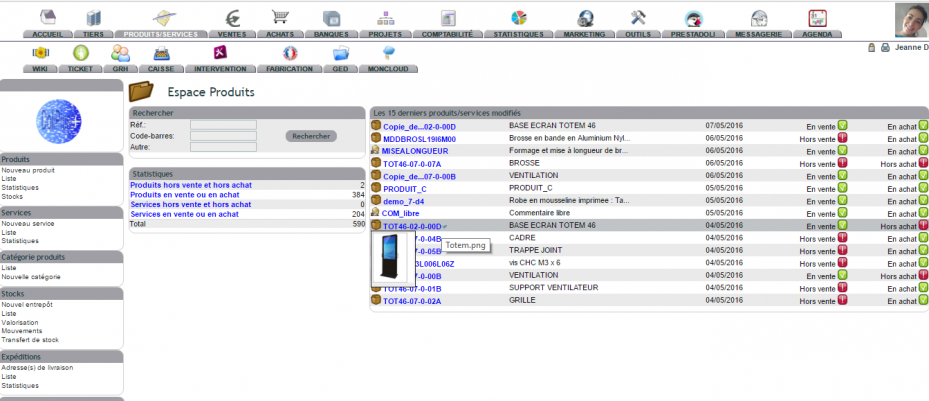
You will find them in several places:
- in the Home menu;
- in the submenus of the PRODUCTS/SERVICES menu;
- in the STATISTICS menu, particularly the Stock (400) and Products (500) series.
Learn more
- Service management in DoliPlus — what distinguishes a service from a product in DoliPlus.
- Pricing management — the right price for each customer, automatically.
- Product/service photos — your product and service images.
- Eco-participation, eco-contribution — environmental contributions on your invoices.
- Identifying consumers of a product or service — find all customers who buy a given product.
Related Entrées
