 on 26 August 2026
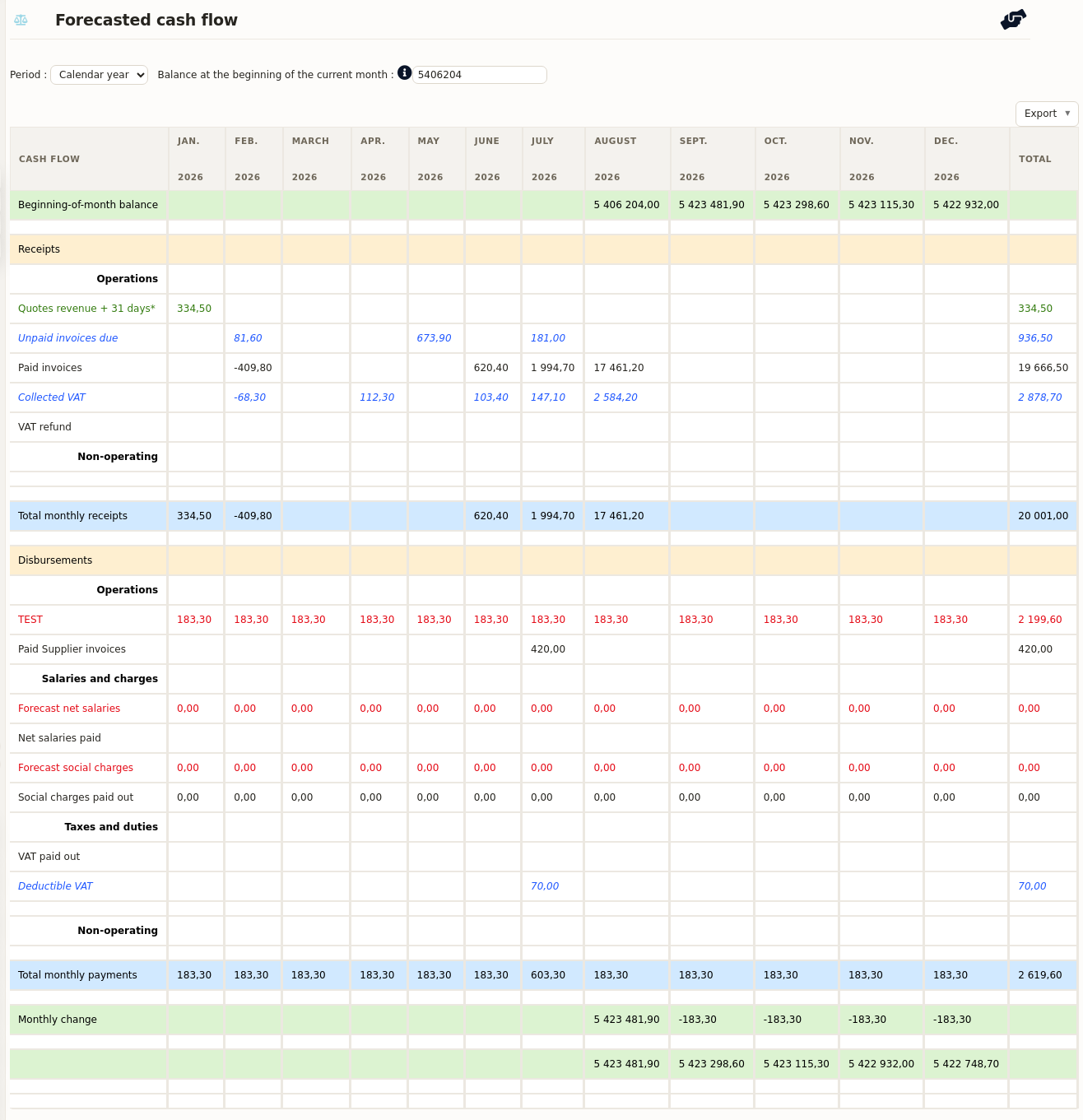
A cash flow forecast software is only useful if someone keeps it up to date. In DoliPlus, that problem disappears: the table builds itself from the data you already enter every day. Therefore you see tight months and comfortable months long before they arrive.
In practice, this cash flow forecast software takes care of:
- your quotes, weighted by their probability of success ;
- your customer orders, projected to their expected payment date ;
- your supplier invoices and purchase commitments ;
- your payroll, social charges and VAT budget ;
- the closing balance, carried forward month after month.
As a result, you only key in a handful of assumptions by hand. Everything else is calculated for you, without a single re-entry.
DoliPlus is the enhanced cloud edition of Dolibarr, the open source ERP and CRM.
Why keep a cash flow plan?
Every company needs one. Indeed, it shows the months when cash runs short and the months when it piles up, one after the other.
Thanks to that view, you act early. First, you look for funding before the balance turns negative. Then, you place your surplus at the right moment. Moreover, you walk into your bank with figures rather than hopes.
The document goes by several names — cash plan, treasury budget, cash flow forecast — yet it always means the same thing: expected receipts and payments, month by month or fortnight by fortnight. For your financial partners, keeping one is a sign of a company that is actually steered. It is usually requested in any application for a bank facility.
Finally, this budget stays a living tool. You update it regularly and you test your assumptions — an investment, a refinancing, a payment pushed back — and you measure their effect on your working capital.
The cash flow forecast software screen
You reach the tool from the Accounting menu, then Management tools, then Treasury and forecasts. The screen is built around a few simple areas:
- the period selector, which picks the year under review ;
- the tabs, where you enter forecasts family by family, in editable tables — one click on a row to correct it ;
- the fixed or rolling mode: January to December, or twelve rolling months from the current one ;
- the opening balance, computed from your bank balance and adjustable by hand ;
- the quick export, to PDF or Excel, in one click.
For a balance that matches reality, use the automated import of your bank statements alongside it. The data area stays dynamic: every forecast you create appears in the table straight away.
Three settings to configure
Configuration sits in the Accounting menu, Settings, Treasury tab. You fill in three items:
- the delay in days between delivery and invoicing on sales (30, 60…) ;
- the same delay on supplier purchases ;
- how often you settle VAT.
Inflows, calculated from your ERP
Two chapters separate resources tied to production from those outside it. Part of the figure is calculated automatically from your own data.
The calculation from quotes. Each quote carries an estimated probability of success and an expected delivery date. The forecast keeps the amount in proportion to that probability, shifted by the delay set in the module — 30 or 60 days, depending on your configuration. Above all, as soon as you update a quote, the cash flow forecast is recalculated. Customer orders on the books follow the same principle and are projected to their expected payment date.
Where you enter what. Revenue expected outside any quote — a product or service launch, for example — goes in the « Operating income » tab. Resources outside production go in the « Non-operating income » tab: a grant, a loan drawdown, a shareholder current account. In addition, collected VAT is computed according to your settings.
Outflows: payroll, suppliers and tax
Just like receipts, costs are split between production and non-production. Several feeds are automatic: social charges come from the Accounting / Social charges menu, supplier invoices are projected to their due date, and unbilled purchase orders are shifted by the configured delay.
Payroll and social charges. Four tables fill themselves from your entries: « Forecast social charges (due date) » and « Social charges (payment date) » come from Accounting / Social charges ; « Salaries (to be paid) » and « Salaries (payment date) » come from Accounting / Salaries. Your future headcount needs, however, are entered in the « Forecast staff salaries » table of the « Staff » tab.
The purchase order, then its invoice. Orders not yet invoiced appear as forecast payments, shifted by the number of days set in configuration. So that this forecast gives way to the real invoice, DoliPlus adds a « Received in full + Invoiced » status. That status is not automatic: you set it when you invoice the order, with the « Classify as invoiced » button.
Recurring costs. The « Operating expenses » tab holds what comes back every month without an invoice: vehicle leases, temporary staff, subcontracting, rent, service charges, insurance premiums and phone bills.
Investments. In the « Non-operating expenses » tab, you split your investment types line by line, state the amounts month by month and the depreciation period. You also choose the funding method: outright purchase or lease — in which case you enter the rentals to pay.
Taxes and duties. Finally, the « Tax and duty » tab takes your forecast taxes. The VAT budget, for its part, feeds itself and works out the amount to pay according to the frequency set in the module.
Linking forecasts to actuals
When you enter a forecast, you attach it to an account from your chart of accounts. Then DoliPlus shows the actual figures account by account, taken from the linked customer and supplier invoices.
You therefore work in iterations, sharpening month after month the financial picture of your business and your strategy.
Going further
- Automated import of bank statements
- Exporting to your accounting software
- Cost accounting
- Total calculation and VAT rounding rules
Related Entrées
