 on 5 September 2026
 Multilingual management software: each employee works in their own language
A multilingual management software does more than just exist in multiple languages: it lets each user choose their own. Here’s what DoliPlus offers:
- each team member sets their display language from their record in just two clicks;
- screens, full navigation — main menu and side menus —, list columns and indicators all update instantly;
- your data remains unique: nothing is duplicated, nothing is entered twice;
- an English-speaking colleague and a French-speaking colleague work on the same invoice, each in their own language.
In short, language becomes a personal preference, just like text size or display theme. It’s no longer a company-wide setting.
One team, multiple languages: the friction no one talks about
You hire a salesperson abroad. You acquire a neighbouring company. Or your workshop employs people who read English better than French. In all three cases, the same issue arises.
Most management software is configured in a single language for everyone. As a result, someone has to work all day in a language they don’t fully master. Data entry errors increase, training takes longer, and the tool eventually gets bypassed.
The usual workaround is to set up a second installation in the other language. However, this solution is costly: two databases, two customer records, two inventories to reconcile. The language issue then becomes a data problem.
Multilingual management software is set per user, not per company
DoliPlus tackles the problem from the other end. Language is not a system setting, but a preference tied to each user account. This way, your company keeps a single installation, a single database, and a single set of figures.
In practice, your administrative manager opens DoliPlus in French. At the same time, their English-speaking colleague opens the same screen in English. Both see the same invoice, the same customer, the same amount.
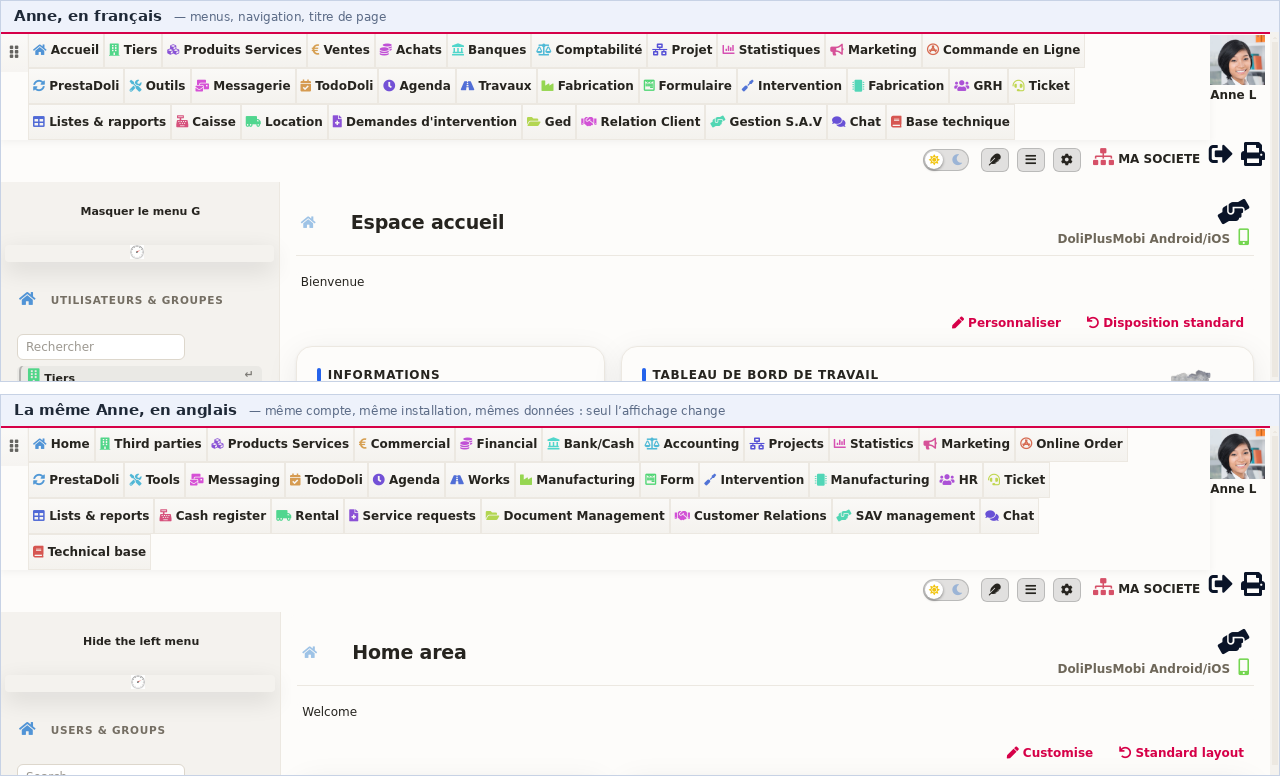
This is the same account, on the same screen, just seconds apart: French at the top, English at the bottom. The menus, navigation and titles follow Anne’s preference. The data, however, hasn’t changed a bit — it’s the same installation.
Your data remains unique, only the screens change
Here’s the key point: translation applies to the interface, never to your content. Your customer names, product references and amounts remain exactly as they were.
Your business content translates separately, when you decide. Each product record has its own translation screen, with AI-powered assistance. Translate your product catalogue
This is precisely what sets apart a merely translated system from a true multilingual management tool. The former makes you choose; the latter lets everyone choose.
This separation delivers three concrete guarantees:
- No duplicates — a customer created in English is the same customer for everyone.
- No reconciliation — your stats count each item only once.
- No workflow changes — nobody has to adapt their way of working.
A translated screen with French menus isn’t truly helpful. After all, menus are what we use to navigate all day.
Now the entire interface switches over. The main menu, each module’s side menus and section headings all follow the logged-in user’s preference.
Below, the customer page as seen by an English-speaking team member. Menus, column headers and action labels appear in English, while the data — your customers, your contacts — obviously remains unchanged.
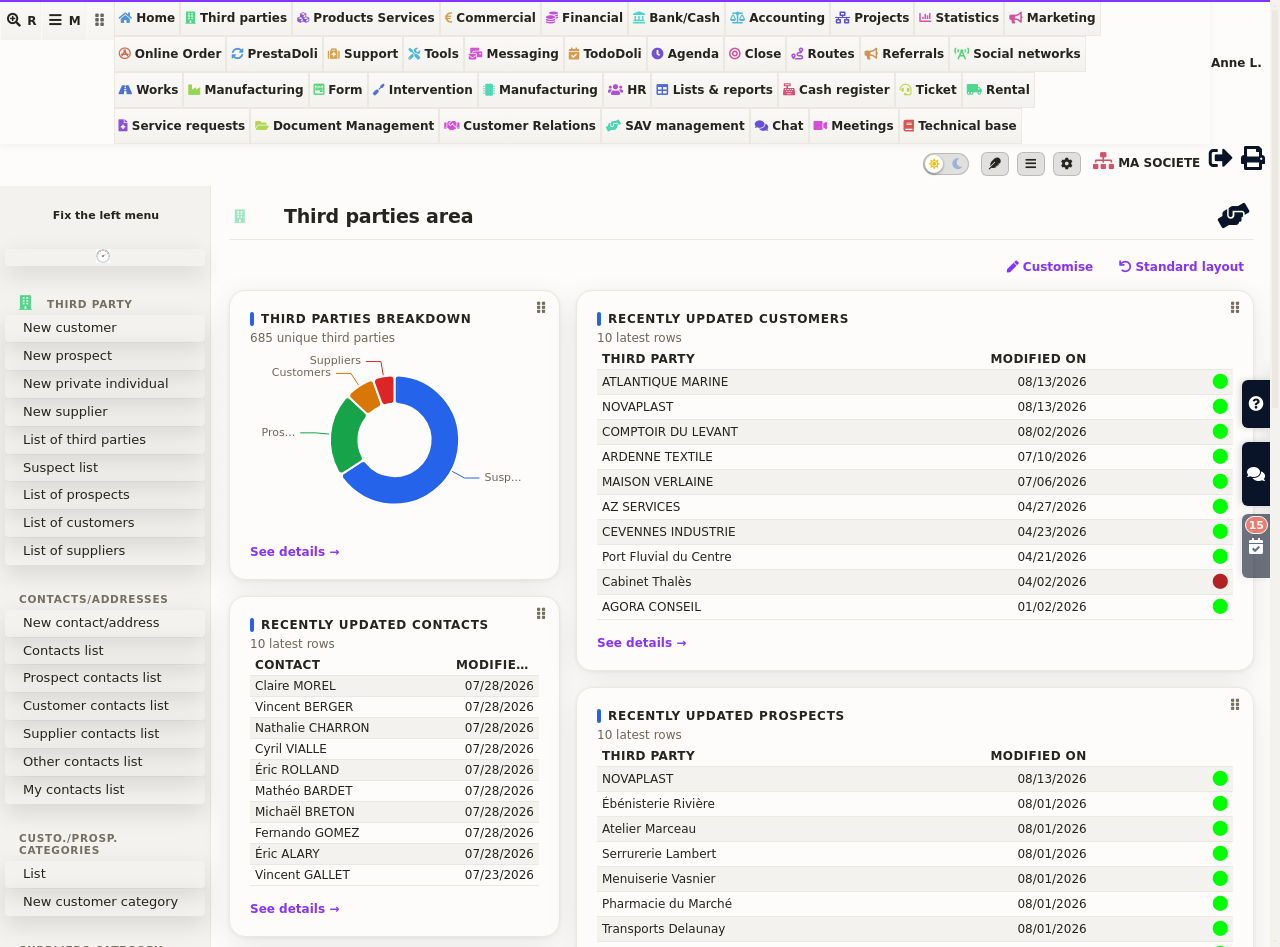
This switch covers both business modules and configuration screens. As a result, an English-speaking manager can set up their own tools without involving a French-speaking colleague.
Where to set a team member’s language
The setting appears on the person’s record, under the display tab. Just three steps:
- open the team member’s record, then the display preferences tab;
- tick the box allowing a personal value instead of the company default;
- select the language from the list, then save.
The change takes effect at the next login. Additionally, each user can modify this setting themselves if you grant them permission. To locate this screen, refer to user management in DoliPlus.
Your reports speak each user’s language too
Dashboards are often the last screens to be translated because they’re calculated and cached for performance. However, cached data retains the language in which it was prepared.
DoliPlus now stores dashboard metrics per language. The first user to access their homepage no longer imposes their language on others. Everyone sees their cards in their own language, with the same fast loading.
To configure these cards and choose which matter to you, explore the customisable dashboard.
Can business software speak languages other than English?
Currently, DoliPlus operates in French and English. These two languages cover the vast majority of teams we support.
However, the underlying mechanism isn’t tied to any specific language. Adding a language simply requires providing its vocabulary, not modifying the software. If your team needs another language, discuss it with your DoliPlus contact: we’ll review the request with you.
Three types of multilingual support – don’t mix them up
“Multilingual” actually refers to three distinct features, and confusing them leads to searching for settings in the wrong place:
- Interface language — the topic of this article: each user sees menus, lists and reports in their language, working with the same data.
- Terminology — renaming labels to match your industry: calling “Case File” what DoliPlus labels “Project”, for example. Customising your ERP’s vocabulary.
- Record content — translating product descriptions so quotes are sent in each customer’s language. Multilingual product catalogue.
All three can be combined freely. For example, an English-speaking assistant can work with English interfaces using your custom terminology, while sending quotes written in Spanish.
Next steps
- User management in DoliPlus — create an account and set preferences.
- User access rights — who sees what, who does what.
- Customisable dashboard — your key metrics at a glance.
- Multilingual product catalogue — translate item records for customer documents.
- Customise your ERP terminology — speak your business language.
- Multilingual product catalogue — translate your item records.
- Management and pre-accounting software — the big picture with DoliPlus.
