 on 5 September 2026
 Customise your ERP vocabulary: DoliPlus speaks your business language
Customising your ERP terminology is child’s play with DoliPlus: every on-screen word can now be replaced with your industry-specific terms:
- search any visible text among over 27,000 labels;
- replace it with your own term (“Customer or supplier” becomes “Member”) in seconds;
- choose the scope: one language or all languages used by your teams;
- share the same terminology across all companies in a group, or let each keep their own;
- revert changes anytime, as the original term is never lost.
Result: your management software finally speaks your business language – the one your teams and customers use.
Why customise your ERP terminology?
An association doesn’t manage “Customers or suppliers”: it supports “Members”. Similarly, a builder talks about “sites” rather than “projects”.
Yet most software imposes generic terms. As a result, your teams constantly mentally translate the interface, and newcomers get lost.
This is why customising your ERP terminology transforms daily work: every screen uses your vocabulary, training becomes quicker and input errors decrease.
Finding an on-screen label
Start in the Home → Setup → Translations menu (admin access only). The “Key search” tab locates any interface text.
For example, type “Customer or supplier” as you see it on screen. DoliPlus scans nearly 20,000 labels and displays all matches with their current value.
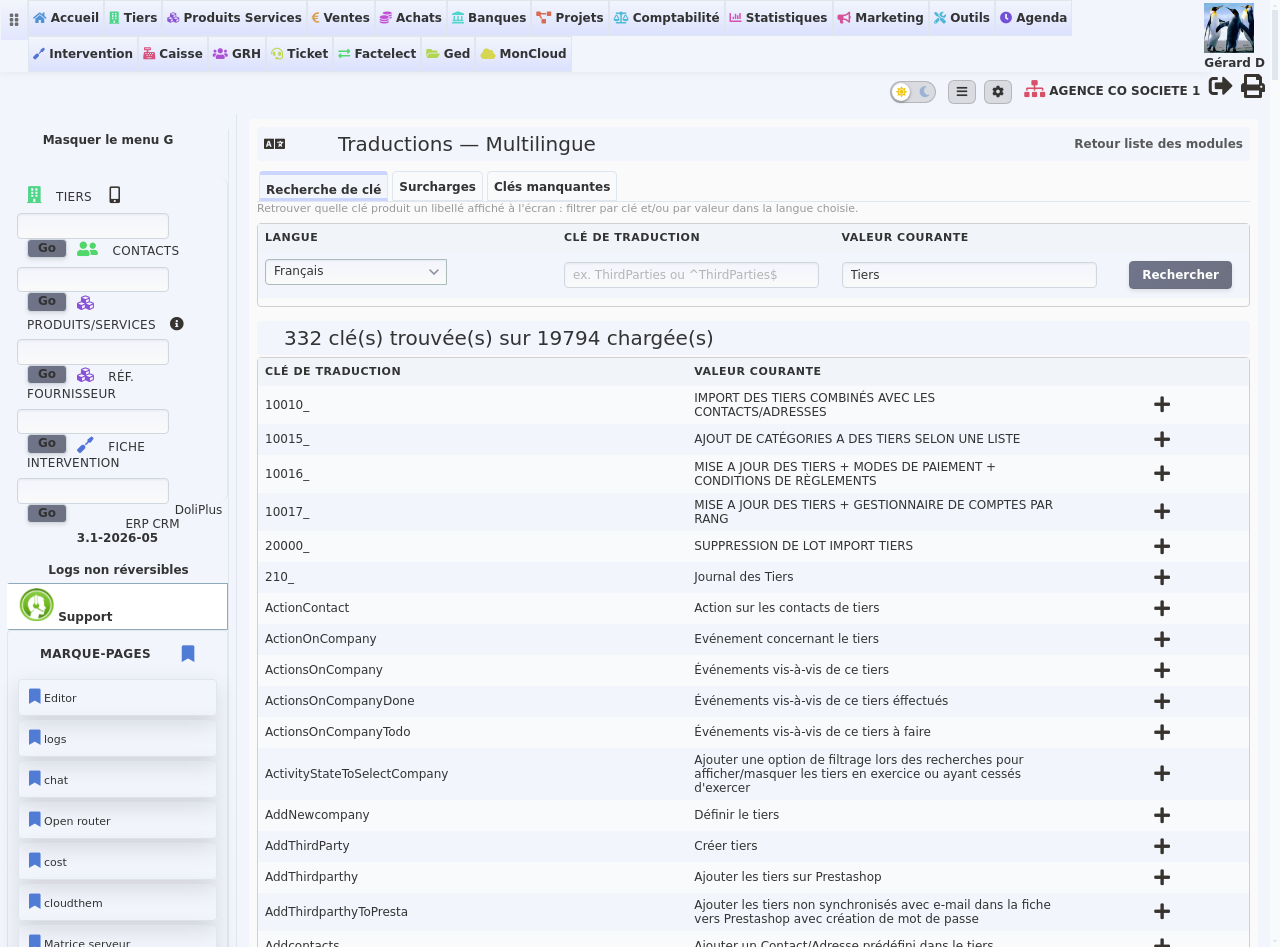
The “+” button next to each line opens the replacement form directly. You never need to understand the software’s internal workings.
Replacing a term in just a few clicks
The « Overrides » tab gathers all your replacements. In practice, you select the language (or all languages), the label to replace, then the new word to display.
DoliPlus calls this an « override »: your word takes precedence over the original term, without ever deleting it. This is the whole point of customising your ERP’s vocabulary this way: the change remains clean and reversible.
See for yourself: as soon as you save, menus display « Members » instead of « Customer or supplier » for all users, with no service interruption.
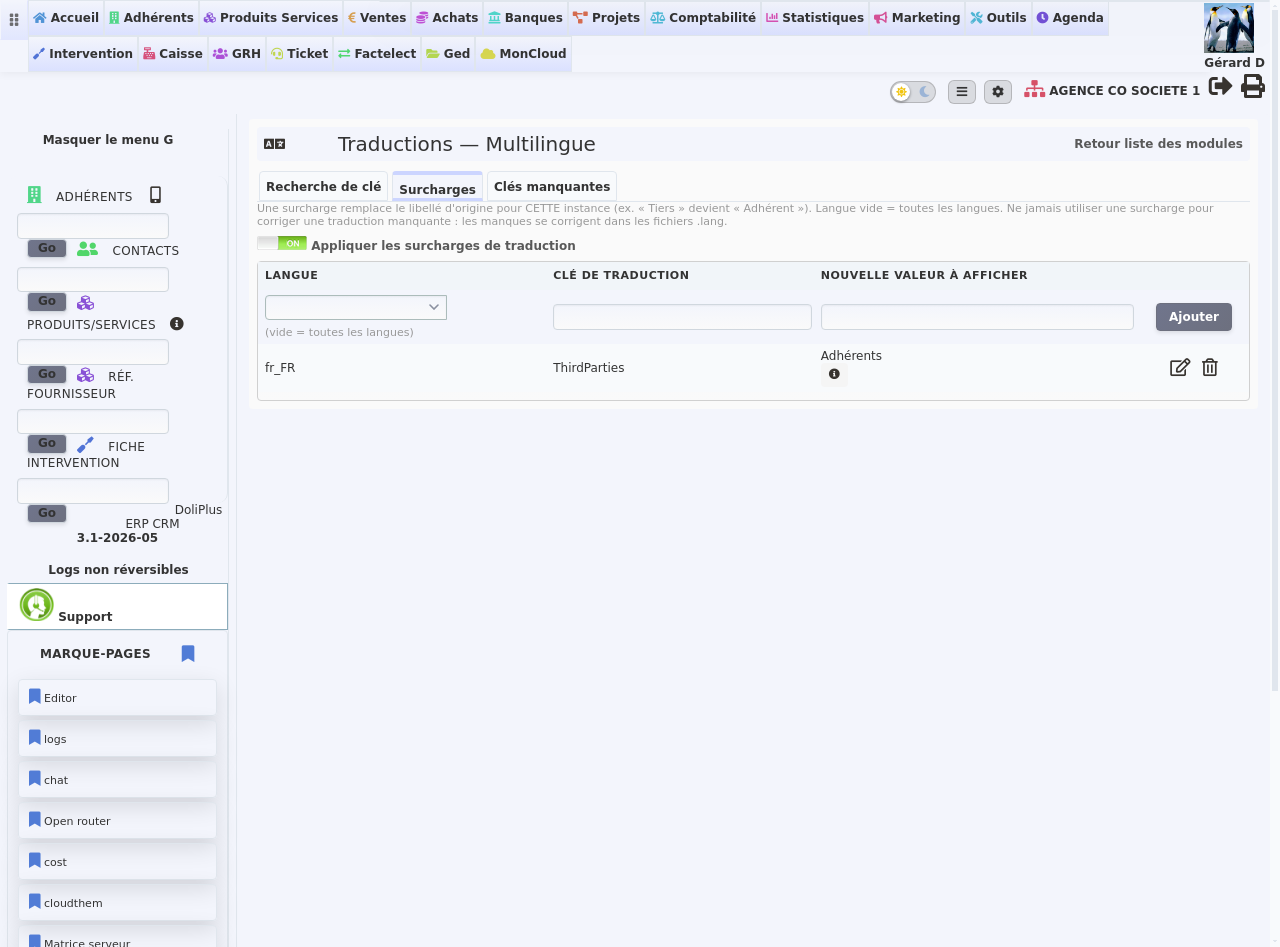
A reversible, risk-free customisation
Customising your ERP’s vocabulary carries no risk. Each replacement can be modified or deleted in one click, and the original term reappears instantly.
Additionally, a master switch lets you disable all replacements at once, for example when contacting support. Your settings remain saved and can be reactivated just as easily.
Finally, your customisations survive DoliPlus updates: they are stored in your space and never overwritten.
Many groups manage multiple companies in a single DoliPlus. Consequently, vocabulary management works differently.
By default, each company keeps its own terms. Thus, your construction subsidiary uses « sites » while your trading arm keeps « orders ». Neither affects the other’s display.
However, a group where all companies operate in the same sector often prefers the opposite. In this case, a single setting suffices: enable shared translations in the multi-company configuration, then select the relevant companies.
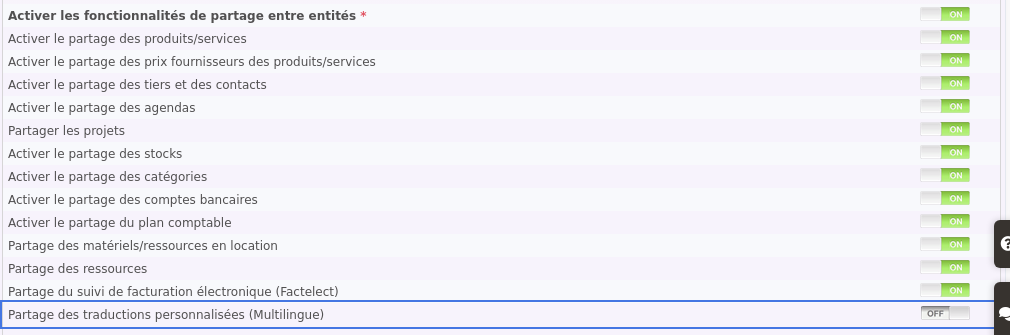
From then on, you enter the word once and all selected companies benefit. Additionally, the replacements screen then displays a « Company » column: you immediately see who created each entry.
Take it further
Terminology is just one way DoliPlus adapts to your business. Discover other customisation options:
- Customise your interface colours and theme
- Add your own fields to records
- Build your custom lists
- Customise your PDF documents
- Manage multiple companies in one DoliPlus
- Let each employee work in their language
- Translate your product catalogue — renaming a DoliPlus term and translating your own records are separate screens
