 on 24 August 2026
 Project planning software: hold your deadlines and team workload
The project planning software built into ProjetPlus runs your jobs from the first quote to the final invoice. Therefore, you keep deadlines, workload and profitability under control:
- an interactive Gantt chart that you drive with the mouse;
- your team workload, measured before you commit;
- milestones, colour indicators and the gap against the initial budget;
- time tracking, either on the task or straight from the calendar;
- one order split across several projects, carried over to the invoice as it stands.
In other words, you see delays and overloads coming while there is still time to act.
DoliPlus is the enhanced cloud edition of Dolibarr. Moreover, it ships two project modules. This page covers ProjetPlus, the advanced one with a Gantt chart:
- Project — standard project management;
- ProjetPlus — the advanced planning module (this page).
Project planning software built around a visual Gantt chart
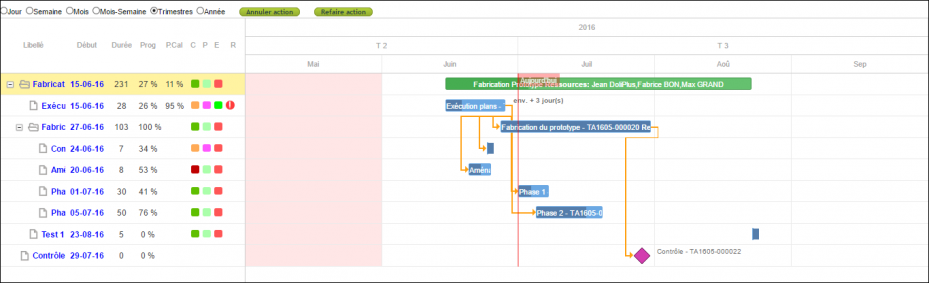
At the heart of ProjetPlus sits an interactive Gantt chart. Indeed, you follow your projects and tasks on a clear timeline, at the scale that suits you: hour, day, week or month.
Moreover, you drive the plan straight from the graph. For example, you can:
- drag a task to another date;
- stretch or shorten its duration with the handles;
- adjust the declared progress with a single drag.
Besides, a “Today” marker shows the current date. Finally, a full-screen mode stays available on every view, which helps when you present the plan in a meeting.
Steer team workload and capacity
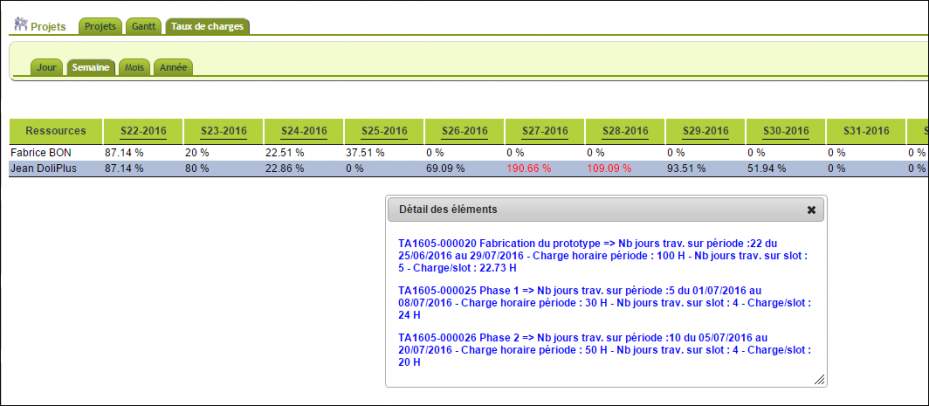
Before you commit, you measure how loaded your teams already are. That way, you spot overloads early. Then you plan a hire or subcontract in time, instead of absorbing the delay.
A dedicated view shows this workload per resource, on several scales: day, week, month or year. In addition, one click on a cell details the load behind it. Finally, the calculation takes holidays and absences from the HR module into account.
Projects, tasks and milestones
ProjetPlus keeps the initial dates and workloads of both projects and tasks. Therefore, you measure the gap against your starting budget. Then you catch drifts early and react in time.
Moreover, colour indicators qualify your projects and tasks: priority, criticality, status and state. These indicators stay fully configurable in the settings.
Finally, a “milestone” task marks a control or decision point, without workload or progress. When needed, you duplicate a whole project with its tasks, which starts a new job in seconds.
Record the time actually spent
You track time in two ways. First, you enter it directly on the task management screen.
Then, an option lets you record it from the graphical calendar: you log the time while you plan the work. For bulk entry, see the timesheet.
One job split across several projects, invoiced without retyping
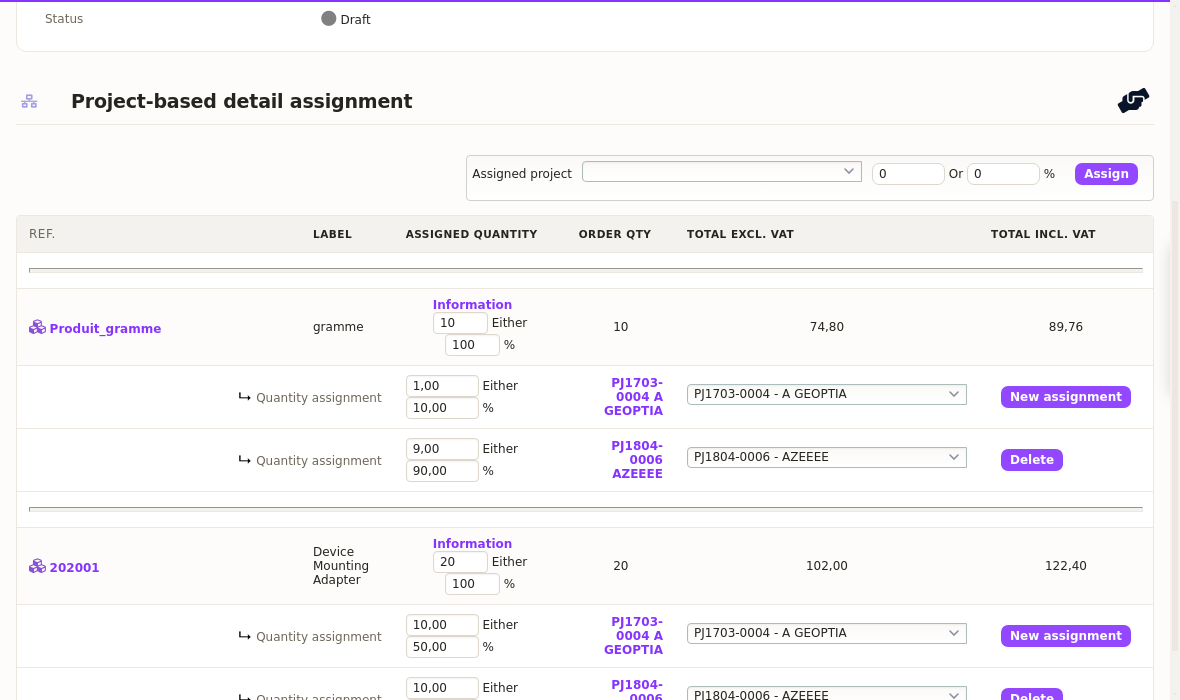
An order rarely covers a single job. That is why ProjetPlus lets you split each line across several projects, either by quantity or by percentage.
For example, a line of 20 items splits 50 % on one site and 50 % on another. Moreover, a single line accepts as many allocations as you need.
Above all, this split follows the document. Indeed, when you turn the order into an invoice, DoliPlus carries over the allocations of every line, with their quantities and percentages. Therefore, you find them all in the “Multi-projects” tab of the invoice, where everything stays editable.
As a result, each project receives the share of revenue that belongs to it. That way, your profitability analysis per job stays accurate, without double entry.
Connected to the rest of your ERP
A project never lives on its own. Because this project planning software sits inside the ERP itself, ProjetPlus keeps the links with your quotes and orders, on the customer side as well as the supplier side. Then it computes your gross margins, so you follow profitability as you go.
Besides, the module works with holiday and public holiday management. In addition, you add your own custom fields to projects and tasks. Finally, the mail archives linked to project resources stay available.
List views and filters
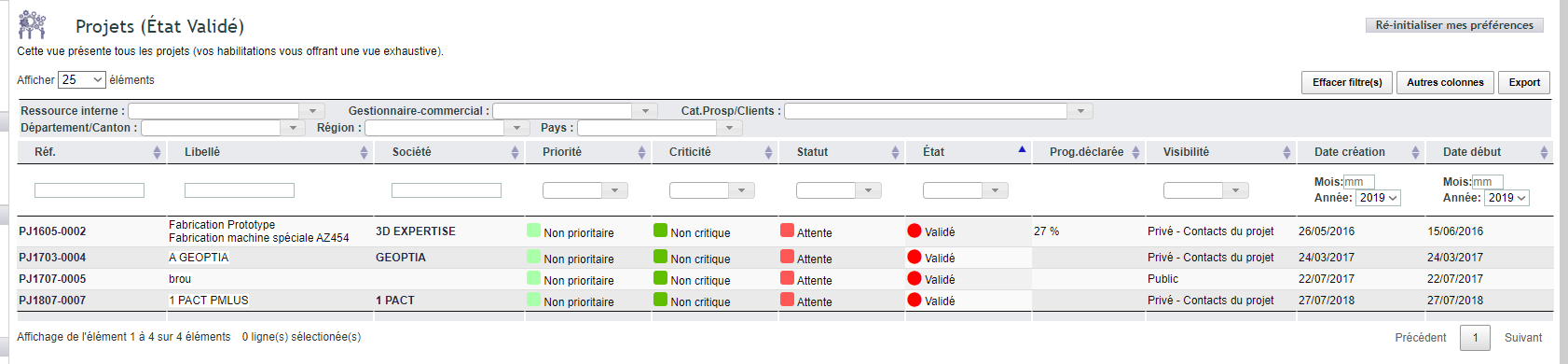
Several list views complete the project planning software. Notably, some offer a pre-filter that takes you straight to one piece of information. Moreover, filters stack, and one button resets the search.
- “Internal resource”: people assigned to the project, whatever their role;
- “Sales manager”: based on the sales rep linked to the project’s company;
- “Prospect / customer category”: based on the category of the assigned company.
Fine-grained permissions
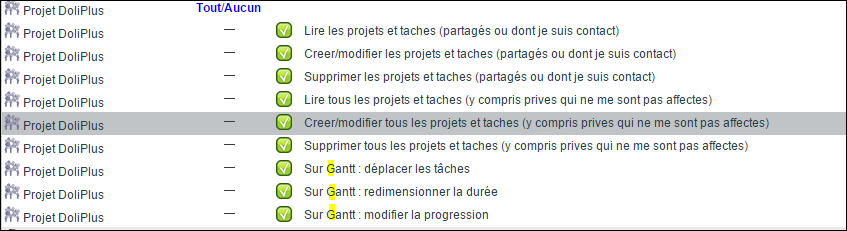
Finally, you set permissions per user or per group. On the Gantt chart, three separate rights frame what each person may do:
- move a task in time;
- resize its duration;
- change its progress.
That way, everyone consults the plan, while changes stay with the right people. Therefore, you avoid any accidental edit on the chart.
Going further
