 on 24 August 2026
 SEPA Direct Debit Software: collect your invoices automatically
SEPA direct debit software lets you collect from your customers automatically, on the strength of a signed mandate. DoliPlus builds the standard file your bank expects, and it now lets you choose the route:
- the classic bank file, in the format your bank will require from November 2026 ;
- collection with no file to deposit, through Mollie, Stancer or — newly available — Stripe ;
- your existing mandates reused as they stand, without asking a single customer to sign again ;
- unpaid debits that report themselves inside DoliPlus, with their reason, instead of surfacing on your statement.
In other words, you decide mandate by mandate who collects for you — and you can change your mind later, without going back to your customers.
💡 Good to know: the screenshots in this guide currently show the French interface. However, buttons and screens keep exactly the same layout whatever the display language.
DoliPlus is the enhanced cloud edition of Dolibarr.
SEPA direct debit in plain terms
A SEPA direct debit is a euro-denominated collection. The creditor starts it on the strength of the debtor’s prior authorisation, formalised by a mandate.
In time, therefore, it replaces every national direct debit scheme. Moreover, all banks in the SEPA area have harmonised how accounts are identified. From now on, each account is identified by an IBAN and each bank by a BIC.
What the SEPA scheme changed
In practice, several rules now frame every collection:
- the creditor must hold a SEPA Creditor Identifier (SCI) ;
- the authorisation becomes a single mandate, more detailed and far stricter ;
- each mandate receives a Unique Mandate Reference (UMR) ;
- the mandate is kept by the creditor, no longer by the bank ;
- a pre-notification must warn the debtor at least 14 days before the due date ;
- each collection carries the mandate details (SCI, UMR, signature date) ;
- the payment reference grows from 31 to 140 characters.
Collections also follow sequences. For a one-time debit, you use ONE OFF. For a series, you tell apart the first one (FIRST), the following ones (RECURRENT) and the last one (FINAL). In practice, the FIRST sequence is no longer mandatory: a series may start straight away as RECURRENT.
Finally, you respect a lead time towards your bank: at least 3 business days before the due date for recurrent or final collections.
The DoliPlus SEPA direct debit software
The SEPA module completes the core direct debit module. Therefore it brings you several guarantees:
- it produces an XML file compliant with ISO 20022, in the version your bank expects (pain.008.001.02 or pain.008.001.08) ;
- you download it directly and hand it to your bank ;
- it checks that IBANs and BICs are consistent ;
- it validates the file against the official schema of the standard before you deposit it ;
- it can also collect through an online provider, with no bank file at all, should you prefer ;
- it passes the invoice number on to your customer ;
- finally, it keeps the inventory of your mandates, with their dates and sequences.
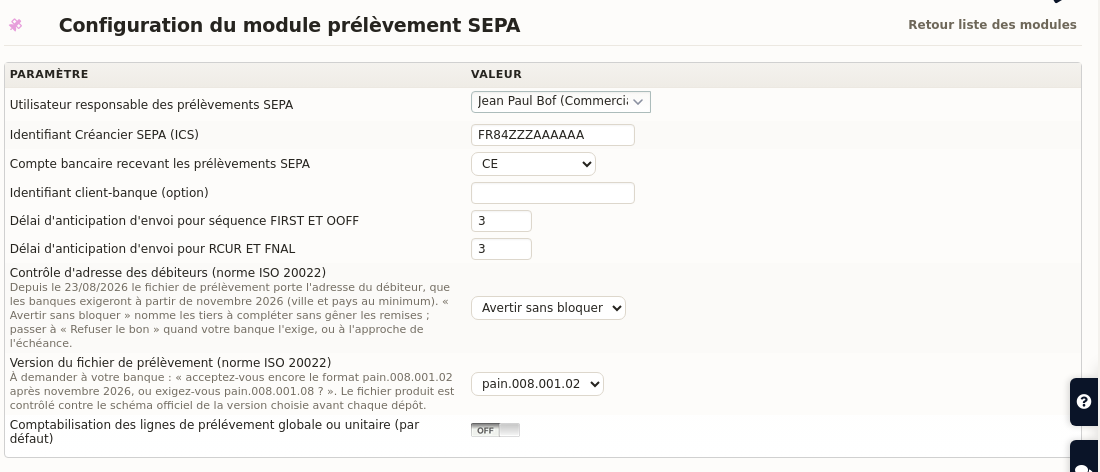
What your bank will require in November 2026
French banks are moving the ISO 20022 standard forward on 1 November 2026. Two points concern you directly, and DoliPlus already handles both.
Your customers’ address travels inside the file
The standard now requires the debtor’s address — at the very least the town and the country. DoliPlus picks it up automatically from the customer record, so you have nothing extra to type.
However, an incomplete record makes your bank reject the whole deposit, not just the offending line. DoliPlus therefore names the customers you need to complete, with a link to each record, at the very moment you issue the slip. Three settings live in the administration console:
- Warn without blocking — the default: your deposits still go out, and you complete the records at your own pace ;
- Refuse the slip — switch to this one when your bank demands it, or as the deadline approaches ;
- Disabled.
Moreover, you do not have to wait until payment day to know where you stand. A dashboard card permanently shows the mandates whose address is still incomplete, and each line opens the customer record concerned. Therefore, the few records to fix are handled gradually, rather than in a rush.
Already collecting from your customers by direct debit? Take ten minutes this week: issue a slip, read the list of flagged customers, then fill in their town and country. It is work you do once, it has to be finished before 1 November 2026, and it does not get done the night before.
The file version becomes a setting
Some banks will keep accepting the historical format, others will demand the new one. Here is the question to ask them, word for word: “do you still accept the pain.008.001.02 format after November 2026, or do you require pain.008.001.08?”
You then record their answer in the administration console, and nothing changes until you touch it. Whichever version you pick, DoliPlus validates the file against the official schema before every deposit: a structural error shows up immediately, instead of surfacing when the whole deposit bounces back.
Four ways to collect a SEPA direct debit
The file you hand to your bank is no longer the only route. Each mandate now carries its own collection mode, which you choose mandate by mandate in the mandate management screen:
- Bank file — the historical behaviour described in this guide ;
- Mollie — the provider runs the collection, with no file to deposit ;
- Stancer — same principle, with a different pricing grid ;
- Stripe — the latest addition, for businesses that also take card payments and want a single provider for both.
Moving a mandate onto a provider requires no new signature from your customer: the existing mandate is carried over as it stands, with its UMR and its original date.
Furthermore, a slip never mixes two modes: you issue one slip per mode, and its reference tells you which at a glance (T for the bank file, M for Mollie, S for Stancer, P for Stripe). A provider slip never reaches your bank — the provider collects, then pays out to you.
A rejection reports itself, and the invoice reopens on its own
With a bank file, an unpaid debit surfaces on your statement, sometimes three weeks later. Through a provider, the information comes back by itself: the invoice returns to unpaid, the slip line switches to rejected with its reason, and you reconciled nothing.
Refunds follow the same logic. Therefore, if you refund a customer, DoliPlus reverses the entry and reopens the invoice automatically. Your bank and your books stay in agreement, with no manual step.
The mandate itself survives. Indeed, an account short of funds on a given day is not a revocation: DoliPlus asks the provider whether the mandate is still valid, instead of disabling it at the first refusal. As a result, the next instalment goes out normally.
Mollie, Stancer and Stripe are three ways to collect, and they are switched on for you on request. Simply tell us you want to collect without a bank file: we open the module on your installation, and we help you pick the provider — the right one mostly depends on the average amount of your invoices, and on what rejections cost you.
For the details of each one: online invoice payment with DoliPlus and direct debit through Stancer, with no bank file.
Using the SEPA direct debit module
This module completes the core direct debit module, which must stay active and configured.
How it works
First, enable the module and the user permissions. Then, configure every field of the bank account that will receive the collections.
Setting up the administration console
In the console, fill in:
- your SCI number ;
- the lead time for the FIRST and ONE OFF sequences ;
- the lead time for the RCUR and FINAL sequences.
Careful: if you change the bank account, validate it again in the console.
Editing the SEPA mandate
For the mandate itself, see the SEPA mandate chapter.
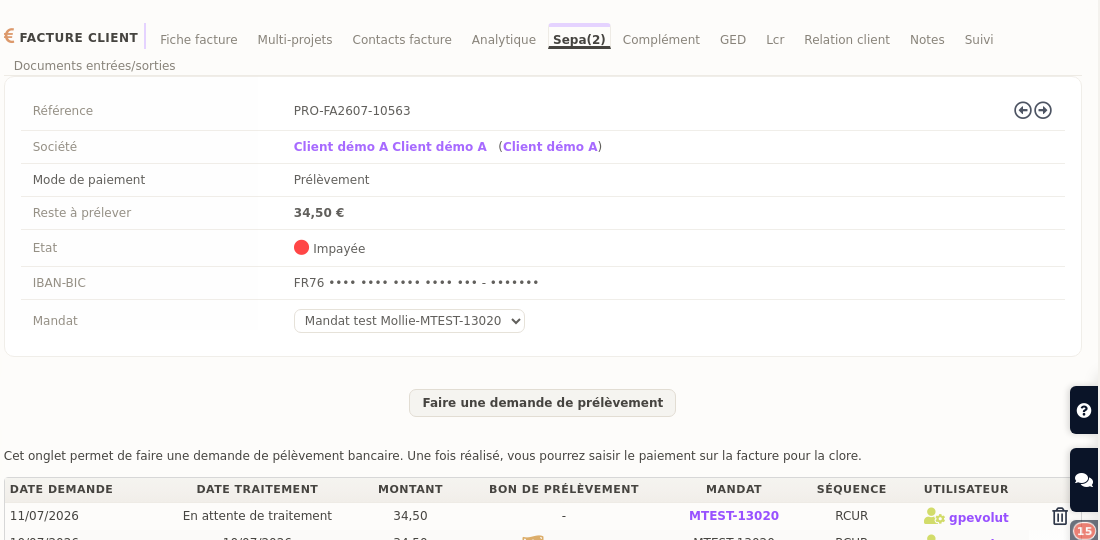
Requesting a direct debit on a customer invoice
Before you launch a collection, check a few prerequisites:
- the customer record carries an IBAN and a BIC (with no spaces) ;
- the payment method is indeed of the direct debit type ;
- you select the mandate ;
- finally, you raise the request from the SEPA tab.
Without an IBAN and a BIC, you cannot validate the request. The SEPA scheme no longer requires the BIC, however several banks still need it to execute the file: DoliPlus therefore keeps asking for it.
Issuing a new direct debit
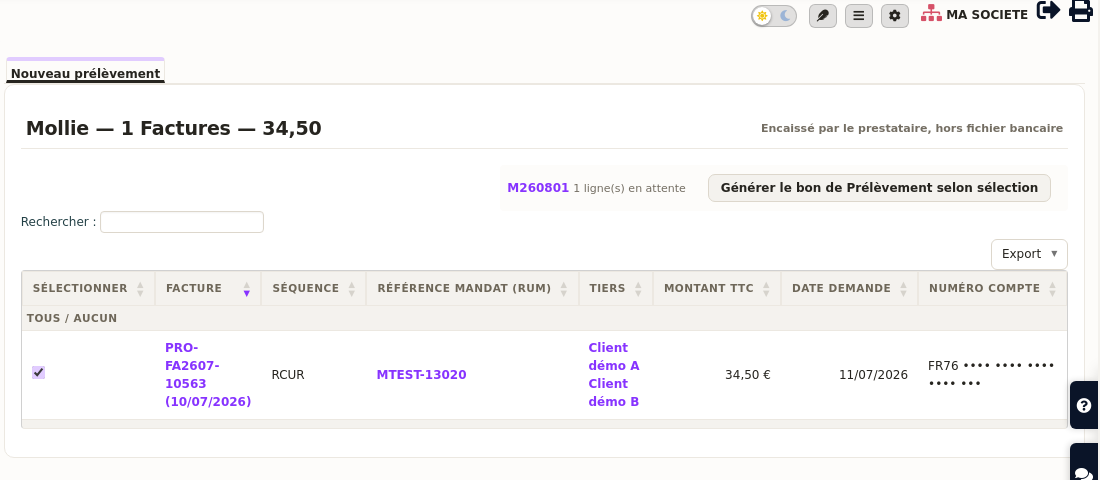
From the Bank menu, start a new direct debit. Then enter the date you want.
At this stage, DoliPlus automatically checks that the date respects the number of business days your bank imposes. Where needed, it adjusts the date for you.
Two files are then produced. The first, the report, helps you check consistency — in particular the dates that were adjusted. The second, in XML format, goes straight into your banking interface.
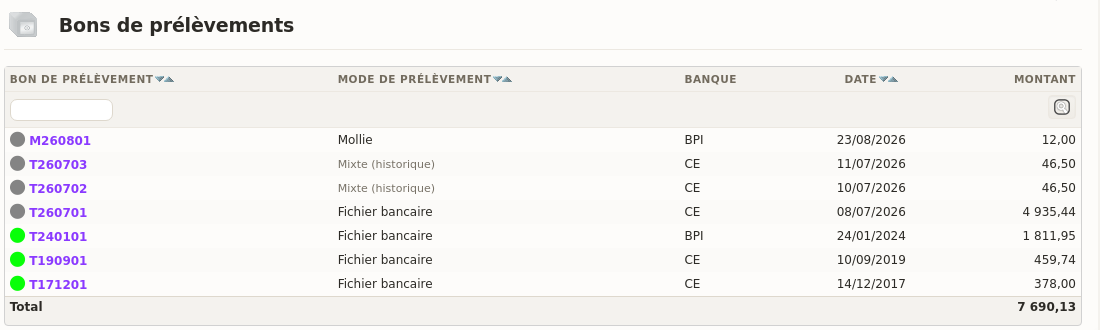
Following a direct debit slip
Your list of slips tells you, for each one, which mode collects it, which account the money lands on and for how much, with the page total at the bottom. As a result, you read a deposit without opening its record.
Then you follow the slip step by step. First classify it as “sent”. Then, once the money is in, classify it as “credited”.
In case of a rejection, go to the “Lines” tab. Click the rejected line, then enter the reason, which is mandatory. DoliPlus then posts a credit on the matching invoice.
Mind the allowed characters
The ISO 20022 standard imposes a Latin character set: unaccented letters, digits and a few signs (/ – ? : ( ) . , ‘ +).
For example, you therefore need to watch company names and references. Indeed, characters such as “&”, “<” or “>” can trigger rejections. Likewise, XML CDATA is not accepted.
Rest assured, however: an automatic treatment already strips accented characters. Finally, whenever the account to debit changes, simply issue a new mandate.
Going further
- Editing your customers’ SEPA mandate — the document without which no collection is possible ;
- Paying your suppliers by SEPA transfer — the same address requirement applies to your outgoing payments, and DoliPlus handles it the same way ;
- Getting your invoices paid online — provider-run direct debit, cards and payment links ;
- Collecting without a bank file through Stancer — the other pricing grid, cheaper on small amounts and on rejections ;
- For another collection instrument, have a look at the LCR bill of exchange.
Related Entrées
