 on 25 August 2026
 Field service mobile app: close the job on site, even offline
A field service mobile app lets your technicians complete everything on the spot, straight from DoliPlusMobi:
- the job sheet is filled in on site, forms and photos included;
- the customer signs directly on the phone or the tablet;
- the job closes on site, even when the site connection drops;
- the invoice and the payment follow straight away.
As a result, your technician leaves without any paperwork to re-enter, and the office sees the job completed in real time.
DoliPlus is the enhanced cloud edition of Dolibarr, so you keep the open source foundations you know, with a mobile experience built for the field.
The field service mobile app in DoliPlus
The job management module extends onto the field through DoliPlusMobi, available on Android and iOS. Therefore, technicians record their work where they stand, even without coverage. Learn more about job and equipment management
From the main menu, the technician opens the Intervention menu, then the list of assigned jobs. Moreover, this list refreshes as soon as a connection is detected, shown by a green banner (or fuchsia when the device is offline).
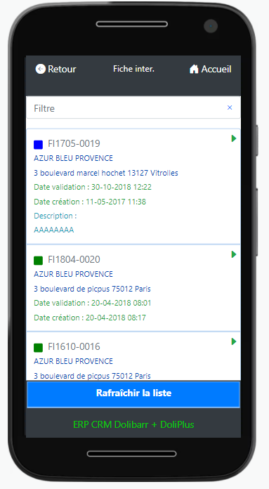
Filling in a job sheet on site
Once a job is selected, a menu page offers several sections. First, the “Detail” section shows the key information: date, description, contacts and address. Then the “Forms” section opens the checklists to complete, while the “Equipment” section lists the machines covered.
During data entry, a colour code guides the technician: green marks a field to fill in, fuchsia a mandatory one. In addition, every field type works comfortably on a phone:
- drop-down lists and radio buttons;
- checkboxes;
- geolocation (connection required);
- free notes, with voice dictation.
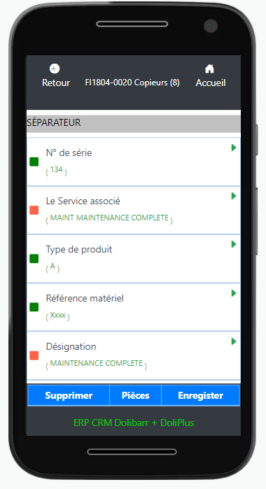
Furthermore, the technician takes photos, attached to the job sheet. He also books the parts he used, which then appear in the Intervention tab of DoliPlus, ready to be invoiced.
Closing the job in front of the customer
Closing happens on the phone too, in either of two modes. The simple mode collects one overall signature, then checks that the forms have been synchronised.
The advanced mode, however, runs through several configurable steps:
- an optional closing form;
- the assembly of the job documents;
- the report shown to the customer, for an on-screen signature;
- the signed report sent by e-mail;
- the invoice, built from the quote and the parts used;
- the payment entry (cheque with a photo, or card through Paybox).
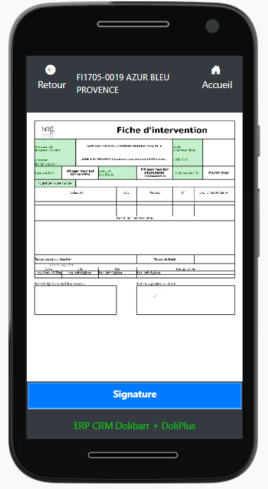
Consequently, the whole journey is covered, from dispatch to closing. At the end, the job status moves forward. Depending on your options, an e-mail reaches the manager and an event is added to the job.
Photos upload on their own, even after a dropout
On a customer site, coverage comes and goes. Photos taken during the visit therefore wait in the phone, without blocking anything.
At closing time, the app sends them again by itself and shows the progress. The technician watches the counter move, then the job sheet closes right after.
As a result, he validates everything from the job sheet, instead of reopening each machine one by one. However, if the connection really cannot carry them, a message says so and gives the number of photos left: he finishes the closing as soon as coverage returns.
Why your technicians need a field service mobile app
Filling in a paper form, then typing it again at the office, wastes time and creates mistakes. A field service mobile app removes that double entry altogether.
In short, you gain on three fronts:
- on-site capture: forms, photos and signature in the field;
- offline operation: dead zones block nothing;
- complete closing: signed report, invoice and payment on the move.
Further reading
Related Entrées
